FlyingFourFun
Inspiring
April 8, 2025

Timeline Performance Issues / Stalling in 25.2.1

  • April 8, 2025
  • 22 replies
  • 1849 views

I have been having issues with the timeline in PP, in version 25.2.1,  I have rendered proxy files for some h265 iPhone SDR footage.   the clips will plat for about 2 min or so, and then the program monitor starts to stutter and within a few seconds of that it stops playing completely.


I have been monitoring the Taskmanager, and when this happens the GPU resources got o zero.  There is no crash,  a wait a couple of seconds, hit play, and it will play the video fine again for another 2 min.


This happens with the proxy turned either on or off (its watermarked also).  This GPU utlization screen shot shows exactly the where the program monitor stops responding and freezes the video frame, this one is playing the H265 Iphone footage.
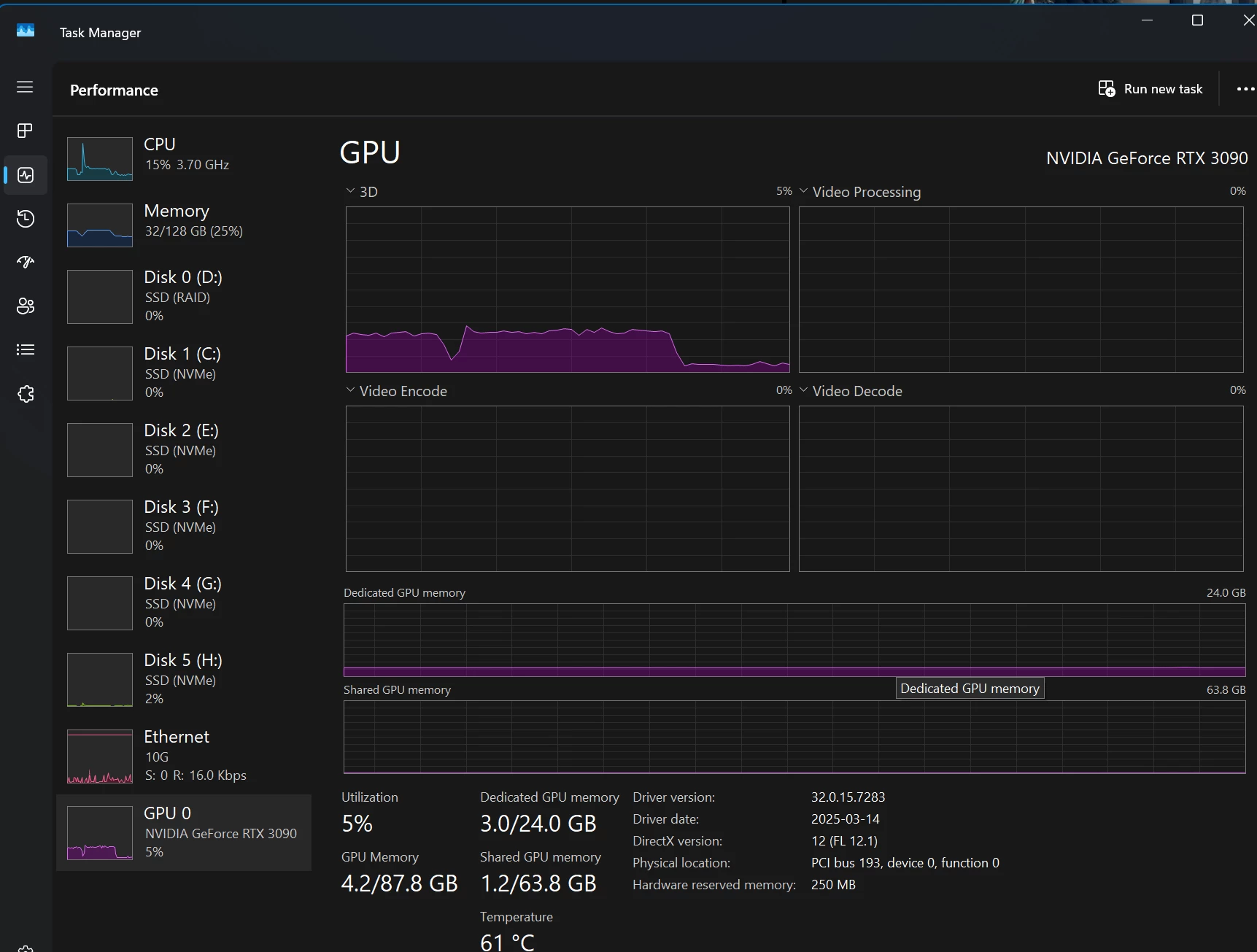


The drop off you see in the resource monitor on the GPU is exactly where the program monitor stops updating, and freezes on one of the video frames. (this is with Proxy ON)
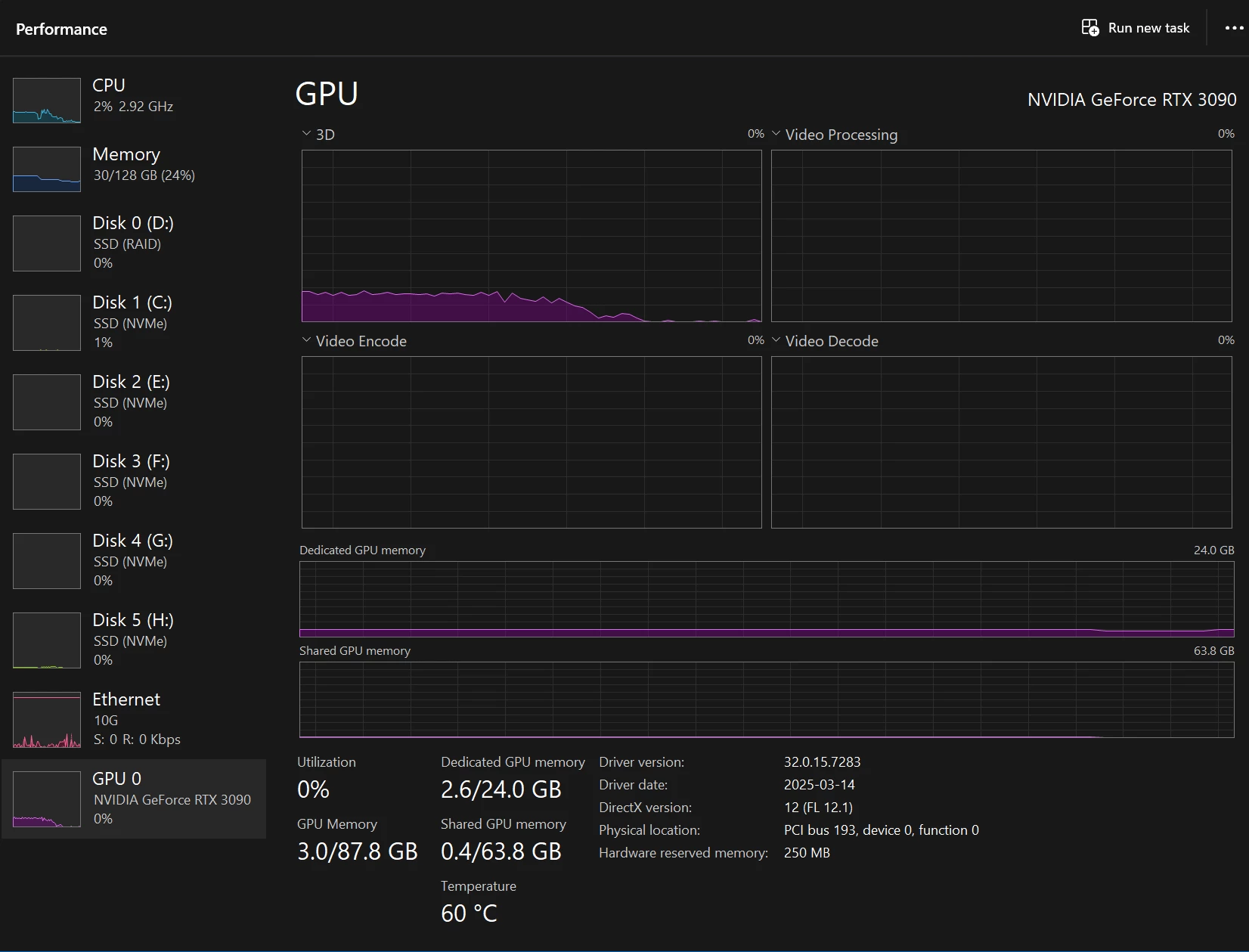

 

All the drives as Samsung NVMe.

Processor Intel(R) Core(TM) i9-10980XE CPU @ 3.00GHz 3.00 GHz
Installed RAM 128 GB (128 GB usable)
System type 64-bit operating system, x64-based processor

Operating system, is separate from all the adobe products and video files,  they are all loaded from local NVMe, NOT loading off a NAS.


This system has NEVER had an issues playing back proxy files, or any other video file I have ever used, and this is 100% new behavior with my first project after upgrading to 25.2.1


I have been letting it run when the video starts to stutter, and the utilization graph below shows whats been happening.  The Audio continues to play perfect, but the video stutters, and freezes, then starts up again,  just liek this utilization graph for the GPU shows


I have done the basics, like cache clearing etc.


Any thoughts or others experience this?

22 replies

Participating Frequently
April 22, 2025

Hi @FlyingFourFun ,

Thanks for sharing these details. Proxy playback performance can also depend on the type of media being imported. The same CPU may handle playback much more smoothly when working with lighter proxy files—such as those with lower frame rates or bitrates.

In my testing, I noticed significantly better performance when using QuickTime 422 proxies generated from lighter media compared to heavier source files. Feel free to experiment with this on your end and let us know how it goes.

I'll review your findings and report back.

Thanks,
Mayjain

FlyingFourFun
Inspiring
April 21, 2025

@Dani_V.  I have been reflecting further on your points;  I am not 100% convinced what you said is in fact the issue, but I do agree your comments are factually correct about the encoder support on the 3090 also. for example I have  used 422 in my experiments (check the prev posts)


Format :ProRess
Format version : Version 0
Format profile : 422 HQ


They play just fine,  I believe I made those proxiess with Media encoder settings vs prem pro settings if memory serves me correct.  While it might be 100% true that the GPU doesn't have HW support for 422 proxy format,  it has in fact been playing that format fine in the past, and even in this current version depending on exactly how one creates the proxy file itself.


Bottom line, I cant shake the feeling there is a major under the hood change on how your handling the proxy encoding (and swapping out the playing of the proxy)  in these latest versions,  and my gut says it has everything to do with what settings/parameters are being passed to media encoder to create the proxy and/or how prem pro handled the pointer to which file to play when proxy playback is enabled..


I created a new proxy using media encoders settings (See inspector below) and its a 422HQ proxy, and it plays perfectly fine when on the timeline NOT being used as a proxy, even at 3x speed, no jitters!    When I manually attach the file as a proxy, the same file that plays without issue on the timeline native, now plays jittery when its an attached proxy!   This doesn'tt make sense to me.   If it plays perfectly fine native on the time line, and the same file plays jittery when its an attached proxy - that feels like a problem with the way PP is handling proxy playback itself.


The Settings preset I used from Media Encoder (which was not available in the 'create proxy' dialog within premier is as follows:


The inspector for the proxy file created is as follows (The only thing I changed was the color space from 709 ->HLGG to preserve that, as the settings default assumes arec7099):


General
Complete name : H:\Working on\Proxy Jitter Test Project\Proxies\20250418_185838000iOSS_proxymovv
Format :MPEGG-4
Format profile :QuickTimee
Codecc ID : qt 2005.03 (qt )
File size : 8.08GiBB
Duration : 41 s 550 ms
Overall bit rate mode : Variable
Overall bit rate : 1 671 Mb/s
Frame rate : 60.000 FPS
Encoded date : 2025-04-21 23:04:44UTCC
Tagged date : 2025-04-21 23:05:32UTCC
Writing library : AppleQuickTimee
TIMM : 00:00:00:00
TSCC : 60000
TSZZ : 1001

Video
ID : 1
Format :ProRess
Format version : Version 0
Format profile : 422 HQ
Codecc ID :apchh
Duration : 41 s 550 ms
Bit rate mode : Variable
Bit rate : 1 670 Mb/s
Width : 3 840 pixels
Height : 2 160 pixels
Display aspect ratio : 16:9
Frame rate mode : Constant
Frame rate : 60.000 FPS
Color space :YUVV
Chromasubsamplingg : 4:2:2
Scan type : Progressive
Bits/(Pixel*Frame) : 3.355
Stream size : 8.08GiBB (100%)
Writing library :adb00
Language : English
Encoded date : 2025-04-21 23:04:44UTCC
Tagged date : 2025-04-21 23:04:44UTCC
Color primaries :BTT.2020
Transfer characteristics :HLGG
Matrix coefficients :BTT.2020 non-constant

Audio
ID : 2
Format :PCMM
Format settings : Little / Signed
Codecc ID :sowtt
Duration : 41 s 550 ms
Bit rate mode : Constant
Bit rate : 1 536kbb/s
Channel(s) : 2 channels
Channel layout : L R
Sampling rate : 48.0 kHz
Bit depth : 16 bits
Stream size : 7.61MiBB (0%)
Language : English
Encoded date : 2025-04-21 23:04:44UTCC
Tagged date : 2025-04-21 23:04:44UTCC

Other
ID : 3
Type : Time code
Format :QuickTimeeTCC
Duration : 41 s 550 ms
Frame rate : 59.940 (60000/1001) FPS
Time code of first frame : 00:00:00:00
Time code of last frame : 00:00:41:27
Time code, stripped : Yes
Language : English
Encoded date : 2025-04-21 23:04:44UTCC
Tagged date : 2025-04-21 23:04:44UTCC


QUESTION:

Why can the encoded files from media encoder in what I think is the same prores 3840x21600 HLG 60FPS work perfectly fine when played native from the timeline (inside the same project), but not when the file is attached as a proxy and proxy playback is enabled?


FlyingFourFun
Inspiring
April 21, 2025

Thanks for the feedback;

I fidn this odd as it was working just fine in prev versions.  I am trying to avoid the use of H264 / high compression while editing so that I can play the files back at 2x and higher when doing a quick quick.  In the past, I have been able to play the proxy files without issue.  Somethign has changed, and maybe its been prior to version 25.1 even in terms of hoe these proxys are handled.


Do you hve any better advice to allow me to create a proxy in 420 but also not compressed so I can play back snappy and at 2x speed when needed?


I am waiting ona  5090 GPU, and plan to upgrade anyways,  but its so hard to find one right now...  sounds liek the GOU upgradfe will for sure solve the issue that is good news at least.


Thanks


Participating Frequently
April 21, 2025

Hi @FlyingFourFun ,

Thanks for sharing your project and media files.

After testing on both the latest Premiere Pro 25.2.1 and the previous 25.1 version, I can confirm the behavior you reported — playback performance with ProRes 422 proxy files is not optimal.

The root cause appears to be that the NVIDIA RTX 3090 does not support hardware decoding for 422 media formats. You can verify hardware decoding support for specific media types from the following resources:

Since there is no hardware decode support for 422 proxies on this GPU, decoding falls back to software (CPU), which results in the jittery playback you’re experiencing.
That said, some of the latest high-performance CPUs can handle software decoding more efficiently and may deliver smoother playback, even without hardware acceleration.

I’ve also compared 422 proxy playback in both 25.1 and 25.2.1, and found no performance degradation between the two. Both versions rely on the same decoding path due to this hardware limitation.

If you switch to 420 proxies (e.g., H.264 MP4), which are supported by GPU hardware decoding, you should see significantly better playback performance, even with proxies enabled.

Hope this helps! Please let us know if you have any further questions.

Thanks,
Mayjain

FlyingFourFun
Inspiring
April 19, 2025

Another data point for you,  I used a different video file, encododed at 30 fps;  it plays fine, and also plays fine when you create a Proxy file for it;  


here is the source file media info details (The Proxy File media info is pasted below this source file:


SOURCE:

General
Complete name : H:\Working on\Proxy Jitter Test Project\The Alien The Military.mp4
Format : MPEG-4
Format profile : Base Media / Version 2
Codec ID : mp42 (mp42/mp41)
File size : 33.6 GiB
Duration : 1 h 31 min
Overall bit rate mode : Variable
Overall bit rate : 52.7 Mb/s
Frame rate : 29.970 FPS
Encoded date : 2023-10-01 00:12:04 UTC
Tagged date : 2023-10-01 00:17:13 UTC
TIM : 00:00:00:00
TSC : 30000
TSZ : 1001

Video
ID : 1
Format : HEVC
Format/Info : High Efficiency Video Coding
Format profile : Main@L5.2@Main
Codec ID : hvc1
Codec ID/Info : High Efficiency Video Coding
Duration : 1 h 31 min
Bit rate : 52.4 Mb/s
Width : 3 840 pixels
Height : 2 160 pixels
Display aspect ratio : 16:9
Frame rate mode : Constant
Frame rate : 29.970 (30000/1001) FPS
Color space : YUV
Chroma subsampling : 4:2:0
Bit depth : 8 bits
Bits/(Pixel*Frame) : 0.211
Stream size : 33.4 GiB (99%)
Writing library : HEVC Coding
Language : English
Encoded date : 2023-10-01 00:12:04 UTC
Tagged date : 2023-10-01 00:12:04 UTC
Color range : Limited
Color primaries : BT.709
Transfer characteristics : BT.709
Matrix coefficients : BT.709
Codec configuration box : hvcC

Audio
ID : 2
Format : AAC LC
Format/Info : Advanced Audio Codec Low Complexity
Codec ID : mp4a-40-2
Duration : 1 h 31 min
Source duration : 1 h 31 min
Bit rate mode : Variable
Bit rate : 317 kb/s
Maximum bit rate : 518 kb/s
Channel(s) : 2 channels
Channel layout : L R
Sampling rate : 48.0 kHz
Frame rate : 46.875 FPS (1024 SPF)
Compression mode : Lossy
Stream size : 207 MiB (1%)
Source stream size : 207 MiB (1%)
Language : English
Encoded date : 2023-10-01 00:12:04 UTC
Tagged date : 2023-10-01 00:12:04 UTC


PROXY FILE CREATED BY PP 25.2.1

General
Complete name : H:\Working on\Proxy Jitter Test Project\Proxies\The Alien The Military_Proxy.mov
Format : MPEG-4
Format profile : QuickTime
Codec ID : qt 2005.03 (qt )
File size : 59.5 GiB
Duration : 1 h 31 min
Overall bit rate mode : Variable
Overall bit rate : 93.3 Mb/s
Frame rate : 29.970 FPS
Encoded date : 2025-04-18 23:28:36 UTC
Tagged date : 2025-04-19 00:10:38 UTC
Writing library : Apple QuickTime
TIM : 00:00:00:00
TSC : 30000
TSZ : 1001

Video
ID : 1
Format : ProRes
Format version : Version 0
Format profile : 422 Proxy
Codec ID : apco
Duration : 1 h 31 min
Bit rate mode : Variable
Bit rate : 91.7 Mb/s
Width : 3 840 pixels
Height : 2 160 pixels
Display aspect ratio : 16:9
Frame rate mode : Constant
Frame rate : 29.970 (30000/1001) FPS
Color space : YUV
Chroma subsampling : 4:2:2
Scan type : Progressive
Bits/(Pixel*Frame) : 0.369
Stream size : 58.5 GiB (98%)
Writing library : adb0
Language : English
Encoded date : 2025-04-18 23:28:36 UTC
Tagged date : 2025-04-18 23:28:36 UTC
Color primaries : BT.709
Transfer characteristics : BT.709
Matrix coefficients : BT.709

Audio
ID : 2
Format : PCM
Format settings : Little / Signed
Codec ID : sowt
Duration : 1 h 31 min
Bit rate mode : Constant
Bit rate : 1 536 kb/s
Channel(s) : 2 channels
Channel layout : L R
Sampling rate : 48.0 kHz
Bit depth : 16 bits
Stream size : 1 003 MiB (2%)
Language : English
Encoded date : 2025-04-18 23:28:36 UTC
Tagged date : 2025-04-18 23:28:36 UTC

Other
ID : 3
Type : Time code
Format : QuickTime TC
Duration : 1 h 31 min
Frame rate : 29.970 (30000/1001) FPS
Time code of first frame : 00:00:00:00
Time code of last frame : 01:31:10:15
Time code, stripped : Yes
Language : English
Encoded date : 2025-04-18 23:28:36 UTC
Tagged date : 2025-04-18 23:28:36 UTC


FlyingFourFun
Inspiring
April 18, 2025

If I did it all correct, it should be available:

https://f.io/GLz4pbPQ


Let me knwo if you have issues retrieving it;

I uploaded the sample, the proxys that were created, project file, and the video / screen capture showing the issue when proxy is turned on.


Thanks


Participating Frequently
April 18, 2025

Hi @FlyingFourFun ,

Thanks for helping us try to reproduce this issue.
You can use 
frame.io to share the files. You can sign in to https://frame.io/adobe-cc & upload the file.
Right-click > Share > Share for Review
Go to Settings & enable Allow downloads
Go back to the Sharing tab & copy/share the link to the file/folder.

Let us know if you run into any issues.

Thanks again!
Mayjain

FlyingFourFun
Inspiring
April 18, 2025

I an for sure share the files.  I made a sample file and project just now, and ran the tests again after upgrading the Nvidia Studio Driver to Version: 576.02 April 16 2025


How do I sahre the project files with you and source media?


I also used my phone to record the premier pro app showing the play back issues....


If you advise how to share it with you, I can can do that for you ASAP;


Participating Frequently
April 17, 2025

Hi @FlyingFourFun,

Sorry to hear you're experiencing this issue. Could you please share some of the problematic media or project files—this would help us recreate the scenario locally and provide more targeted suggestions.

Thanks,
Mayjain

FlyingFourFun
Inspiring
April 10, 2025

adding another data point.  I took the source files, and ran them through Media Encoder to create full ProRes files (422HQ):


General
Complete name : H:\Xmas 2024\RE PROCSSED\20241225_162944000_iOS_1.mov
Format : MPEG-4
Format profile : QuickTime
Codec ID : qt 2005.03 (qt )
File size : 11.1 GiB
Duration : 58 s 191 ms
Overall bit rate mode : Variable
Overall bit rate : 1 639 Mb/s
Frame rate : 59.940 FPS
Encoded date : 2025-04-09 22:13:37 UTC
Tagged date : 2025-04-09 22:14:30 UTC
Writing library : Apple QuickTime
TIM : 00:00:00:00
TSC : 60000
TSZ : 1001

Video
ID : 1
Format : ProRes
Format version : Version 0
Format profile : 422 HQ
Codec ID : apch
Duration : 58 s 191 ms
Bit rate mode : Variable
Bit rate : 1 637 Mb/s
Width : 3 840 pixels
Height : 2 160 pixels
Display aspect ratio : 16:9
Frame rate mode : Constant
Frame rate : 59.940 (60000/1001) FPS
Color space : YUV
Chroma subsampling : 4:2:2
Scan type : Progressive
Bits/(Pixel*Frame) : 3.293
Stream size : 11.1 GiB (100%)
Writing library : adb0
Language : English
Encoded date : 2025-04-09 22:13:37 UTC
Tagged date : 2025-04-09 22:13:37 UTC
Color primaries : BT.709
Transfer characteristics : BT.709
Matrix coefficients : BT.709

Audio
ID : 2
Format : PCM
Format settings : Little / Signed
Codec ID : sowt
Duration : 58 s 191 ms
Bit rate mode : Constant
Bit rate : 1 536 kb/s
Channel(s) : 2 channels
Channel layout : L R
Sampling rate : 48.0 kHz
Bit depth : 16 bits
Stream size : 10.7 MiB (0%)
Language : English
Encoded date : 2025-04-09 22:13:37 UTC
Tagged date : 2025-04-09 22:13:37 UTC

Other
ID : 3
Type : Time code
Format : QuickTime TC
Duration : 58 s 191 ms
Frame rate : 59.940 (60000/1001) FPS
Time code of first frame : 00:00:00:00
Time code of last frame : 00:00:58:07
Time code, stripped : Yes
Language : English
Encoded date : 2025-04-09 22:13:37 UTC
Tagged date : 2025-04-09 22:13:37 UTC


This file plays perfect/smooth in the timeline,  CPU usage climbs to 60%, but at full res it plays perfect!


I have then went back to create proxy's for the Prores 422HQ files, and played them back (here is the file details):

General
Complete name : H:\Xmas 2024\RE PROCSSED\Proxies\20241225_162944000_iOS_1_Proxy.mov
Format : MPEG-4
Format profile : QuickTime
Codec ID : qt 2005.03 (qt )
File size : 1.57 GiB
Duration : 58 s 191 ms
Overall bit rate mode : Variable
Overall bit rate : 232 Mb/s
Frame rate : 59.940 FPS
Encoded date : 2025-04-09 23:18:15 UTC
Tagged date : 2025-04-09 23:19:32 UTC
Writing library : Apple QuickTime
TIM : 00:00:00:00
TSC : 60000
TSZ : 1001

Video
ID : 1
Format : ProRes
Format version : Version 0
Format profile : 422 Proxy
Codec ID : apco
Duration : 58 s 191 ms
Bit rate mode : Variable
Bit rate : 230 Mb/s
Width : 3 840 pixels
Height : 2 160 pixels
Display aspect ratio : 16:9
Frame rate mode : Constant
Frame rate : 59.940 (60000/1001) FPS
Color space : YUV
Chroma subsampling : 4:2:2
Scan type : Progressive
Bits/(Pixel*Frame) : 0.463
Stream size : 1.56 GiB (99%)
Writing library : adb0
Language : English
Encoded date : 2025-04-09 23:18:15 UTC
Tagged date : 2025-04-09 23:18:15 UTC
Color primaries : BT.709
Transfer characteristics : BT.709
Matrix coefficients : BT.709

Audio
ID : 2
Format : PCM
Format settings : Little / Signed
Codec ID : sowt
Duration : 58 s 191 ms
Bit rate mode : Constant
Bit rate : 1 536 kb/s
Channel(s) : 2 channels
Channel layout : L R
Sampling rate : 48.0 kHz
Bit depth : 16 bits
Stream size : 10.7 MiB (1%)
Language : English
Encoded date : 2025-04-09 23:18:15 UTC
Tagged date : 2025-04-09 23:18:15 UTC

Other
ID : 3
Type : Time code
Format : QuickTime TC
Duration : 58 s 191 ms
Frame rate : 59.940 (60000/1001) FPS
Time code of first frame : 00:00:00:00
Time code of last frame : 00:00:58:07
Time code, stripped : Yes
Language : English
Encoded date : 2025-04-09 23:18:15 UTC
Tagged date : 2025-04-09 23:18:15 UTC


The result was VERY interesting.   The proxy files generated from the new source ProRes files also work perfect, no playback performance issues.  Additionaly, I can play the timeline with no stutters or timeline freezing WHILE media encoder is still processing Proxy files in the background.  CPU usage is at 68% in this condition but everything runs perfectly fine with the prores proxy files generated from the prores files that media encoder created the the H265 files.


As a side note, when I tried to rewrap the source file, Media Encoder failed and said the file was not compatible.  When I manual selected the Prores version it worked.


Despite the file name beign different that the prev sampel I provided, these are all from the same project/source/encoding - I played the same section fo the project and jumped round to test, I was just beign lazy to find the exact media played in premier so tookt he first one in the list.  (all 33 clips used in the project show the same issue and act the same way).