
Participant
June 14, 2025

Version 25.3 broke the Turbulent Displace effect

  • June 14, 2025
  • 16 replies
  • 1963 views

I have a number of videos using the Turbulent Displace effect. Suddenly all my projects have a broken effect, even older ones that rendered successfully just one week ago with version 25.2.3 (build 4). 


Basically, applying this Turbulent Displace effect to a clip now causes the clip to jump around and resize as the effect parameters are changed. Also, all the edges of the clip are 100% digital noise/distortion. I tried deleting all the cache files to no effect. Loading old projects now have the bug during scrubbing, not just during render.


I reverted to 25.2.3(4) and everything is fine. I'll stick with this version for now.


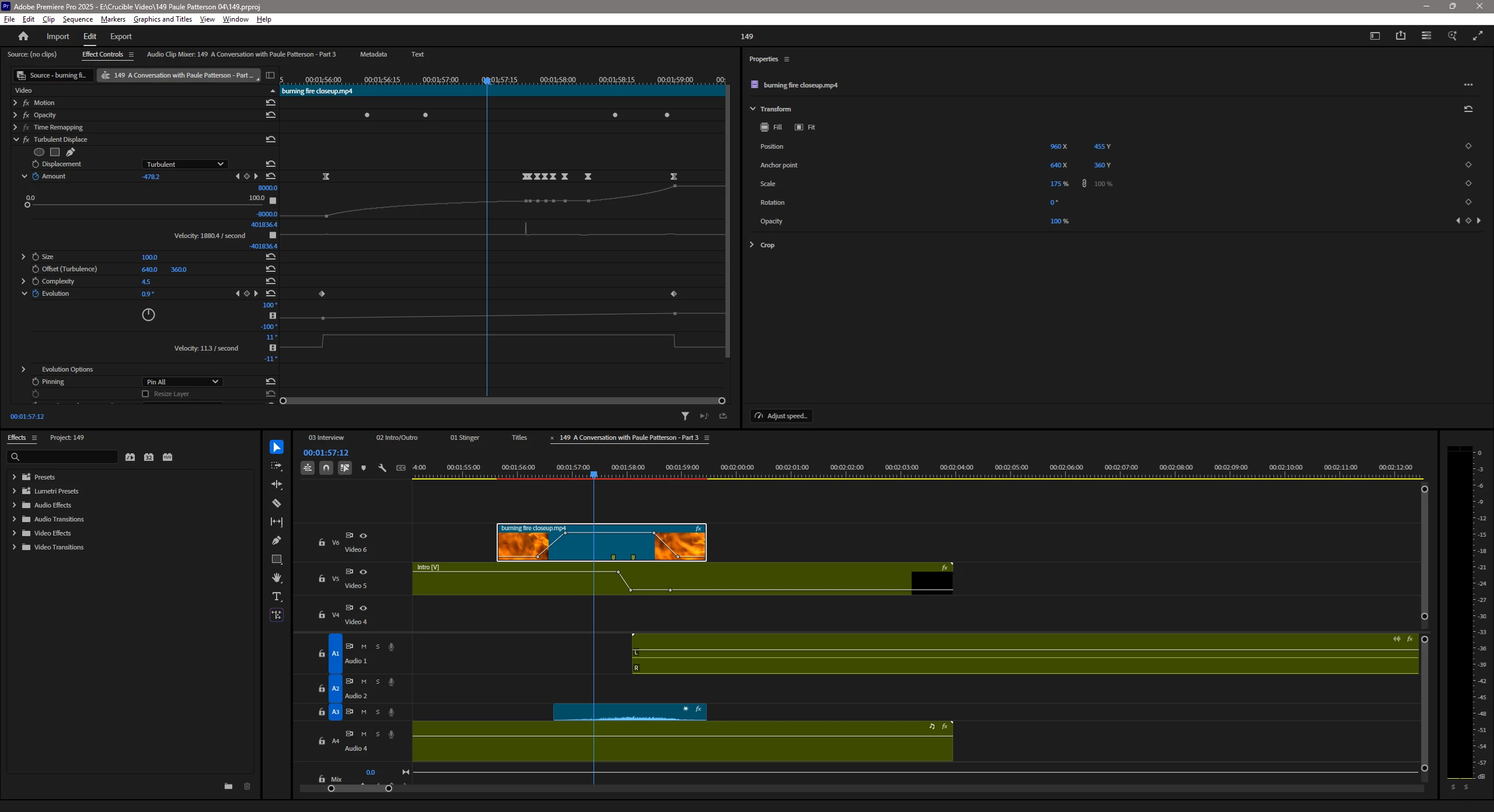
The attached image shows the settings for the clip and the Turbulent Displace effect. Some parts of it are fine, but as the clip progresses thru the keyframes for Amount and Evolution, it starts randomly glitching and misplacing.

I did not change my video card (4070 Super) drivers related to when this problem started.
16 replies

Participant
June 17, 2025

Thanks, Ian. I responded via DM. If we sort this out, I'll post an update for others who may come here looking for similar information.

IanB_360
Community Manager
Community Manager
June 17, 2025

Hi @BrandonSoMD 
You can send us any project files or video recorded clips of what you are seeing through any file share service you prefer.  Check your messages and you should have one from me for the purpose of sharing the files.

Here to Help 
Ian

Participant
June 16, 2025

By the way, I'm willing to assist with specific testing if someone from Adobe is actually involved. I value the software and would like to know I've contributed to its ongoing quality. If there's a way to do it privately, I can provide the project file and I can share a clip showing the "as desired" and "as broken" effect.

Participant
June 16, 2025

I have zero 3rd party plug-ins. I'm only using the stock, installed-by-Adobe software and effects. So this is a problem with the Adobe effect. 


I have not tried refreshing the preferences. I can't try it on 25.3 at the moment, since I reverted to 25.2.3. So I'll wait to try it again on a future update. I'm not sure what that would do in any case, since there are no preferences specific to that effect; is there some magic stored in the prefs for effects that I need to know about?


I tried applying the effect to a new clip in the same sequence. I started from scratch trying to rebuild my effect, which (as you can see from the image) had a fairly specific keyframe setup; even without my keyframe details, it still caused the clip to badly misposition, so I didn't see any point in continuing configuring the effect.

IanB_360
Community Manager
Community Manager
June 16, 2025

Hi @BrandonSoMD 

Are you using a 3rd party plug in for the Turbulent Displace? Or are you using just the basic Turbulent Displace from the effects panel? Have you tried to refresh the user preferences ? Or applying the effect to a new sequence to see if it works on a new sequence?

Here to Help

Ian

Participant
June 14, 2025

For some reason, my Turbulent Displace is getting some visual glitches, every time I render the video/use the effect a different glitch appears, before it was no problem to use but now it hinders more than it helps.

Community Manager
June 19, 2025

Hi Daniel Del Angelo,


Sorry to hear about this issue. Could you please confirm if you are using the latest version of Premiere Pro (v25.3)? Also, was the project originally created in an older version of Premiere Pro?


Thanks,

Sumeet