
Inspiring
April 10, 2025

Very slow handling of AVI files

  • April 10, 2025
  • 10 replies
  • 954 views

Premiere is very slow when handling AVI files encoded with a lossless codec (e.g. UT Video).

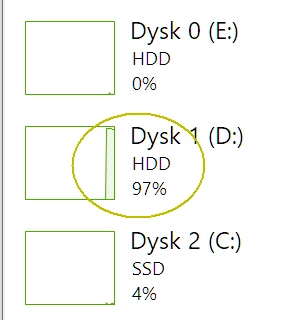
Jumping to a selected frame is terribly slow, and if the file is saved on the HDD, it takes a dozen or so minutes, and it looks as if Premiere is reading the entire file from the beginning.

I checked the file in VirtualDub and Magix Vegas -- in both cases the time is almost instant.
The file lasts about 1 hour and takes up 200 GB, UT Video 4:2:0 8-bit codec.


Windows 10, Ryzen 5700G, 32GB RAM

Tested without any plugins.
 

10 replies

rgr2Author
Inspiring
April 28, 2025

My AVI files are too large to post. But you can recompress theok8577996's posted files with ffmpeg:
ffmpeg -i input.avi -c:v utvideo out.avi
and you'll get a sample AVI file that Premiere has trouble with.

theok8577996
Inspiring
April 18, 2025

Ha Dani,

You have a look to this download

https://tkooijmans.stackstorage.com/s/MrlAu2S9Nlp1MakV


The first 2 are AVI files (DV25) with long duration


steps

Set taskmanager to show network load

puts these AVI's on a NAS with gigabit connection to you edit PC.

Try to open them from the NAS in Premiere CC2025.


result

it wil take a long time, can be minutes

try to edit in a timeline and switch to another app, like explorer.


result

when you switch back to Premiere, it lockup while again loading the whole AVI file.


also have a look to

screen capture DV bug with network.mp4

There is also a rar file with CC2023.

Extract that to a folder and start CC2023.

Try above steps,


result

- no delay with opening the AVI's

- no wait, or lockup while editing and switching to other apps.

Community Manager
April 17, 2025

Hi @rgr2@Masa72@theok8577996, I hear you on how frustrating this is.


Might any of you have any sample files you would be willing to share with the team so we can test out?

Thanks,
Dani

rgr2Author
Inspiring
April 17, 2025

And is something happening in this case?

Participant
April 12, 2025

Hi @rgr2 
I'm facing a similar issue with After Effects, and I see that similar reports were made last year in Japanese forum. But I think the issue is not fixed.

Since that is an issue with After Effects, I will create a separate thread. I'll post a link to this thread there.
Thanks,

rgr2Author
Inspiring
April 12, 2025

Yes, I get the "media pending" message and waiting for the correct frame to appear takes several minutes. During this time, the HDD load is 100% and the processor is basically 0% -- as if Premiere had to read the entire file every time.
I have "High Quality Playback" turned on, because the filters require it.
A bizarre situation -- I have to load the AVI file into Magix Vegas or VirtualDub, there I quickly find the number of the frame I need, in Premiere I jump to it and wait several minutes for it to appear.
Someone wrote above that the problem exists after the CC 2023 version -- does that mean that no one knows about it and is not working on it?

Community Manager
April 11, 2025

Hi @rgr2,

Thank you for your bug report. Really sorry for the frustration.

Are you getting any 'media pending' errors, or seeing any processes that may be happening in the background? Are you able to have any playback at all, and what is the playback resolution set to? If you right-click the program monitor, check if "High Quality Playback" is selected and if so, deselect it.

Hope we can help you soon,
Dani

rgr2Author
Inspiring
April 10, 2025

Thanks for the reply.

You mean they haven't fixed a bug in 2 years that would require immediate fixing?

theok8577996
Inspiring
April 10, 2025

The only known fix for now is to install cc2023. Please see my other post.

Same happens with native DV25 avi's

rgr2Author
Inspiring
April 10, 2025

Build 61 (25.0.0)