
adamv6623535
Participant
May 17, 2018
Question

(0xc0000005) startup error. How do I fix this?

  • May 17, 2018
  • 5 replies
  • 29168 views

I just ran the most recent updates on my CC account and now when I try and open Premiere or After Effects I get this error message, "The application was unable to start correctly (0xc0000005). Click OK to close the application."
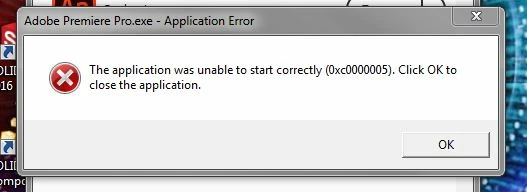
I can open all the other Adobe applications that I have loaded on my computer except the two I need most. I have a really important project due Friday but my troubleshooting (Adobe Cleanup Tool, uninstalling/reinstalling) have not fixed the problem.

What do I do?

Can I revert back to the previous version somehow? If I can, I cannot figure out how to do that.

Thanks in advanced for the help.

Adam

5 replies

Participant
January 16, 2025

Hi,


I am getting the below error after upgrading my SSD and reinstalling Creative Cloud


Thanks


Lindsay

Kartika Rawat
Community Manager
Community Manager
January 16, 2025

Sorry about the error. Could you try some suggestions mentioned in a similar thread: https://adobe.ly/3PEWpH4


Let us know how it goes.


Thanks, 
KR

Participant
January 16, 2025

Kartika,

I resolved my issue by using the Adobe Creative Cloud Cleaner Tool.

All appears to work as normal again after I reinstalled Adobe Creative Cloud.

Thanks

Lindsay

Participating Frequently
December 23, 2020

"This is a known issue and we're working on it".


TRANSLATION: "Leave us alone, we don't care. Here, try this 'solution' which we know won't work."


2020, Dec 23, and my previously working CC has begun doing this. I'm screwed. My other PC no longer boots PS.


I hate you, Adobe. You deserve bankruptcy.

Kevin J. Monahan Jr.
Legend
August 28, 2018

AdamV,

Sorry for this issue. Which OS are you using?

Thanks,
Kevin

Kevin Monahan - Sr. Community and Engagement Strategist – Adobe Pro Video and Audio
Vidya Sagar
Participating Frequently
May 17, 2018

Hi adamv6623535,

Sorry for the trouble. It is a known issue, Engineering team is working on a fix. Please use a previous version.

Here are the steps to install: Install previous version of your Creative Cloud app

Thanks,

Vidya

Participant
May 21, 2018

Vidya,

The link you provide to download/install previous versions is not all helpful since Creative Cloud 4.5.0.331 app dropdown menus do not offer an "Other Versions" selection. They only offer "View Tutorials" or "Uninstall".

AND, if you choose the latter, hoping for a path to choose which version to then reinstall, you're sorely disappointed.

Please provide a very clear direction on how to revert to a Premier Pro CC version prior to 12.1.1 for those of us for whom disabling Nvidia is not an option (e.g., using dual displays for workflow / creative development).

Vidya Sagar
Participating Frequently
May 25, 2018

Hi erich44163315,

I have the same version of Creative Cloud(4.5.0.331) installed & I am able to install previous version of Premiere Pro using the same steps mentioned in the article.

It seems like your Creative Cloud is not activated properly or in trial mode. Please try the steps mentioned in the following article & check the issue.

Stop Adobe Creative Cloud from opening in trial mode after purchase

Thanks,

Vidya

John T Smith
Community Expert
Community Expert
May 17, 2018

How to get previous using a Cloud subscription https://forums.adobe.com/thread/2372985

-an option to check to see more previous https://forums.adobe.com/thread/2426726

-and more on previous versions https://forums.adobe.com/thread/2389056 see reply #3

-and even more on previous versions https://forums.adobe.com/thread/2409527 see reply #1

Another idea that sometimes helps is to Search http://www.microsoft.com/en-us/default.aspx to find and re-install the C runtime