



adamv6623535
Participant
May 17, 2018
Question

(0xc0000005) startup error. How do I fix this?

  • May 17, 2018
  • 5 replies
  • 28532 views

I just ran the most recent updates on my CC account and now when I try and open Premiere or After Effects I get this error message, "The application was unable to start correctly (0xc0000005). Click OK to close the application."
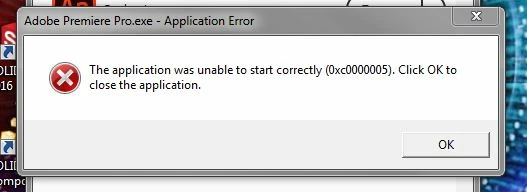
I can open all the other Adobe applications that I have loaded on my computer except the two I need most. I have a really important project due Friday but my troubleshooting (Adobe Cleanup Tool, uninstalling/reinstalling) have not fixed the problem.

What do I do?

Can I revert back to the previous version somehow? If I can, I cannot figure out how to do that.

Thanks in advanced for the help.

Adam

5 replies

Participant
January 16, 2025

Hi,


I am getting the below error after upgrading my SSD and reinstalling Creative Cloud


Thanks


Lindsay

Kartika Rawat
Community Manager
Community Manager
January 16, 2025

Sorry about the error. Could you try some suggestions mentioned in a similar thread: https://adobe.ly/3PEWpH4


Let us know how it goes.


Thanks, 
KR

Participant
January 16, 2025

Kartika,

I resolved my issue by using the Adobe Creative Cloud Cleaner Tool.

All appears to work as normal again after I reinstalled Adobe Creative Cloud.

Thanks

Lindsay

Participating Frequently
December 23, 2020

"This is a known issue and we're working on it".


TRANSLATION: "Leave us alone, we don't care. Here, try this 'solution' which we know won't work."


2020, Dec 23, and my previously working CC has begun doing this. I'm screwed. My other PC no longer boots PS.


I hate you, Adobe. You deserve bankruptcy.

Kevin-Monahan
Community Manager
Community Manager
August 28, 2018

AdamV,

Sorry for this issue. Which OS are you using?

Thanks,
Kevin

Kevin Monahan - Sr. Community & Engagement Strategist – Pro Video and Audio
Vidya Sagar
Adobe Employee
Adobe Employee
May 17, 2018

Hi adamv6623535,

Sorry for the trouble. It is a known issue, Engineering team is working on a fix. Please use a previous version.

Here are the steps to install: Install previous version of your Creative Cloud app

Thanks,

Vidya

Participating Frequently
May 18, 2018

Any action on this? This has been broken since day one of the latest release. We are paying for versions that we can't use.

I am aware of all the work arounds. I have two laptops running v12.0 that cannot be used for projects that were started on the other machines using 12.1. Nor can they work without the Nvidia GPU.

I think Adobe could give an update every day just to let us know we aren't being forgotten on this issue. After all, it's been a month now and it certainly feels like we're being forgotten.

John T Smith
Community Expert
Community Expert
May 17, 2018

How to get previous using a Cloud subscription https://forums.adobe.com/thread/2372985

-an option to check to see more previous https://forums.adobe.com/thread/2426726

-and more on previous versions https://forums.adobe.com/thread/2389056 see reply #3

-and even more on previous versions https://forums.adobe.com/thread/2409527 see reply #1

Another idea that sometimes helps is to Search http://www.microsoft.com/en-us/default.aspx to find and re-install the C runtime