Known Participant
March 31, 2020
Question

12 Channel Audio for Broadcast

  • March 31, 2020
  • 3 replies
  • 1960 views

Hi Community! I'm really hoping I'll get an answer for this one.


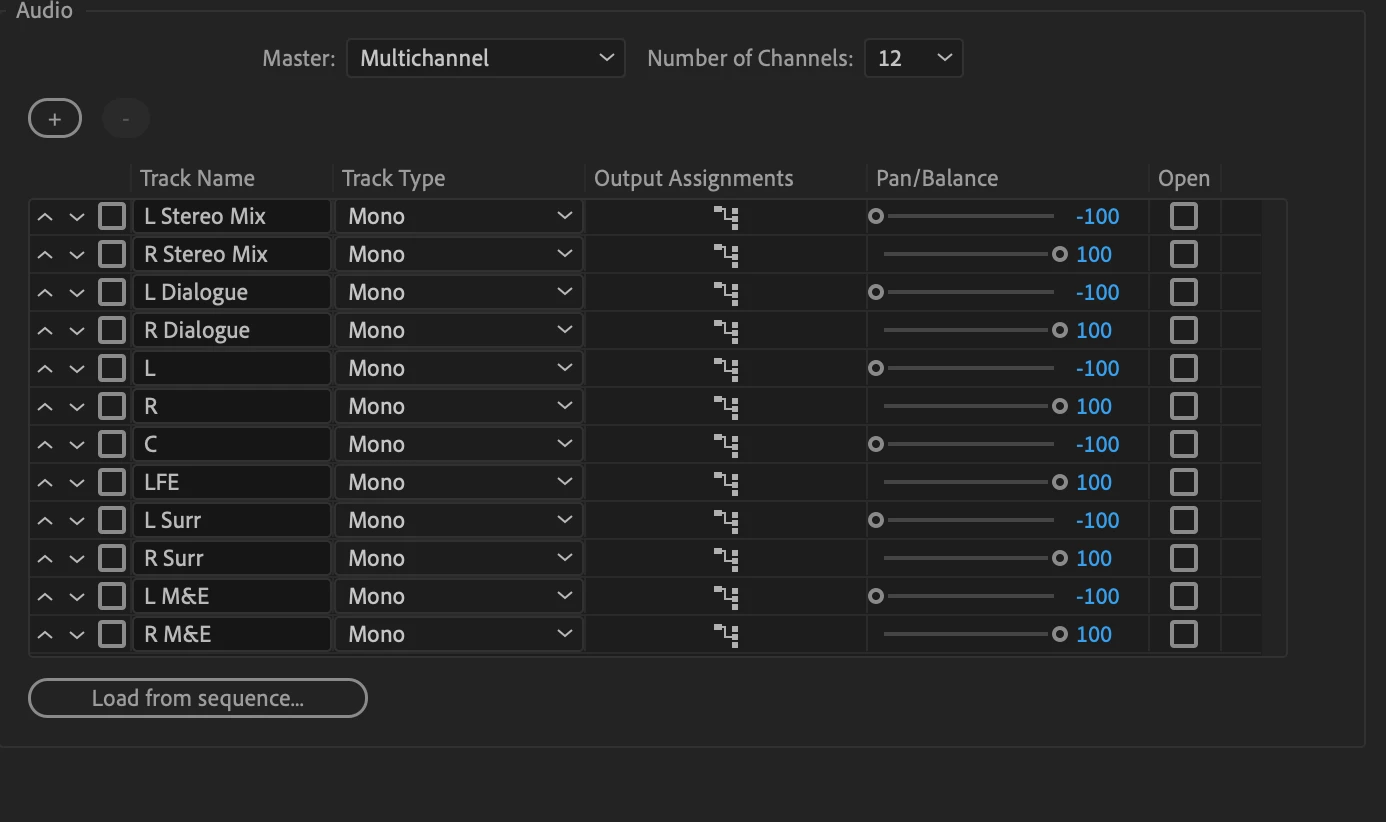
I need to set up a sequence for 12-chanel audio with the following routing:


Ch. 1+2: Stereo Mix

Ch. 3+4: Dialogue

Ch. 5: Left

Ch. 6: Right

Ch. 7: Center

Ch. 8: LFE

Ch. 9: L Surround

Ch. 10: R. Surround

Ch. 11+12: M&E


Could someone set up the proper sequence settings, screenshot it, and post it here? There's surprisingly scant information out there for this question.


For Jarle (or anyone who can help):
 

This topic has been closed for replies.

3 replies

R Neil Haugen
Legend
April 3, 2020

Understand ... I don't get a dime. But Jarle's massive tome The Cool Stuff in Premiere Pro is the manual Adobe should have paid for. The hard copy (paperback) is a full-sized and 1224 monster including an extremely detailed Table of Contents, appendixes, and index. It covers setting up projects and metadata through all phases of editing and functions of Premiere including audio, color, graphics, editing for speed, and integration with AfterEffects.


I orginally bought the ebook, and have it on my tablet ... which was by my computers when working and home at night for studying. At Adobe's MAX event in LA last fall, I saw the printed version ... at only $54.99, it's a steal. Picked it up, as that is even faster to find what I need at any moment than the ebook is. Best editing money I've ever spent.


He has a long, detailed section on audio that would be exactly what you and any editor prepping for b-cast/cable/satellite distrubution over a service needs. As he's based in Norway, roughly attached to the EU, they have multiple streams that they need to attach frequently including mutliple languages. Yea, he knows this stuff.


Neil


Everyone's mileage always varies ...
R Neil Haugen
Legend
March 31, 2020

David,


With Jarle involved, you've got the best support on the planet for this question! Go for it, he's got your cure.


Neil

Everyone's mileage always varies ...
Legend
March 31, 2020

Hi David,


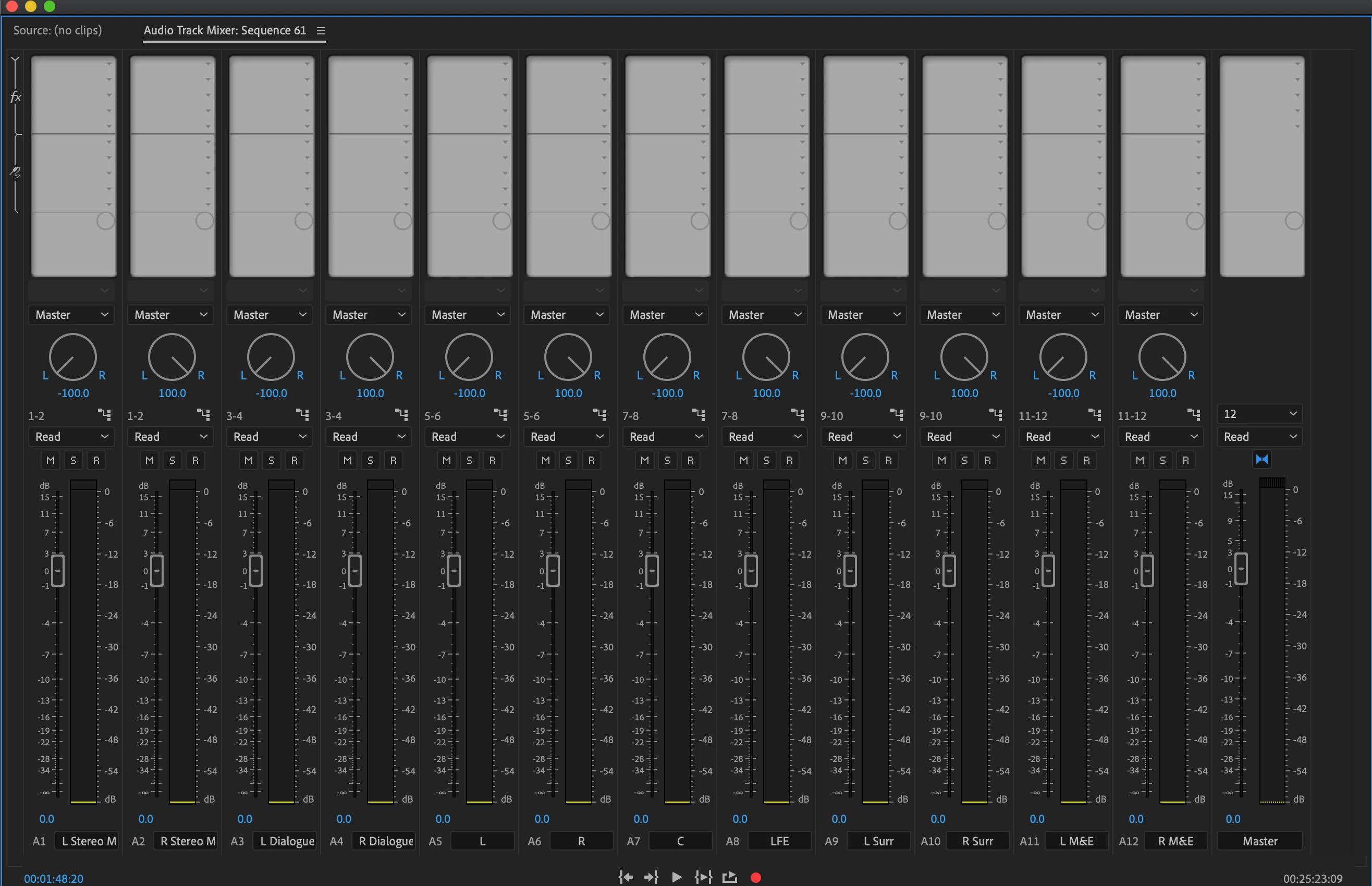
Setting up this properly takes a few minutes. What if you provide a screenshot of your current settings (Audio Track Mixer panel), so we can comment on what needs to be changed?

Known Participant
April 1, 2020

Hi Jarle,


Hope your day is going well. I've updated my post with screen shots. Looking forward to your assistance in this matter!

Legend
April 7, 2020

You can't use a 5.1 output when you also need a stereo mix. You must use a MultiChannel sequence. Then you just need to route the tracks to the outputs they need to be on. 
3+4 means it will be output to 3+4. Want it on 3 only? Pan it left. Want it on 4 only? Pan it right. Want it on 1+2 in addition to 3+4? Add that, while keeping 3+4. Etc. As I tried to show with my images.

I highly recommend that you do this in the Audio Track Mixer in a Multichannel sequence, and then use the Import from Sequence option in the New Sequence dialog to create a preset for future use.


Ch. 1+2: Stereo Mix: Route all the tracks that make up a stereo mix here. Pan htem left/right as needed

Ch. 3+4: Dialogue: Route only dialogue tracks here. Pan on left and one right.

Ch. 5: Left: Route what needs to go to Left/Right here, and pan Left

Ch. 6: Right; Route what needs to go to Left/Right here, and pan Right

Ch. 7: Center: Route what needs to go to Center here, and pan Left

Ch. 8: LFE: Route what needs to go to LFE here, and pan Right

Ch. 9: L Surround: Route what needs to go to Surround here, and pan Left

Ch. 10: R. Surround: Route what needs to go to Surround here, and pan Right

Ch. 11+12: M&E: Route M&E Tracks here, and pan Left/Right


If this doesn't help you understand this, I recommend that you hire someone to do this setup for you and create a sequence preset. 


You must understand that ALL audio tracks are essentially really just MONO. Stereo audio is just two mono tracks tagged as lef and right stereo tracks. A ProRes file doesn't really have stereo and surround tracks. It can only do mono tracks, which can be tagged as whatever you want, but they're still all mono tracks. 

To make this surround mixing session meaningful, you also need to route your audio output monitoring correctly in the Audio Hardware Preferences, so you're listening to the mix in the correct manner. It's a bad idea to put right surround output into your subwoofer. 🙂


OK, it just occurred to me that maybe you're not editing source material, maybe you're editing a finished mix (5.1 + stereo + Dialogue and M&E) from a file with 12 tracks?
If so, just import everything as mono, not stereo, as I tried to explain in my first answer (Shift+G, or set a preference) and pan every other track left and right. 

1 and 2 to 1+2, panned left/right, 3 and 4 to 3+4 and pan left/right, etc.

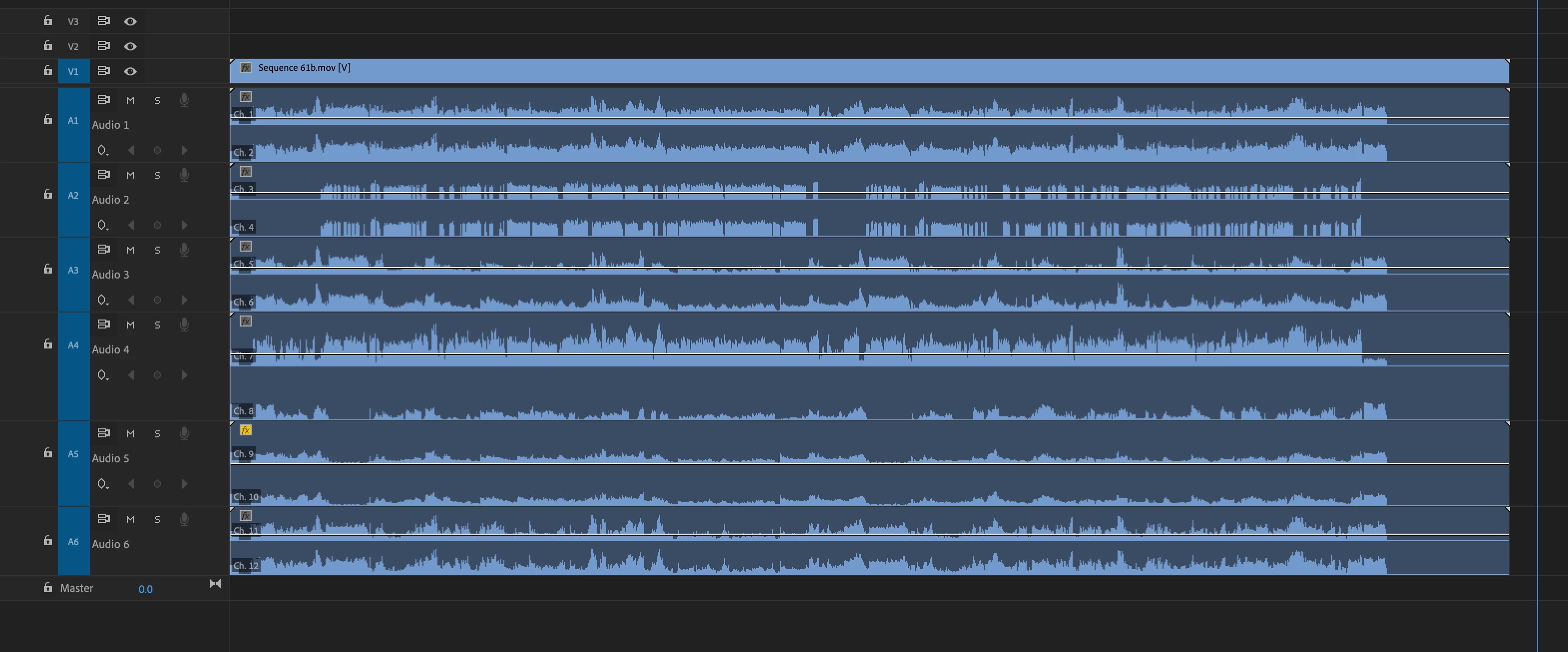
Anyway, you can NOT just import a 12-channel ProRes file as stereo and put in a timeline and expect it to work. Your own screenshot shows that you've done this:


Either set your preferences or hit Shift+G witht the clip selected in the bin before adding it to the sequence. The sequence must be a multichannel sequence, and the tracks in the file need to be interpreted as mono or multichannel.


If you could post a video recording of what you're doing, all the way from importin the file to creating the sequence to putting the clip in the sequence, we could find out when and why things go wrong.