Inspiring
May 24, 2014
Answered

4K video

  • May 24, 2014
  • 14 replies
  • 30248 views

I am shooting in 4K using the Sony FDR-AX100.

I can import the 4K files into Premiere Pro CS5. And, when I create a timeline with it the preview shows it in 4K. I know the preview shows it in 4K because when I bring an HD file into the same sequence/timeline it is half the size.

The problem I'm having is PPro CS5 doesn't export 4K. Even when I "Match sequence settings" it doesn't export in 4K.

Because money is tight, is there a way to update my version, maybe the media encoder, so I can actually export 4K in CS5? If not, what is the least expensive solution? Maybe upgrade to CS5.5 or CS6?

Thanks!
This topic has been closed for replies.
Correct answer Steven L. Gotz

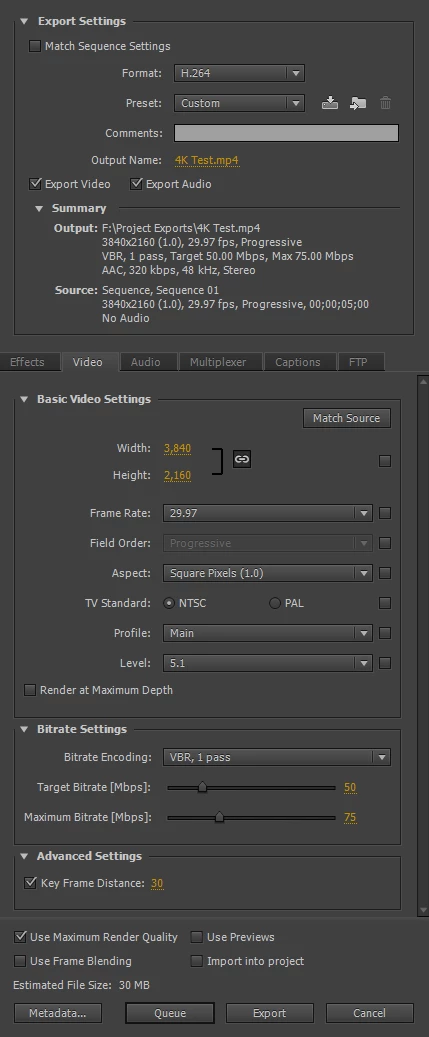
You are showing us an image of the sequence presets and what we need to see are the export settings.

If you are now temporarily using CC, then the image in post #12 of this thread should show you that it is possible to export "real" 4K.

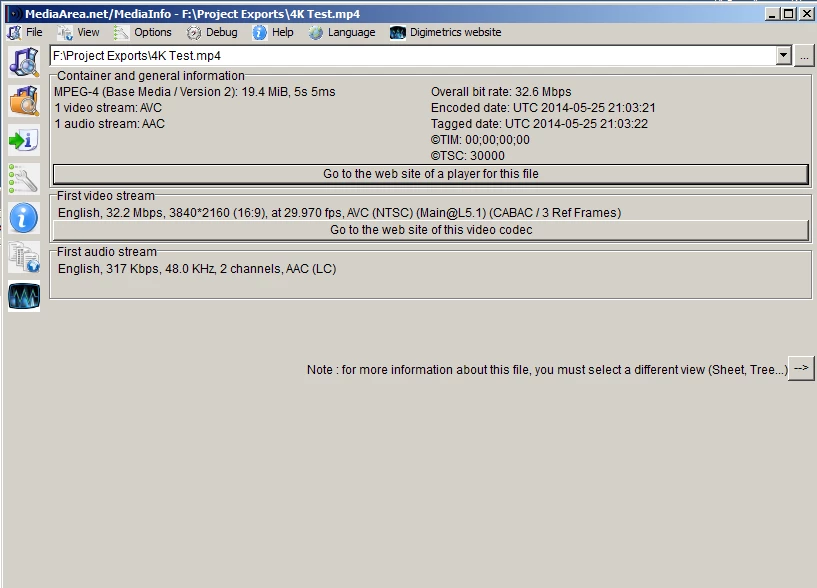
I can also export the frame size of your video (3840X2160). But Ann is correct in that you have to change the level.

Here are my export settings. Notice the sequence settings as well as the export settings. Ignore the estimated file size. I used an extremely short clip to save time.

As you can see, it is exporting as requested.

14 replies

NeofilmAuthor
Inspiring
May 24, 2014

Thanks Ann, if that's absolutely the case then the next question is can CS5.5 do it? or CS6?

Steven L. Gotz
Inspiring
May 25, 2014

This works in CS6 but you will have to try it for yourself to see if it works to create 4K presets in CS5.

The Video Road – 4k presets for Adobe Media Encoder

artofzootography.com
NeofilmAuthor
Inspiring
May 24, 2014

Thank you so much for your responses! I need to explain what I'm asking a little further though...

I have been totally fine with Premiere Pro CS5. It is ABSOLUTELY all I "need" right now to do what I do (edit weddings, corporate videos, etc...). I do not want to spend more money than necessary. I am only asking here for the best way to export 4K in the least expensive way, presumably upgrading media encoder. PPro CS5 edits it just fine, I only need to export it in 4K. So, if "upgrading" to CS 5.5 or CS6 from my current version will do it, then that's probably the least inexpensive solution. However, if there's another way, like upgrading media encoder somehow, maybe with an update or something, then I prefer that.

I am not after overkill. I've been shooting HD since sony came out with the HDR SR1 practically 10 years ago. I produce video for a living and have only had 1 customer, only ONE, want HD. So, the probability of someone wanting 4K is anytime soon is extremely remote. I simply want to do it for my YouTube channel and that's it, just for some creative fun.

So, please do not respond with something off track, I already know about CC, I already understand the obvious, I'm searching for something specific here. Thanks again for your responses, but I only want to know how to make my premiere pro cs5 export 4K. That's it. If there is no way to do it, that is, if there's no way to upgrade the media encoder, then will 5.5 do it, and so on... I want to keep things as simple, close to what I have already, and inexpensive as possible.

Ann Bens
Community Expert
Community Expert
May 24, 2014

You cannot upgrade just Media Encoder as a single program, its part of Premiere (or AE).

Legend
May 24, 2014

If you're working with 4K, I would recommend upgrading to the newest version of Premiere Pro.  The features and work flow have been significantly improved.

Steven L. Gotz
Inspiring
May 24, 2014

It all depends on what you mean by least expensive.

For example, some people go shopping for a car and say "I want my payments to be $300 per month". Other people plan on paying cash out of their life savings and just want to know how little they can pay for the car they want. Others like new cars every couple of years so they lease the cars they want.

Adobe has stopped making software you can buy, and now only offers the lease.

You can still buy Premiere Pro CS6 for a lot of money but it will never ever be upgraded again, or you can simply rent Premiere Pro CC for $20 per month. (Or the entire package of programs for $50 per month.) You stop paying for your yearly subscription (paid monthly usually) when you stop using it. After that, you have nothing you can use 30 days later. Or you can rent monthly for more money per month but with no obligation to pay for a year. So it is up to you to determine what fits you best.

If you can afford to shoot 4K, you can probably afford to make one of the choices in order to be able to edit it. Or you can find another software brand to try.

artofzootography.com