
Participant
November 25, 2023
Question

8GB RAM for Installed RAM only!

  • November 25, 2023
  • 2 replies
  • 1321 views

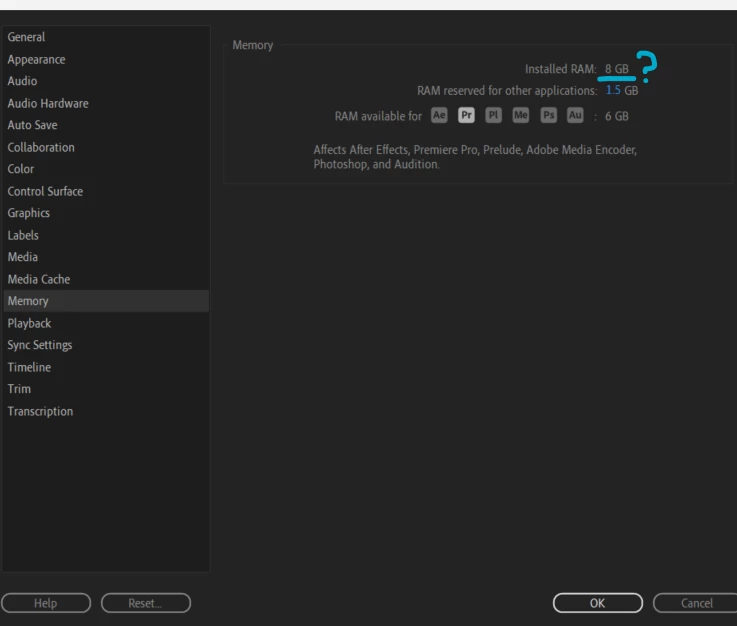
Hi all, hoping someone can help. I have an issue whereby my 'installed RAM' for Premiere is only 8GB. I'm assuming that is shared by other applications from Adobe. I have a new laptop and it's not lacking in memory, so I'm wondering how so many people have 16GB of installed RAM in the first place? How do I change this so that all my Adobe products have a bigger RAM pool? 8GB of RAM essentially means I can't do anything, video lags even with proxies!


I know that you can go to Preferences-->Memory and scale down the RAM reserved for other applications but this does nothing if the installed RAM is only 8GB! I'm not 100% sure how to change this, but I could do with at least allocating 16GB for Adobe.


Thanks in advance,


Paula.
 

This topic has been closed for replies.

2 replies

Legend
November 25, 2023

In addition to what Ann stated, does your system have a discrete GPU at all? Or does it rely solely on integrated graphics?


If it's the latter, then keep in mind that all integrated graphics steal a lot of system RAM for itself, and thus that amount of RAM becomes completely unavailable for apps to use due to Windows memory management shortcomings.

Participant
November 25, 2023

Looks like integrated. I'll have to look at adding RAM, cheers!

Ann Bens
Community Expert
Community Expert
November 25, 2023

If you want more RAM, you need to physically install more ram into your computer.

As of now, you have only 8 gig. You cannot magically assign more ram if your computer does not have it.

Post a screenshot of your computer specs. (system).

Participant
November 25, 2023

Ok, that's fine. That's all I needed to know. I don't expect to magic any RAM in. If I need to get more, I need to get more. That's all I needed to know. Thanks.