
ariggs123
Participating Frequently
December 21, 2018
Question

980 TI Issues

  • December 21, 2018
  • 2 replies
  • 5259 views

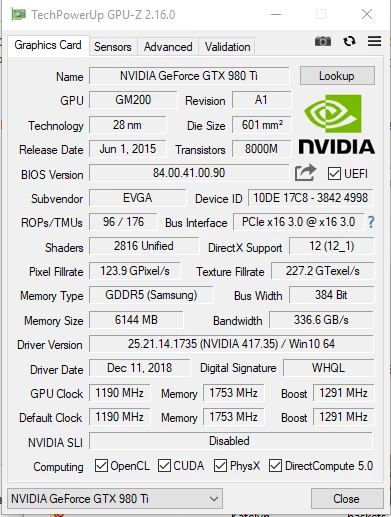
I have Windows 10 build 1809 with Adobe Premier Pro 2019 CC 13.0 (build 225) installed with a 980 TI graphics card with fully updated drivers from NVIDIA. I keep getting these below messages and PP is using the CPU to encode. From what I can gather, this is not normal. Any advice?

<12064> <MSDKDecoderWithMCDemux> <5> No Intel device D3D11 or DX9 context created, hardware decode not available.
This topic has been closed for replies.

2 replies

Christian.Z
Community Expert
Community Expert
December 21, 2018

Hello,

Just to add to what Neil mentioned,

The GPU does not kick in for Premiere unless you have an accelerated effect applied or scaling. Only then they GPU will jump in to help. otherwise it just sits there doing nothing and all the work is on the CPU.

I work with 980 ti as well and it's a great card. lot's of CUDAS, but as Neil said, your CPU might be weak and I also suspect storage. Can you give me an Idea what your HDD/SSD setup is like?

Also to address your question about Mac vs Windows, I can confirm that Macs are generally more stable and the editing process is smoother. I have a Windows monster PC at home, and iMacs where I work. You can build up speed with your PC rigs, but Macs are always superior when it comes to stability.

ariggs123
ariggs123Author
Participating Frequently
December 21, 2018

Thanks for everyone's help. After a lot of research and reviewing, I think we may go the Mac route just because there are other YouTuber's that we know out there that also go the Mac route and always say they have better luck.

We are looking at this machine. Do you think it can handle it? Really all we are doing here is cutting video, adding music and voice overs. So no really effects or anything for the most part, though we may start that one day. If I added an extra 32GB of RAM to this machine, would this get the job done reliably with 1080p video? Reviews says yes, but I know nothing about Apple, so I want to ask experienced people.

https://amzn.to/2SdoYfh

https://amzn.to/2V04rws

Peru Bob
Community Expert
Community Expert
December 21, 2018

That only has a weak dual core processor.

R Neil Haugen
Legend
December 21, 2018

If you're talking about this "software encoding" message in the Export dialog ...

That is referring to whether or not your CPU has the new Intel QuickSync hardware ... if it does, this will say "hardware encoding". If not, you get this.

Which has NOTHING whatever to do with your GPU ... period.

That is set via the Project Settings/Mercury acceleration dialog ...

Is this your question?

Neil

Everyone's mileage always varies ...
ariggs123
ariggs123Author
Participating Frequently
December 21, 2018

I don't think that is my question.. My issue is my PP is very slow, I have to edit 1080p in 1/4 frames yet it is still so laggy I cannot hardly work and it takes 1 hour to export a 10 minute video. Typically when playing a video in PP without any effects, I loose frames even at 1/4th. And from what I have read, when using the editor, if the CPU spikes to 100% like it has been when trying to play a sequence in the editor, then that means it is not using the GPU at all. I also see no reference to my GPU in the settings at all like I see in other people's screenshots.

So I assume the error message I posted in my OP that I am getting in the console could be the reason I am experiencing all of this. My cheap laptop edits better than this gaming computer that can play any game at max settings.

R Neil Haugen
Legend
December 21, 2018

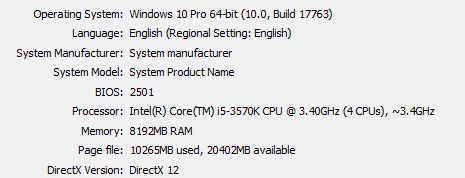
That's only a 4-core CPU, and with only 8GB of RAM.

If your media is H.264 long-GOP, I would expect fairly poor playback on that rig. An intraframe codec like DNxHD/R, ProRes, or Cineform would play better but still have issues after effects are added.

That CPU/RAM combo can't work fast enough to get that much to send to that GPU at any one time.

Neil

Everyone's mileage always varies ...