
Participant
July 21, 2017
Answered

A low level exception occured in AE.ADBE Text

  • July 21, 2017
  • 17 replies
  • 41334 views

Hello,

I keep getting this error message in my video. I know it has something to do with the text as deleting the text removes the error but I can't seem to find a fix for it, my suspicion is that it has something to do with the new essential graphics panel as I have never seen this when using the legacy title. Below is a screen grab of my screen showcasing the error.
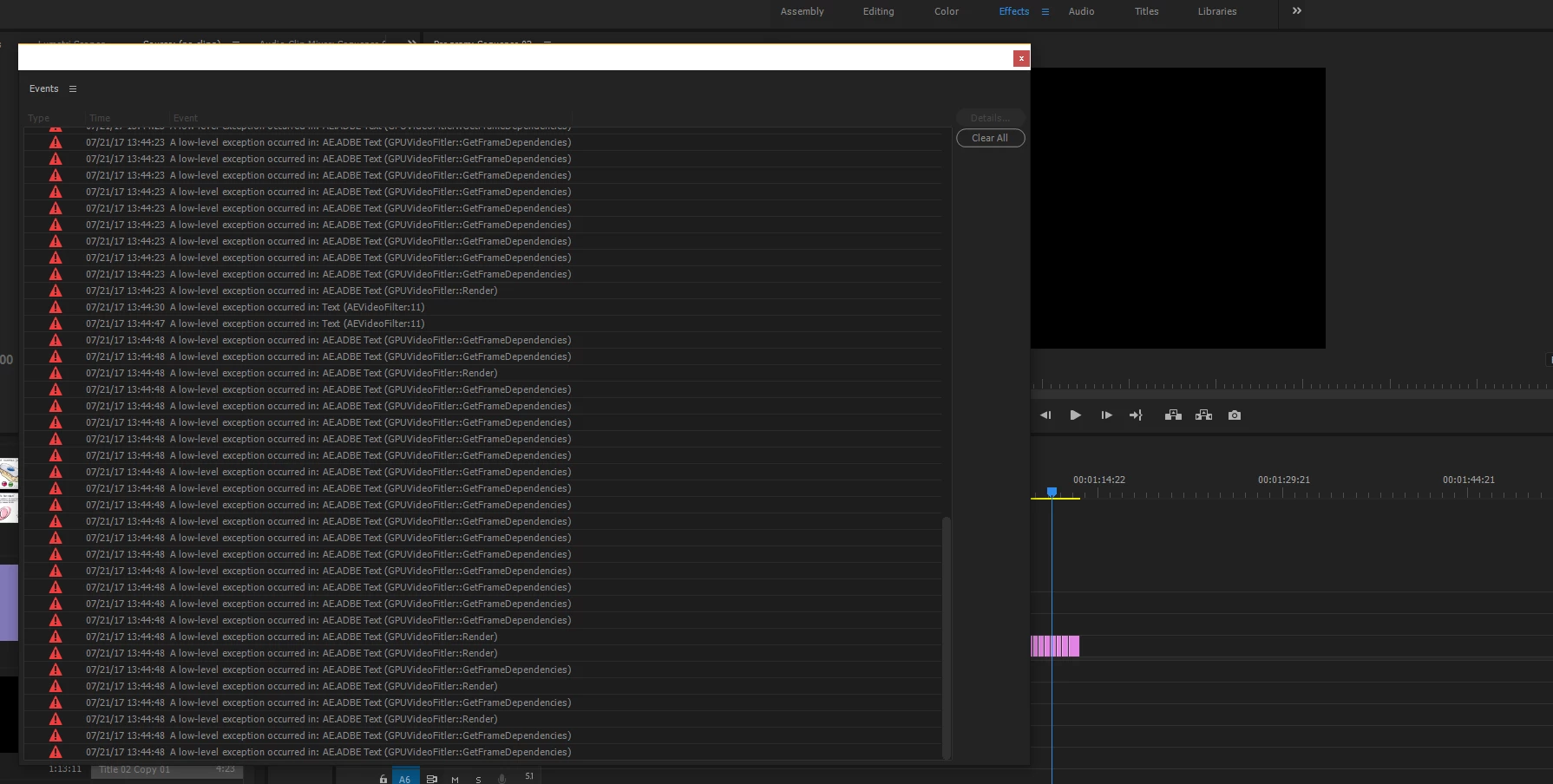
The error first appeared on a colleagues PC, it originally opened fine on but today it has come up with the same error. I haven't installed any new fonts recently and everything is up to date. Reinstalling premiere also didn't work. Any help on this issue would be greatly appreciated

Cheers

Ben

Correct answer jeremiegrandemange

I FOUND THE SOLUTION with the help of the Adobe Customer Service.

1. Delete all fonts on your computer that are 3rd party.

2. Uninstall Premiere (I deleted app preferences, don't know if that makes a difference).

3. Install and Update premiere to the latest version. Do not open application!
4. Restart Computer.
5. Open Premiere and voila!

17 replies

Participant
October 2, 2023

I removed the shadow from the text as i had it checked ON because i like the effect, turning it OFF fixed it for me . 🙂

Participant
July 10, 2023

for me it was solved in the following way: even easier, I simply looked for elements that were using external fonts (those that do not come with the computer) I noticed that a font did not appear in the name, I just changed that text font, and it worked again! So the solution is to look at all the text fonts in your project, and check any that are disturbing, use simpler or more original fonts. 

Participant
August 18, 2022

I had this same issue, the way I was able to resolve it was changing my font, I assume the font i had selected was malfunction, corrupted, or incompatible with premiere so just selecting another one (and avoiding that one or removing it) seems to be the fix

Randune23
Inspiring
September 11, 2022

I too tried your fix b/c it was so much less labor intensive as deleting all my 3rd party fonts and uninstalling PP.  I had opened a couple of different projects I had finished in which I had used some 3rd party mogrts.  In both of these projects  NEVER had the issue in those projects.  So I opened up my massive Kauai project, and immediately Adobe claimed there were two font issues (Futura).  So I found all the text I used that used those fonts and changed to an Adobe font and MPEG importer error disappeared.  Well, for a time being and it has once again reared its ugly head again.  So I saved and shutdown PP hoping it would stop appearing.  Here's to wishing me some luck.  

Participant
July 29, 2022

This may not be a help, but I just got this error message. All I did was save and close premiere and opened it back up. Didn't get the error message again. I'm glad this fixed it for me. All these other responses have to do with reinstalling/updating drivers or files. Simple fix for me.

brunosodre
Participant
May 27, 2022


Olá! tive o mesmo problema. Apenas desativei a opção de Negito Falso, e tudo foi resolvido! Não precisei desistalar nada, nem mexer nada no texto. Só selecionar o texto todo e tirar o neglito falto, ou mudar para uma outra fonte.

Abraço!

____________________________________________________________


Hi! i had the same problem. I just turned off the Fake Negito option, and everything was resolved! I didn't have to uninstall anything, or change anything in the text. Just select the entire text and remove the missing bold, or change to another font.

Hug!


BRUNO

AlyButWhere
Participating Frequently
April 4, 2022

I also had a similar problem. I managed to checked all of my 3rd-party fonts on my PC (Oxygen and Eastwood are some of them), however none of them are OpenType font files. The thing is, I installed a while back a video editor (Filmora 11) before I got Premiere, and before I was experiencing the errors, I managed to go to the program files of Filmora, so I went to the program files again, and I found out some of the text files used by Filmora are OTF files, so I uninstalled it. When I opened Premiere, the errors were gone.


Hope this helps.

Participant
November 17, 2021

SOLUTION: I just uninstalled the problem font, I had a feeling I knew which one was causing the issue. Didn't even have to restart Premiere.

ISSUE: Installed a 3rd party font through Creative Cloud, which I had added through my other computer. This was an effort to get the fonts exactly the same no matter what PC I used, as opening projects on different PC's can be a hassle with all the re-linking. Had to manually install on both PC's instead of using CC's flawed function.

Participant
December 1, 2021

I did this as well. Just one font that was the problem.

ubernemo
Participating Frequently
July 16, 2021

MY SOLUTION: My problem seemed related to a 3rd party free OTF font (not TTF) I used in Windows. Closed Premiere Pro 2021, reinstalled the font and restarted PP2021. Message gone. Worked!

I also had this font in nested sequenced before. I UNnested them but that did not do it by itself. The reinstall of this OTF font is what finally solved it. Cannot tell if UNnested helped or not. No PC reboot, no PP reinstall. Just reinstalled the OTF font.

Participant
November 4, 2021

Downloaded some lowerthirds from adobe had the same error, all I did to fix the issue was to edit the template in essential graphics and replaced the font that downloaded with the template, and it worked. No need to uninstall fonts or premiere. 

AfroBlanket
Inspiring
June 3, 2021

Had a similar issue. I had text layers not loading properly. All of the text was in nested sequences. I opened all of the nested sequences creating the issue, saved the project and restarted my computer. Reopened the project, quickly opened all timeline tabs to make sure the issue was not there and exported the video with no hold ups.

esassaman
Participating Frequently
November 17, 2019

This happened to me after installing some 3rd party fonts. Simply uninstalling the fonts and restarting Premiere (v14) fixed the problem. Looks like one of them was either corrupted or a bad format.  Can't blame Premiere for not working with corrupted/bad files.