
Inspiring
July 18, 2018
Answered

A low level exception occurred in: ImporterMPEG (Importer:37)

  • July 18, 2018
  • 9 replies
  • 64396 views

PP finally starts working after crashing constantly and now this with the new update: 12.1

A low level exception occurred in: ImporterMPEG (Importer:37)  - rendering the imported footage unusable.
Nothing else has changed barring the AE and AME updates.
Anybody else with this?
This topic has been closed for replies.
Correct answer Carlos Ziade

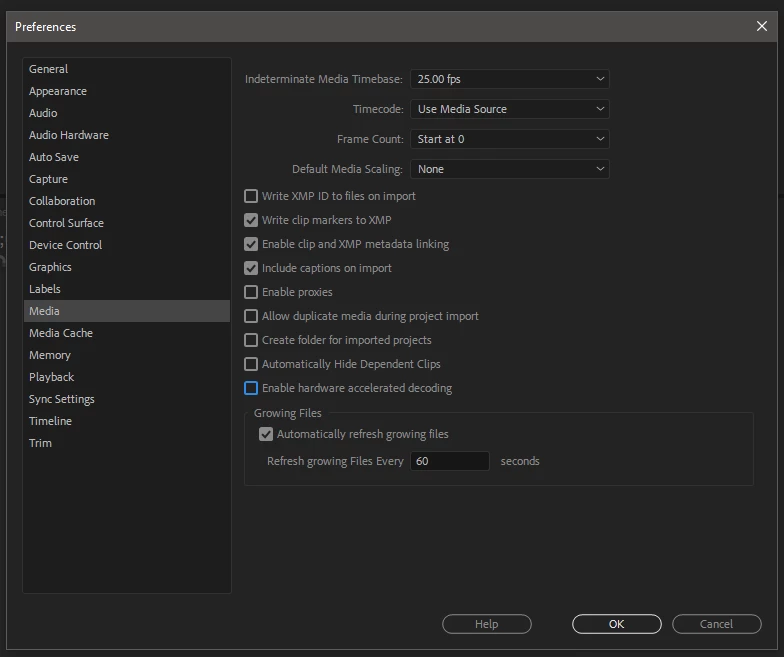
Only this on mine no "Enable accelerated H.264 Decoding" but no change even with this un-ticked.


If it was working on previous versions, roll back, I don't think this version of Premiere on this generation of your CPU

will handle H.264 files normally ... are you on the latest premiere pro update released days ago ? if no try to update

premiere to the latest, if yes, roll back to previous working versions

9 replies

Randune23
Inspiring
September 12, 2022

I'm not saying, "I found the fix" but I did find a workaround.  As I was working on a very long video project and doing my first edit, I started adding mogrts where I wanted to put text on the screen.  Well, every time I would close the project and open it back up it would give me a font error for Futura-medium.  So I went and deactivated the font in Adobe CC and it still kept coming up.  So I found the font in question (PC Windows/Fonts) and deleted the font.  Then I went to the internet and re-downloaded the font, installed it and reopened PP.  Well the same error kept coming up.  Frustrated, I went to every place on the timeline where I had a mogrt, added a marker (I use adjustment layers b/c they make for an easy marker and you can rename them to the text you want to add later), and then deleted the mogrt.  Next, I saved the file and no more of those stupid ImporterMPEG (Importer:81) showed up.  I'm crossing my fingers that I can still add mogrts when I get closer to being done.

Participant
October 15, 2021

my pp dosent crash but it has this error with mp3 only

error message: the importer reported a generic error


Randune23
Inspiring
September 3, 2022

I still cannot believe someone hasn't come up with a fix for me.  Some of these posts are from 2017.  It's 2022 and it still is plaguing me.  I've done all the fixes and nothing works.  Briefly last night when I change the preview to Quicktime it worked.  Then I went back to editing this file I have been working on for the last three weeks and within 30-minutes...***BOOM*** it's back to doing the same thing.  I can't even preview/watch any of the footage in my sequence.  So I shut down, restart, and it does the same STUPID thing.  UGH

Participant
April 8, 2021

DELETE A PASTA DA ADOBE CRIADA NOS DOCUMENTOS 
ABRA O PREMIERE ANTES DE ABRIR O PROJETO VAI EM CACHE DE MIDIA E EXCLUA TODOS OS CACHES 
PRONTO O ERRO SOME ESPERO TER AJUDADO AQUI RESOLVEU 

Participant
September 29, 2020

for anyone still having "importer 37" error:

i tried almost all the listed solutions, nothing worked..
now i decoded the problematic video to .mkv with an online video converter and bamm! it works!

Studiii
Participant
August 12, 2019

Hi,

I have problem with my premire pro

"Low level exception occurred in importer mpeg (importer:8)."

Can u step by step show me how to replace that?

I need help please!

Participant
March 30, 2020

I have the same issue since today reporting: "Low level exception occurred in importer mpeg (importer:8)."

Can you please help?

Thanks in advance!

Jon Cracroft
Participating Frequently
October 10, 2018

I'm having this problem too. Exact same error message: A low-level exception occurred in: ImporterMPEG (Importer:37), and crashing repeatedly. Super frustrating as I'm in the middle or a weekly-released web series and trying to keep working.

Inspiring
October 11, 2018

Unbelievably frustrating for you! My PP  (Build 69 V12.1.2)  and AE are now working seemingly without a hitch and importing MP4's with no problems. This is totally random after trying all the fixes suggested which did not work at the time. Sorry I can't tell you why.

Participant
September 30, 2018

I was having this problem too, very frustrating of course, but I checked my update status and found an updated version for my Premiere Pro CC to Version 12.1.1 Build 69 and it's fixed. So far.

Sorry, I forgot to take note of the version that was causing trouble.

Community Expert
July 18, 2018

Try Jeff's suggestions in this thread :

Low Level Exception??

Inspiring
July 18, 2018

After 10 crashes when PP actually started correctly - no - unfortunately this also didn't work. Thank you for the suggestion.

Community Expert
July 18, 2018

can you share your system specs in details ?

Community Expert
July 18, 2018

01. Delete all your Media Cache files

02. Delete all render files (go to Sequence - Delete Render Files)

03. Manually delete all Video and Audio Previews (render files, location related to scratch disks)

Inspiring
July 18, 2018

Thanks for the reply but unfortunately this didn't help in my case and maybe not related but no Premiere is crashing on startup 90% of the time and when it doesn't it will crash on save. Love Adobe products