Participant
July 27, 2022
Question

AAF Export for Pro Tools

  • July 27, 2022
  • 3 replies
  • 876 views

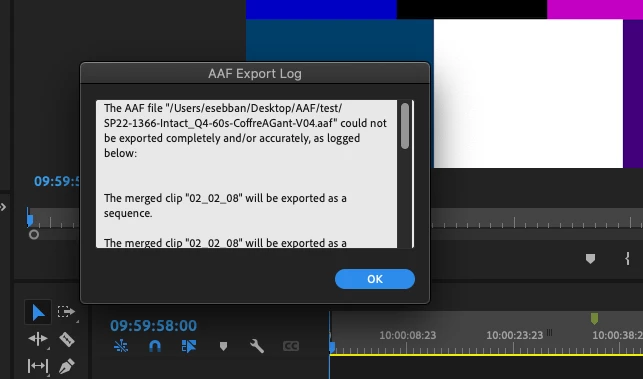
Do you know why Premiere gives me this message when I export AAF? After pro tools is not able to open it correctly. The only solution I found is to duplicate the sequence and delete the video.
Thanks
Matt

This topic has been closed for replies.

3 replies

R Neil Haugen
Legend
August 10, 2022

Merged clips are your problem ... don't do that. Use the multicam process, and flatten before exporting that AAF, then it will work perfectly.


"Multicam" in Premiere is kinda misnamed in practice ... it isn't just for multiple cams, it's the preferred/best-practice way to join video with separate audio in Premiere.


Merge clips tosses out the audio metadata, btw ... read the section in this new best-practices guide on merged clips versus multicam.


Adobe Long-form and Episodic Best Practices Guide


Neil

Everyone's mileage always varies ...
Known Participant
August 10, 2022

I do not find how multicam will be helpful with film edit.

We have tons of short takes with one video file, that sometimes have audio, and some audio files. Usually there are auxiliary people that synchonices and merges each video take with its corresponding audio takes and renames it.

Later, the film editor will use this thousands of takes to create a film...

The final edit will be sent to audio editors through aaf export. Audio editors need to have all the audio clips separated.

We think merged clips is the only way to move takes back and forth into the timeline keeping video and audio always in sync.

Regards,

R Neil Haugen
Legend
August 11, 2022

Hi Kevin and Neil,

I use a workaround... I delete all video clips (dragging with alt key pressed) and export the aaf file.

I've been testing the multicam way and I am astonished, this is the right way!!!

Best Practices & Workflow Guide for long form and episodic post production will be a very helpful tool. I will share it with all people I collaborate.

There will be a spanish release?

Thank you both for your invaluable and kind help.

Lluís


It seems weird I know, considering the name ... but the Multicam is the designed way for joining all video/audio where you want to keep the audio metadata. And works for the 'hand-off' workflows just fine. As long as you flatten, of course.


Jarle published on his website an expanded version of the multicam section ...


Jarle’s blog expansion of the pdf Multicam section: Premiere Pro Multicam


And there's also a link on his site to his 1200 page tome, "The Cool Stuff in Premiere Pro" ... which though it's a few years old, is still the best manual for fast, pro workflows getting stuff done from editing shortcuts & processes through audio setup and even Ae workflows.


Neil

Everyone's mileage always varies ...
Known Participant
August 10, 2022

Hi matthieus24600646,

I have the same problem... always. And I use the same workaround.

aaf export only works if  video clips have one audio track and are not merged with other audio tracks.

I have an aaf workaround manual that I send to any video editor to get an usable package for sound editing.

Regards,

Lluís

Kevin J. Monahan Jr.
Community Manager
Community Manager
July 29, 2022

Hi matthieus,

Sorry. What are your computer specs and the format you are using? Macs running Apple silicon might be able to handle AAF.


Thanks,
Kevin

Kevin Monahan - Sr. Community and Engagement Strategist – Adobe Pro Video and Audio