
Inspiring
May 31, 2023
Question

AAF Export No Adjustment Layer Color Applied

  • May 31, 2023
  • 4 replies
  • 440 views

Bug Description:


When exporting an AAF with video mixdown, the included video does not use the lut applied by the adjustment layer in the video. 


Project Type: Team Project

Color: 2 Lumetri Effects linked to folder on local system, (luts/adjustments) on an Adjustment Layer on video layer 3 over the footage layers. 

Footage: 3840 x 2160 Alexa LF Apple ProRes4444 in mxf container. 

Timeline: 1080p 23.976


AAF Settings.
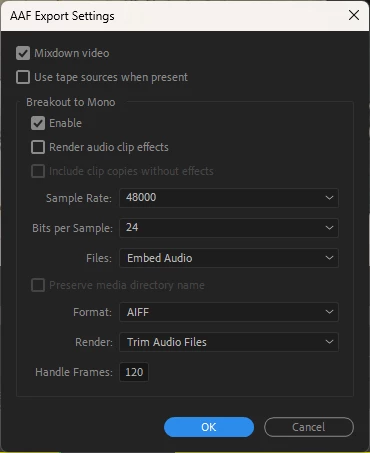
 

Steps: 


1. Export to AAF.

2. Select Settings as shown above. 

3. Export AAF mix to desktop

4. Check included .mxf file. 

5. Color correction from adjustement layer was not applied. 


Quirks:


Color that has been applied to a clip directly seems to work ok. 


Whenever I do a normal export of this project the color is applied without issue. 

This topic has been closed for replies.

4 replies

Scott.C.Author
Inspiring
June 23, 2023

I've had some other weird things where a scaled multicamera clip will go back to being unscaled and I've seen this in the flatten behavior as well. Some quirks in there for sure. 

R Neil Haugen
Legend
June 22, 2023

I replied in another thread.

Everyone's mileage always varies ...
tomtomdotcom
Participant
June 22, 2023

I'm experiencing the same or similar problem. It's a new problem for me. 

Project Type:

Personal Project

Color:

I started with basic color corrections in one adjustment layer in V2 (No LUT)

- When that was exporting with what appeared to be no corrections, I played around with various settings. I exported (H.264) with the following variations:

- Rec. 709/Main/High/High10, Rec. 2020/Main/High. No.

- Then I tried exporting ProRes format with Quicktime (422, then also 422 HQ). Still, no.

- Then I tried H.265. No, again.

- Last attempt: Applied color corrections directly (to V1 clip). Nope.

* It took 8 "failed" (uncorrected) exports before I decided there's a possibility that it's not user error.


I've been using Premiere Pro for several years. I certainly wouldn't claim to be an expert, but I've exported hundreds of videos. This is a new issue since the latest "update." I put that in quotations because I'm not sure if it was an update. What I do know is, I strangely had to re-download Premiere via Creative Cloud yesterday because the version I had refused to open. I was surprised to find the "Install" button next to Premiere in CC, because I always have it downloaded and I didn't uninstall it.


Footage:

2160x3840, Sony XAVC S 4K, 150mbps, 4:2:2, 10bit, 59.94fps

Timeline:

1080p, 59.94


Any suggestions would be greatly appreciated. Thank you

^ These are all the failed attempts at exporting with color corrections. All are differently formatted but feature the same out-of-camera picture profile.

Scott.C.Author
Inspiring
May 31, 2023

Ok super weird. I moved the adjustment layer down to V2, and it worked. Must have been just some really weird fluke?