Known Participant
October 26, 2018
Answered

Accelerated Renderer Error / LUT BUG STILL NOT FIXED

  • October 26, 2018
  • 2 replies
  • 12175 views

Hello,

Since updating to Version 2019 i get this error all the time and sometimes not all the time now:

Export Error Error compiling movie.  Accelerated Renderer Error  Unable to produce frame.  Writing with exporter: H.264 Writing to file: \\?\E:\Media\Masters\JL-102418-Mas.mp4 Writing file type: H264 Around timecode: 00;55;22;52 - 00;55;23;24 R

Pretty much making it unusable for me - i can't export any thing right now.

Next problem: Under Lumetri Look/LUT, the LUT bug has still not been fixed - how is this possible? Totally unacceptable in my opinion. You select your LUT in AME and you see the change in the preview window, but it still says: Applied NONE. And the LUT never gets applied to the exported file even though visually you see the change in the preview monitor. Very sad that this bug has not been fixed.

    This topic has been closed for replies.
    Correct answer R Neil Haugen

    sorry meant to write the minute "i" switched


    You might try using the Adobe CC Cleaner tool to uninstall/remove PrPro/Me 2019, then reboot, download/install them afresh.

    That is a rare issue with 2019, and shouldn't be happening.

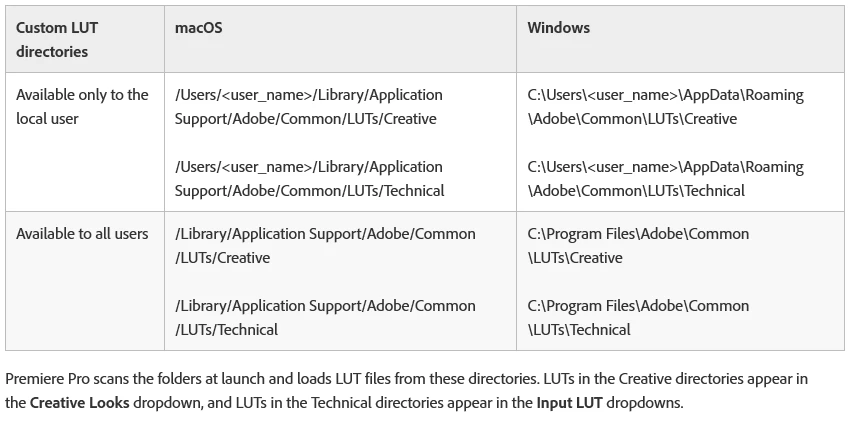
    Oh ... are you using the correct locations for you LUTs/Looks? Note: it's not clear, but you go to these locations and create the Technical and Creative folders yourself, then put your LUTs/Looks in them.

    Neil

    2 replies

    Known Participant
    November 16, 2019

    You are right... IT SHOULDN'T BE HAPPENING!!!!!!!!!!!!!!!!!!! Every update brings new issues and the clients have to suffer!!!!! Every solution is always, uninstall and start afresh! Maybe it's time for Adobe to UNINSTALL AND START AFRESH!

    R Neil Haugen
    Legend
    October 26, 2018

    I presume you have manually gone to the manufacturer's website for your graphics card and downloaded/installed the latest drivers. Often what is reported as "up to date" ... isn't. That's a likely possible issue here.

    Next, is this in a new project, or one brought forward from a 12.x (2018) build by simply opening it in the new version? This kind of thing is more likely with a project opened in a new build, rather than when you create a new project in the new version, then in Media browser, navigate to and select the previous version's project file, and import the assets of that project.

    Also, when you see such a specific time-code, that often means there is a problem with that sequence at that point in time. Going to that place and seeing what is going on ... maybe redoing the Lumetri or noting that some other effect is also in play there ... things like this can find the problems.

    As to the Me problem ... that's now working as expected for at least most users, I've not seen a single post on that about the 13.x/2019 version. It's working fine on my Win10 rig, just did a quick test ... yea, working as expected.

    So, check that your Me says CC 2019 at the top.

    Neil

    Everyone's mileage always varies ...
    Known Participant
    October 26, 2018

    Hi Neil,

    Thank you for your response. Yes, I have the latest drivers for my Nvidia GTX 1080 Ti card. New projects, brand new files, straight from the camera. Same computer, same setup, same everything... Also my Me (if by Me you mean Adobe Media Encoder) was definitely 2019 version... LUT may work for most users, definitely not for me. The minute is switched to the older version I had no issues at all.

    Thanks,

    Known Participant
    October 26, 2018

    sorry meant to write the minute "i" switched