alexanderp14232607
Participant
January 4, 2019
Answered

Add in and out points (set to 5 secons) at the same time

  • January 4, 2019
  • 2 replies
  • 1055 views

I am assistant editing a large project. As I am going through all the footage I am grabbing Selects to put in the time line. I don't need clean edits, just chucks of video. I figure I could save a lot of time with an "in and out" shortcut to quickly grab 5 seconds of video and drag it to the timeline. ANy suggestions or work arounds?

Thanks!
    This topic has been closed for replies.
    Correct answer Christian.Z

    Here's the first workaround that comes to mind:

    1- Create a black video, Insert it to timeline and trim it to 5 seconds (or required duration). Copy paste as many times as you need.
    2- Place your play-bar at the beginning. Use the Down arrow key to go to the next edit, use the M key to insert a marker (or whatever your shortcuts might be). When you finish inserting markers, delete all the black video from the timeline.

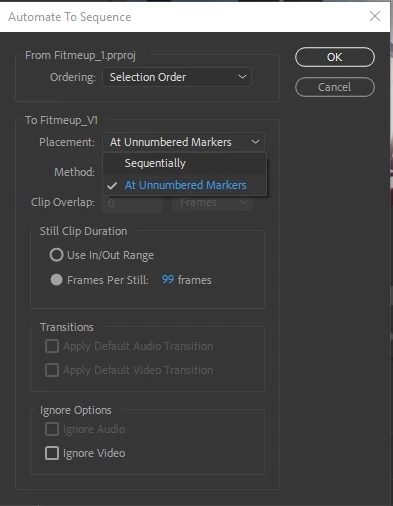
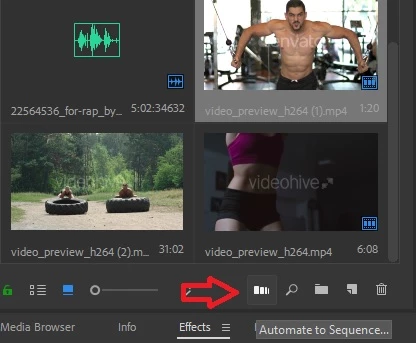
    3- Select your clips in the project panel, Click the "Automate to sequence" button, make sure that Placement is set to "At Unnumbered Markers" click OK.

    2 replies

    Christian.Z
    Community Expert
    Christian.ZCommunity ExpertCorrect answer
    Community Expert
    January 5, 2019

    Here's the first workaround that comes to mind:

    1- Create a black video, Insert it to timeline and trim it to 5 seconds (or required duration). Copy paste as many times as you need.
    2- Place your play-bar at the beginning. Use the Down arrow key to go to the next edit, use the M key to insert a marker (or whatever your shortcuts might be). When you finish inserting markers, delete all the black video from the timeline.

    3- Select your clips in the project panel, Click the "Automate to sequence" button, make sure that Placement is set to "At Unnumbered Markers" click OK.

    alexanderp14232607
    Participant
    January 5, 2019

    I appreciate the tip, thank you for your help!

    Christian.Z
    Community Expert
    Community Expert
    January 5, 2019

    Glad I could help!

    Mike Dziennik
    Community Expert
    Community Expert
    January 4, 2019

    You could set up some sort of macro using AutoHotKey which will Mark In > Go forward 5sec > Mark Out > Insert Edit.

    Alternatively you could add an In & Out 5secs apart to the source monitor and then drag that selection (by click-dragging the middle of the InOut selection) to your playhead before performing an Insert edit. Unfortunately you can't shift-snap this selection to the playhead in the source monitor.

    alexanderp14232607
    Participant
    January 5, 2019

    Thats  a great Idea, Thanks for the tip!