
Answered
Add partial solid color fill over video clip in Premiere
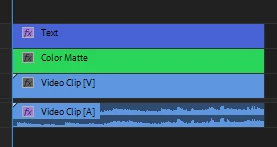
I can't seem to find a tutorial on how to do this using a color matte or any other technique. I need to cover about a third of the screen w/ background set to around 90% transparency to lay text over. I can use color mattes to create a background (for like a bumper at the end of a video) but I can't figure out how to layer it over the clip so I can lay text over it. Maybe this is something better done in After Effects? I'm just trying to keep this simple and haven't used AE in many, many years so if I can do it in Premiere, it's better.


 AdChoices