
Participant
March 12, 2020
Question

added regular text to a video frame and it shows up as bold when I play the video

  • March 12, 2020
  • 3 replies
  • 1911 views

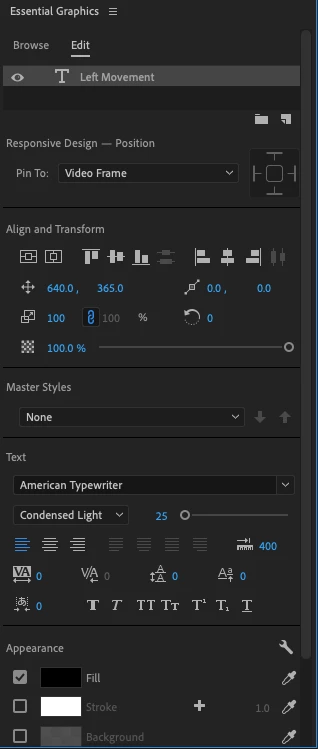
I'm trying to figure out how to keep regular text in a video frame and not have it bold when the video is played. As far as I know, I don't have any bold options selected and it shows up as regular text when the video is paused. I'm using Adobe Premiere Pro 2020. Below is a screenshot of the font settings. 
    This topic has been closed for replies.

    3 replies

    Participant
    November 16, 2024

    Just right on screen where the playback resolution there is a "Wrench" icon just click on it and then click High quality playback.

    Then it will solved.

    Participant
    February 14, 2022

    Same 😞 is there already a solution? 

    Alex Affonso
    Inspiring
    March 12, 2020

    Hi Tim,


    What's the playback resolution? You can check it under the Program monitor. If you have 1/2 or lower resolution during playback you'll see quite different text rendering while previewing due to quality degradation for real time preview. If you see the right text rendering when paused and it looks different when playing that's possibly the reason why.

    Tim Author
    Participant
    March 12, 2020

    Hi Alex


    I checked the playback resolution and I have it as full. If I change it to 1/2 or 1/4, the text rendering worsens. Below I have a few more screenshots of the text. The one on the left is when it's paused and the one on the right is while it's playing.

    Participant
    March 7, 2021

    This is my experience as well. Text in an exported project or playing back in a Full resolution preview is a step bolder than when it's not playing back. If I step down to a Light version of a font, it looks light until playback, when it looks regular. Tim's screenshot is spot on.


    I have the exact same issue !