

Iliya Kunin
Participant
February 18, 2022
Answered

Adding audio to video clip after it was dragged into the timeline without it

  • February 18, 2022
  • 2 replies
  • 1899 views

Hi everyone,


Sorry for a rookie question, but I am wondering if there is a way to add back audio to a clip that I originally dragged into the timeline as video only.


The audio is baked into the original .mp4 clip, I just decided that I want to use the original sound for some parts of the edit only after I finished everything else. I know that I technically can use the original clip and recut  it or take an audio from it and try to manually syncronize, but I am wondering whether there is a better way of going about it,


Thank you!
Correct answer Richard M Knight

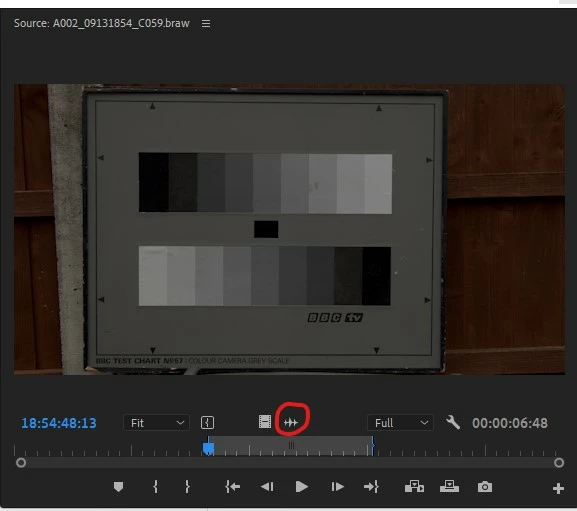
Select the clip and position the cursor at the start. Press 'F' to match frame. This will open the clip in the source monitor with the correct duration and with the start the same as your cursor position. Just drag the audio using the waveform icon to your A2


2 replies

Richard M KnightCommunity ExpertCorrect answer
Community Expert
February 18, 2022

Select the clip and position the cursor at the start. Press 'F' to match frame. This will open the clip in the source monitor with the correct duration and with the start the same as your cursor position. Just drag the audio using the waveform icon to your A2


Iliya Kunin
Participant
February 18, 2022

Thank you so much, I was worried that I will have to redo that manually!

Ann Bens
Community Expert
Community Expert
February 18, 2022

Select clip, hover over with playhead, hit F and original file will open in the source monitor on the same frame. Go from there.

Iliya Kunin
Participant
February 18, 2022

Thank you so much, it worked!