
Participant
December 29, 2021
Question

adding multiple motion effects on video

  • December 29, 2021
  • 3 replies
  • 1491 views

Hi there

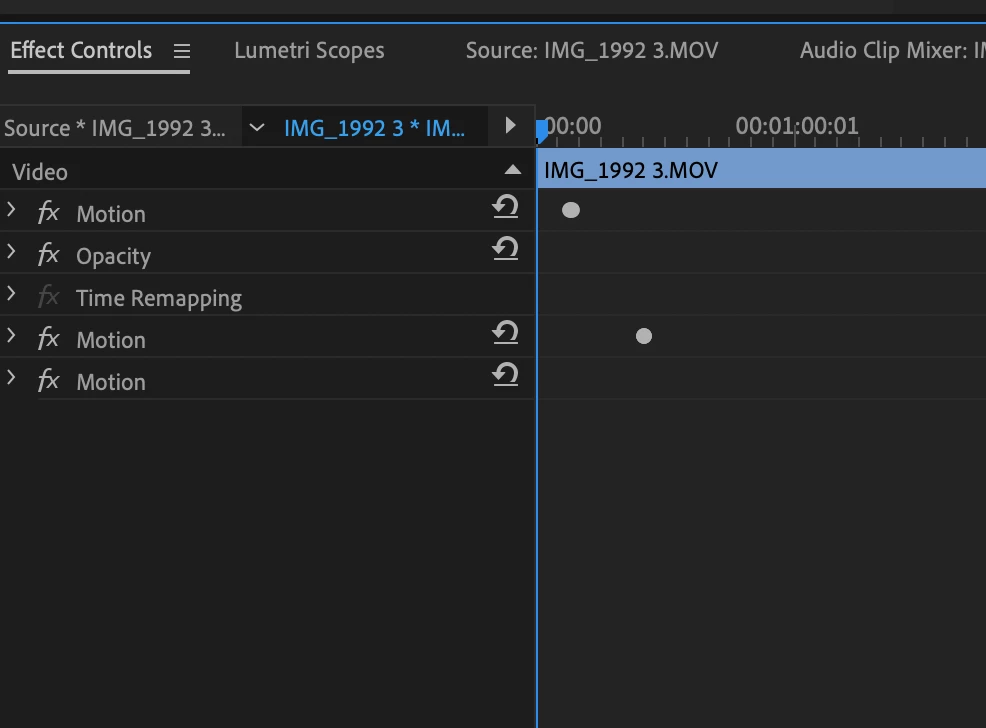
I'm trying to add multiple motion effects to a single video clip. Essentially, I'm creating a drumming video and I want to zoom into certain parts of the drum set throughout the clip. I created the zoom using the motion effect, but when I add in more than one motion effect, they end up cancelling each other out, and there is no zoom (even though the "scale" shows up at over 100%). I seem to only be able to zoom in once. Any advice on how to add multiple zooms throughout the clip?


I posted an image below - as you can see, there are multiple "motion" effects, but none of them are applying to clip


Thanks
This topic has been closed for replies.

3 replies

Christian.Z
Community Expert
Community Expert
December 30, 2021

rely on nesting

Peru Bob
Community Expert
Community Expert
December 29, 2021

Apply the motion effect, nest, apply another motion effect.

Or you just need to keyframe a single motion effect.

Community Expert
December 29, 2021

Usually you can't add more than one motion effect to a clip, I wonder how did you do it.

Are you using any third party presets? Have you tried to use the "transform" effect to achieve what you are looking for?

If you can, post an example of the type of animation you are looking for so we can suggest something that can help you to achieve it.