Correct answer MyerPj

Well, maybe the 'god of this world' (2 Corin 4:4), but not the god of the universe. (Psalm 83:18).

🙂

Try a new project, import in the clip, drop it into an empty timeline, then create the Adjustment layer and see what you get.

2 replies

MyerPj
Community Expert
Community Expert
April 26, 2025

Did you try creating a NEW adjustment layer, after you fixed the aspect ratio in Sequence Settings?

igor_4258Author
Participant
April 26, 2025

Yes, still doesnt work

I think god is going against my plans to become a video editor


MyerPj
Community Expert
MyerPjCommunity ExpertCorrect answer
Community Expert
April 26, 2025

Well, maybe the 'god of this world' (2 Corin 4:4), but not the god of the universe. (Psalm 83:18).

🙂

Try a new project, import in the clip, drop it into an empty timeline, then create the Adjustment layer and see what you get.

R Neil Haugen
Legend
April 26, 2025

Did you make the adjustment layer for that sequence? Premiere ALs are a sized thing, so they normally fit a sequence if you make them for and from that sequence.

Everyone's mileage always varies ...
igor_4258Author
Participant
April 26, 2025

I believe i have the sequence correct


Ann Bens
Community Expert
Community Expert
April 26, 2025

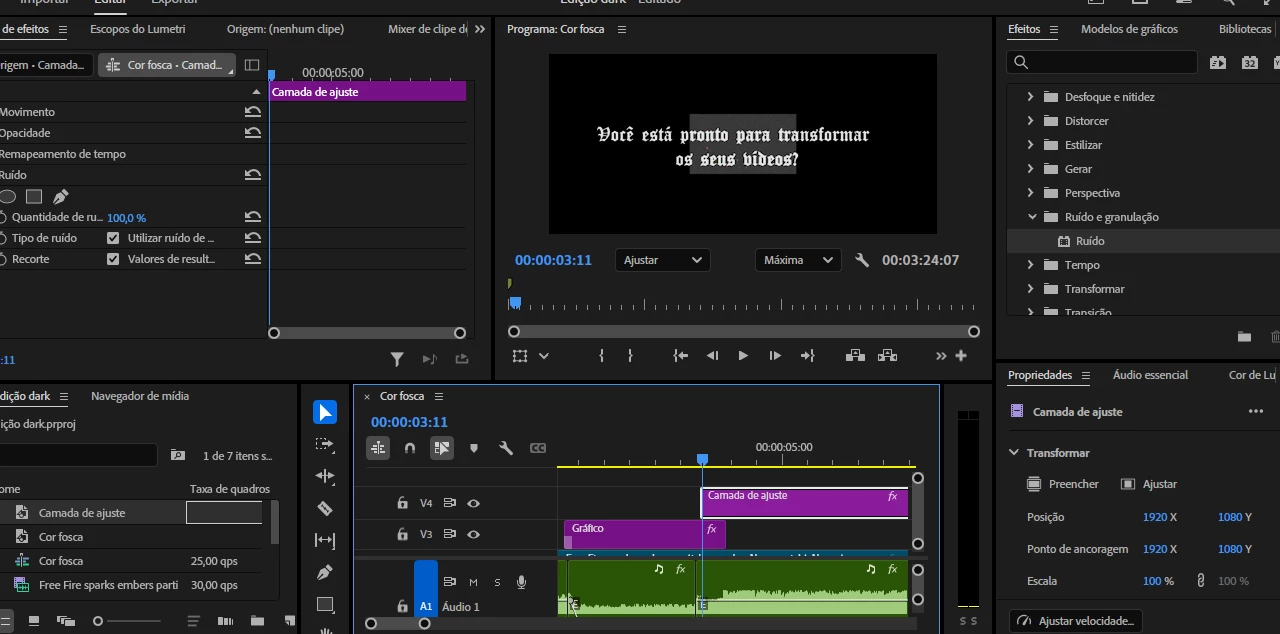
Your pixel aspect ration is incorrect: should read 1.0 and not D1/DV

You have an effect with a mask on the adjustment layer; hence the 'odd' size.