dianam8183404
Participant
April 28, 2017
Answered

Adobe Encore and Closed Captions

  • April 28, 2017
  • 1 reply
  • 2129 views

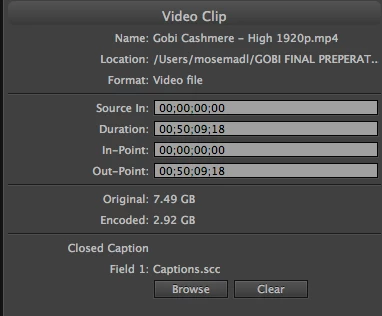
I used Movie Captioner to export a .scc file to add to a DVD project in Encore. I've attached a screen shot of the properties data once I've done this. After I build and burn the DVD I test it in iDVD Player with the captions on and they do not show.  Anyone know why?

This topic has been closed for replies.
Correct answer Stan Jones

Thanks Stan,

So if I export as a .m2v instead and import that to the timeline, it might behave itself? And yes the menu audio seems to work OK.


Perhaps...

The most reliable workflow is to export your asset as I described. You get an m2v and audio file (wav or a3c). I would create a new Encore project as a test, add one menu, then import "as timeline," selecting the 2 files. Is the video "do not transcode"? Then add the scc and see what you get. To test the scc, burn a test (rewritable) disk..

If that works, you can try to add it to your existing project, but Encore is not forgiving, and you may need to work in the new project and redo the menus.

1 reply

Stan Jones
Community Expert
Community Expert
April 29, 2017

Software players often get it wrong, so first test on a burned disk.

An mp4 is probably being re-transcoded in Encore, also suggested by the
"original" and "encoded" size. This should not effect captions, but it is not ideal. You want to see "do not transcode" in the project panel for that video file asset under the DVD Transcode Status column.

dianam8183404
Participant
May 1, 2017

Hi Stan,

Thanks for the reply. I don't have the option 'do not transcode'. I have the default setting 'untranscoded', the settings force you to pick a codec and all that stuff. So once you start building it transcodes anyway.

dianam8183404
Participant
May 3, 2017

Excellent! Always glad to contribute to the mental health of the editing community. lol.

Are you saying that the .scc is all good now? And if so, in the iDVD player?


Yes. the .scc finally works in iDVD Player. I had a weird thing happen. After I did the smaller test which worked, I tried it on the real project and still had issues. So I opened the captions again in Movie Captioner and even though there were the right number of captions with time codes, there was no text. Luckily I had exported the captions in several different formats so I imported one and exported again in .scc. I know Movie Captioner unexpectedly quit on me yesterday but I have no idea how that could have mucked up an exported file. Anyway, I don't care. I've got my finished DVDs in my hand and am doing my happy dance.