Participant
October 4, 2018
Resuelto

Adobe Encore CS5 "General Error"

  • October 4, 2018
  • 6 respuestas
  • 3179 visualizaciones

Hello Joined Hoping you guys can help me fix my problem I was creating a new dvd Menu for my family video i had it almost done i need Premiere Open to get some info off the Video so i open Both Programs at same time and it locked up Encore and Premiere Would not load so i closed both and open Premiere got info and went back to my Encore Project now every time i Go to Menu edit or anything to do with Libraries it get an Error "General Error"

I've Tried clearing Media Cache Database I also tried uninstalling all Adobe software and Reinstalling i Tried Deleting my Preferences files I also tried download new set of libraries still not matter what i do i get Error "General Error" I need to get this video done for family be end of this month hoping someone on here can help me get rid of this darn Error message

It was working just fine before i open both Premiere and Encore at same time i didnt know you wasn't able to do that i thought they both loaded there own Quicktime Server.

Anyways Thanks so much for any help you all can give

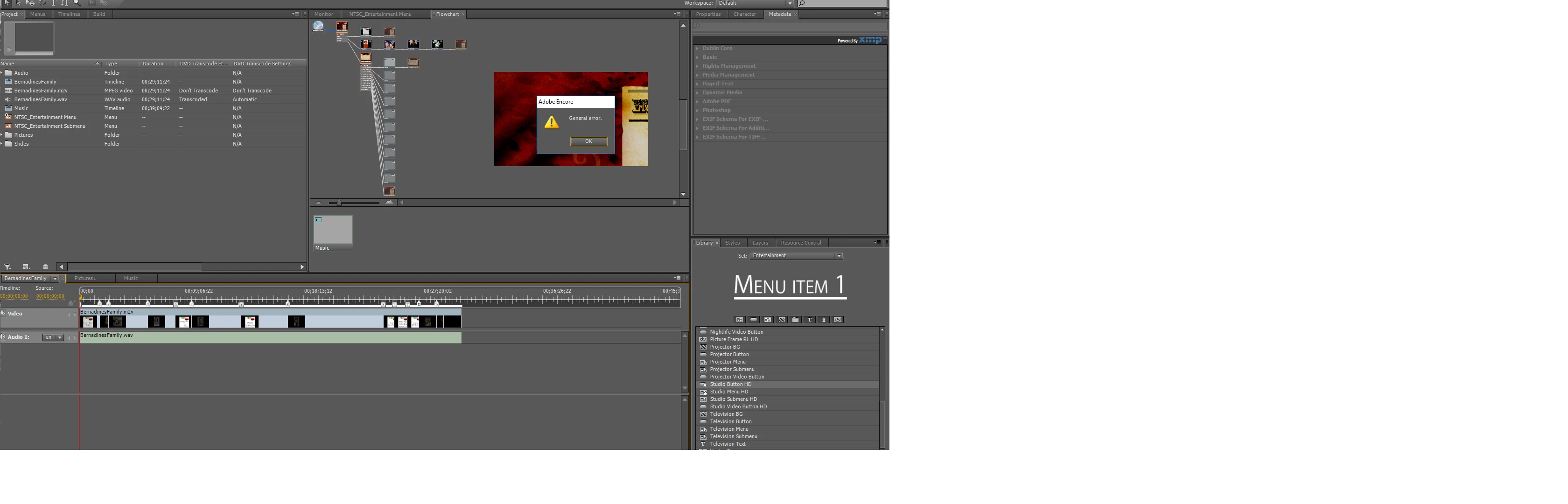
Here Flowcart and Error Message and My Project Layout if needed

P.S. i even tried open whole new project with none of my video files and clicked a Libraries Menu and same error message

If you need any more info Please let me know Thanks
Este tema ha sido cerrado para respuestas.
Mejor respuesta de Colm1960

I was getting this 'general error' after upgrading to Windows 10. I was also getting 'photoshop error -1'. I uninstalled Quicktime completely and the errors stopped. From what I understand Quicktime doesn't need to be installed for Premiere Pro CC 2019.

6 respuestas

Stan Jones
Community Expert
Community Expert
October 3, 2020

The next step would be exporting MPEG2-DVD from PR and not using dynamic link. You can look at the transcoded files from the DVD dynamic link version to see the datarate, or calculate the export settings.


Stan

Stan Jones
Community Expert
Community Expert
September 26, 2020

rricki,


Does Encore open? What operating system? If it opens, what version of Encore (look under help about)?


Stan

Participating Frequently
September 26, 2020

Hello Stan, 

Such awesme rapide response ! 


My system is Windows 10 64-bit English


My Encore (not CS5  but CS6) opens normally. 

My project IS ABLE to export  .img file of Blue-Ray Disc.  

I also want to do DVD version of the same. (No change in input data, DVD .img creation simply makes fine the size of whole disc and video quality to DVD disc export). 

Always there is "general error" occures at the end of the build procedure. 

When i create new "test" project,  DVD sample just exports fine.  

My tries:

- uninstall, restart and reinstall  Quicktime

- renamed all linked videos from Premiere Pro in Encore - if strange signs appeared (e.g.  "space" changed to "_") to have normal namestring

- renamed video sources in Premiere Pro in the same manner as in Encore (and link them back again)

- renamed Premiere pro filename (get rid of "spaces")

- cleared the Cache in Premiere Pro, and also in Encore


what can I do more ? 


Stan Jones
Community Expert
Community Expert
September 27, 2020

This error can have many causes. And you've done some good troubleshooting tests. It is better to use a separate project to create the BD and the DVD, but sometimes one project will work.


What specific Encore version? For Windows, the last update was 6.0.2.


Are you running Encore "as administrator"? (Set it to always run this way on Windows) Also, I found that I had to run Encore with compatibility set to Windows 7.


If you can export a BD .iso, can you burn a disk from that? You are good on the BD version?


> "...renamed all linked videos..."

Are you using dynamic link from PR CS6 to EN CS6? Renaming can have unintended results if not done correctly. Encore is not forgiving, and once a project is corrupt, it may require starting from scratch. You can keep the menus, but must redo all the linking.


Stan


Participant
October 31, 2019

Hi james82754709,

I am having the same problem as you did with the "Adobe Encore general error" when opening up a menu or adding a menu.

Do I need to uninstall Quicktime and reinstall?


Any help is appreciated.

Participating Frequently
September 26, 2020

Hello, Same problem here, 

Coudl someone help ?

Colm1960
Colm1960Respuesta
Inspiring
March 18, 2019

I was getting this 'general error' after upgrading to Windows 10. I was also getting 'photoshop error -1'. I uninstalled Quicktime completely and the errors stopped. From what I understand Quicktime doesn't need to be installed for Premiere Pro CC 2019.

Participant
October 12, 2018

Thank you guys for suggestion odd enough I figured it out when I used Encore option to edit in photoshop somehow that crash my photoshops ability to use the text option photoshop was not able to add or edit text anymore so I found that weird I looked it up online they had me remove preferences files i Can’t remember what exactly now i look up later and post for others but once I fixed photoshop ability to use and edit text then Encore started working again I am able to edit menus again without the error message

Stan Jones
Community Expert
Community Expert
October 12, 2018

Thanks for reporting.

Participant
October 10, 2018

I experienced the same issue after doing some system clean up. I ended up uninstalling and reinstalling quicktime. 

- Shut Down Encore

- Uninstall Quick TIme

- Download a fresh copy of Quick Time - in the event the installer already on your system is corrupt

- Install QuickTime

- Relaunch Encore

Stan Jones
Community Expert
Community Expert
October 10, 2018

I missed seeing the original post.

I don't see any .mov in the screenshot. QuickTime should not be needed. It may or may not throw the warning that QT is not installed.

Do you have a slideshow?