

Adobe Media Encoder Audio Settings / Premiere Audio Sequence settings
Setting up an offline / online workflow and need to batch transcode 4k footage with 4 mono channels to 1080 proxy with the same amount of channels so when I relink back to my 4k footage the audio will match exactly. There isn't a "same as source" button for audio so I could either do
1 stream --> 4 channels
or click mono and add 4 streams with source channels being 1-1 , 2-2 , 3-3 , 4-4...
other question: when I create my sequence setting in premiere, when I do "new sequence from source" it creates a sequence with audio info: stereo but there are 4 audio tracks on my timeline which seem correct. Do i want to manually go in and change the sequence settings to 4 mono or leave as is?
I did a test and my original footage says "4 channel mapped to 4 mono" + my proxy file says "4 mono." So when I created a 4k sequence with 4 channels, pasted my proxy file into the timeline, made the clip offline, reconnected back to my original footage, only one audio channel reconnected instead of all 4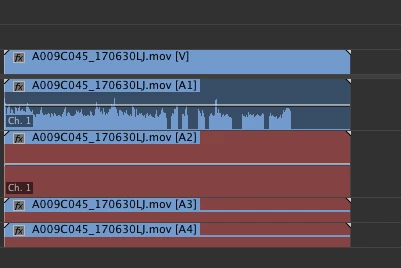 .
.
 AdChoices