
January 22, 2019
Question

Adobe Premier and Media Encoder crash randomly at rendering.

  • January 22, 2019
  • 2 replies
  • 1374 views

I'm triyng for many weeks to render a timeline. But it always crash randomly at different stage.

First I was using export to media encoder, but I tried at last resort to export directly from Adobe Premier CC.

It always crash randomly at different point on the timeline. So It's probably not related to an effect or a specific video. This is a mix of MXF 8bits/H264/H265 and After effect video. The video is at 3840x2160p5994 and the timeline is 120 minutes long. So it take around 60h to render on my computer. I export it on x265, CBR at 18mbps.

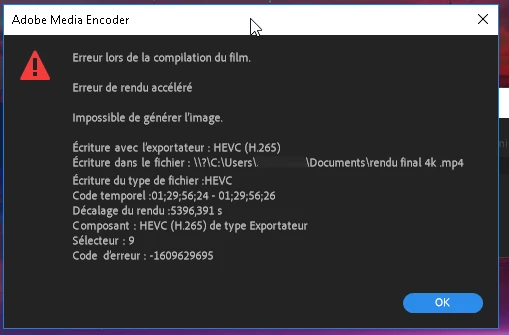
With Media Encoder I got no info about the crash... the software simply stop responding. On adobe Premier pro, I got an error code 1609629695. I'm curently trying a software export instead of mercury engin, but it say 200h for rendering, witch is not an option.

Someone would have clue on why I got problem.

I use a Lenovo Thinkstation P320 with 48gb of ram and a second SSD for all the video required for the project. I have the latest drivers for the system.
This topic has been closed for replies.

2 replies

January 30, 2019

I finally found that display driver nvlddmkm  is not responding (Control pannel / administrative tool / Event viewer, )  and it's why it crash. But this time I got no error message from adobe.. it just doesn't do nothing. I hit cancel and it bring me back to the rendering page, but if I close the page and try to replay the timeline I only get black screen. I need to close the software and it close without asking me to save.


Rendering the project in software appear to work, but it's not an option as it take way too much time. This is why we bought an expensive video card at first.

Christian.Z
Community Expert
Community Expert
January 31, 2019

nvlddmkm not responding is a video issue.

The cause might be faulty drivers, wrong voltage, conflicts, etc.

If you do a quick google search, you will find plenty of articles and posts that will help you solve this problem.

However, a most common solution is a CLEAN re-install if Nvidia driver.

February 3, 2019

I saw plenty of Adobe premier post in regards of drivers crash with NVIDIA. Has I already tried a burn in test with Furmark and done multitude 3dmark test with the card and the system I can conclude that the bug is not on hardware side. My best guest is that Adobe is not compatible with latest Nvidia drivers, but I can't find the right drivers witch was compatible... every test take me 2 day to execute... I'm already more than a month late on my project.

I already test 5 drivers, a clean install, setting the graphic card driver to 3D App - Visual Simulation, changing the power setting to maximum inside NVIDIA control panel without success. The only way it work is by CPU rendering witch take 200h to render instead of 24h.

Per FAQ this is where I should get the Adobe Crash log:

Graphic card crashes with Premiere Pro CC

But this folder is empty.

If someone could point me a driver they use successfully with a Quadro p2000 and Adobe premier cc 13.0 (Latest version) this would be appreciated.

Shivangi_Gupta
Community Manager
Community Manager
January 22, 2019

Hi lucb,

Sorry for your issue. I understand you are getting an error while exporting.

Please check this article: How to fix issues that cause errors when rendering or exporting

I hope it helps.

Thanks,

Shivangi

Christian.Z
Community Expert
Community Expert
January 23, 2019

check your "code temporel" is it the same every-time it crashes?

January 29, 2019

I had answered but for unknow reason I may have forgot to hit add reply.

It doesn't crash at the same place every time.  So i'm confident that this is not related to a specific video or specific effect.