
Known Participant
March 24, 2019
Answered

Adobe Premiere and Colour Gamut limited to BT.709

  • March 24, 2019
  • 20 replies
  • 21940 views

Is it true that if I import video footage shot in a wider colour gamut the BT.709 (such as S-Gamut, S-Gamut3 or S-Gamut3.Cine) , Adobe Premiere will clip the wider colour space to BT.709?
While doing some research I found that if I import footage into Adobe Premiere and drop it in a timeline and if I do any colour grading inside Premiere using the lumetri colour, the colour space will be reduced to BT.709. This made me worry because I shot footage with the Atomos Shogun Inferno and the Sony FS700R which allows to record Sony RAW. When recording I set the Gamut in the Atomos Shogun Inferno to S-Gamut. I know should had use a smaller colour space such S-Gamut3.Cine. But I used what was set by default in the Atomos Recorder. I was planing to do the editing and the colour grading in Premiere CC 2018. But then I read some people saying that if I do grading inside premiere, Adobe Premiere will convert the orignal  colour space to a reduced BT.709.

If this is true, Adobe Premiere is not recommended at all if you want to do colour grading for films that will be screened in theatres / cinemas. The wide colour space is clipped by premiere.
If so, doing colour grading in Adobe Premiere is not recommendable if one is working with footage that was recorded in colour spaces wider than BT.709. The only solution is to edit in Premiere but not apply any colour correction or grading and export the timeline in a XML format that can be used by a Professional Grading Software such as DaVinci Resolve. !
Is this true?


Thank you in advance
This topic has been closed for replies.
Correct answer R Neil Haugen

I just got a reply to my request for information from a color engineer for Premiere Pro, and permission to share ... so here's the full scoop on exporting HDR/wide-gamut from Premiere 2019 ...

Neil

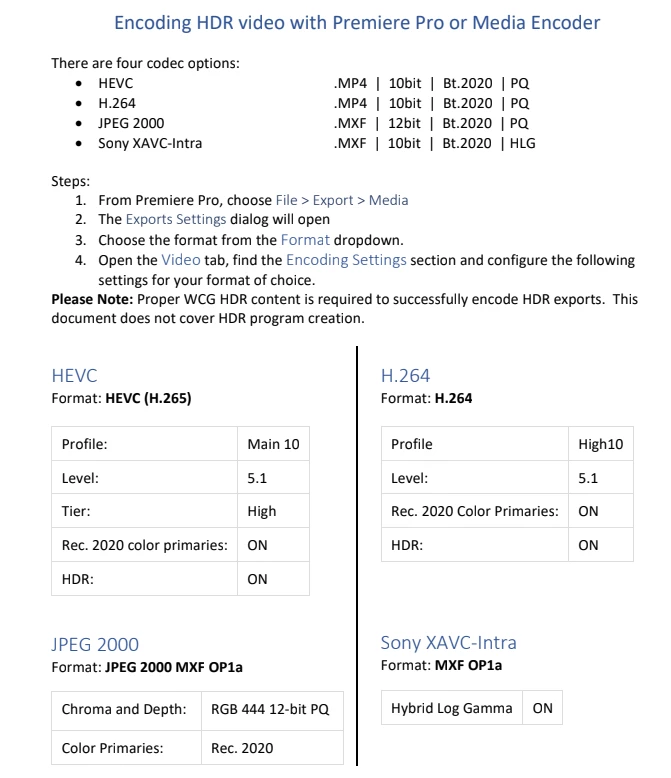
PPro currently is hard-wired to Rec709 – so everything needs to get converted into Rec709 at some point.  But we do this conversion in such a way that we retain the data that is outside the Rec709 gamut – we call this over-range 709.  Grading operations can recover this data, but upon export, detail outside the Rec709 gamut is definitely clipped.  The only way to retain wide gamut data is to choose an HDR output, but this only really suitable for HDR workflows.  I have attached a doc on encoding HDR.  I don’t know of a way to export P3 specifically.

20 replies

R Neil Haugen
Legend
June 25, 2020

Premiere can export to Rec.2020/2100 standards which are larger than P3, as they are designed for the HDR material. In a few format/preset/option settings, it can also use the P3D65 color space for exports.


Note, the P3 color space is a very different thing, not really connected with HDR. The two main uses are P3-DCI (Theater) and P3-D60 (ACES Cinema). It is of course in heavy current use for SDR media in theatrical release/projection use. In HDR for theatrical release, the color space is still the wider Rec.2020 one.


But there are a couple ways to get P3 from Premiere.


The JPEG 2000 MXF format allows you to select P3D65 color primaries. Select the format, then  the top option in the Preset box, then down below in "Chroma and Depth" select the PQ option. At that point you can select Color Primaries, take the P3D65 option. This process is the only one that doesn't seem to assume the export is an HDR file.


For the HDR exports, for example ... H.264 or H.265:

  • Format of H.264, H.265,
  • then select the Adobe Stock DCI preset
  • in the Video tab, select "Render at Maximum Depth"
  • High Dynamic Range
  • Include HDR10 metadata


Then another box below opens up, and you can select the primaries, Rec.709, P3D65, or Rec.2020. There are two boxes below for setting the min/max brightness that seem to assume of course that you are producing HDR ... which puzzles me. HDR by standards is Rec.2020, not P3. This is as shown in the pic below. 


Neil


Everyone's mileage always varies ...
Participant
June 26, 2020

Neil thanks for the quick response. I understand that HDR and P3 are very different. I am trying to master a DCI P3 for theater use out of Premiere. Our editor has to re-apply some speed ramps and other effects, hence why I would like to avoid having to master out or Resolve.


I did a test export using the settings in the first method you suggest jpeg2000 mfx - however when I bring it into resolve in P3 timeline it looks very flat. Any suggestions of what I could be doing wrong. Thanks! 

R Neil Haugen
Legend
June 26, 2020

That could be from a number of things, including various settings in Resolve. You might check what CM Resolve is applying to both that clip and the timeline it's on.


Neil

Everyone's mileage always varies ...
Participant
June 24, 2020

Hi Neil I was wondering if there have been any more developments/workflow for properly exporting a P3 out of Premiere?

Known Participant
March 31, 2019

Glad that this helps. Regarding the gamma for low light, you may also try cine2 and see which results better for you.
I asked myself the same question regarding sequence settings but I think you will be fine by just doing what you did. In my case I do not have ProRes presents for the sequences so I just work with "Custom".  But maybe someone else here knows the correct answer to your question.
Here is a video about that:
FAQ: How do I choose the right sequence settings?

Regarding the HDR workflow in Premiere, I am still digging on it so I do not have a response for you.

Known Participant
March 31, 2019

Meanwhile I found this:

"Create a sequence with uncompressed video playback

For the highest-quality previews of sequences on an SDI card or device connected to an external monitor, use one of the uncompressed formats for preview files. Uncompressed 8 bit (4:2:2 YUV) is suitable for projects meant for SD output, while Uncompressed 10 bit (4:2:2 YUV) is best for projects meant for HD. Also, with Uncompressed 10-bit (4:2:2 YUV) and high bit-depth color rendering Premiere Pro uses the color information in 10-bit assets and up samples other assets in a sequence to generate 10-bit preview files. Premiere Pro delivers the best preview performance when using these preview file formats on a system with a supported SD-SDI or HD-SDI card installed.

Both these uncompressed formats do subsample video files at 4:2:2 YUV. Unlike the other file formats available for preview files, they do not then run the video data through a compressor. They are called uncompressed because they do not add this second layer of compression. And hence retain much higher color depth in the previews than the compressed formats. Therefore, uncompressed preview files can be quite a bit larger than compressed preview files."

More info here:

Create and change sequences in Premiere Pro


Any way, I think you will be fine (if the footage is coming from Atomos recorder in ProRes) to define the sequence settings with the same characteristics of your source footage. And this will reduce the size of your previews which will be quite large if you use uncompressed video for the  previews. I think Quicktime ProRes 422 or ProRes HQ  will work just fine. But this is just me thinking. If you really want to make sure you get the best quality possible for the previews, then use uncompressed video. and make sure you assign fast and large capacity drive just for the  previews.

Participating Frequently
March 31, 2019

You guys are awesome. Thanks so much for your help.

Legend
March 29, 2019

I am probably confusing the issue...but in my opinion....as Neil said...

most exports will be rec 709 anyway, so staying with PPro is probably a good idea for you.

In my opinion, shoot your S log stuff or whatever you camera can give you for wide gamut stuff...which gives you more F stop latitude than shooting rec 709 right in the camera.

Adjust as you like in PPro ( to rec 709 space which is INHERENT in ppro program monitor ) so the S log stuff looks nice..

I may be wrong, but I think if you shoot the S log and stick it in PPro you'll have a more robust 'adjustment' available to you to get the blacks and whites and midtones ( lift gain gamma ) where you are happy.  More than likely, if you shot at the right color temp you won't have to adjust color that much.

Legend
March 27, 2019

I am happy to see such civil discourse !

I believe this statement by the engineer says it all, in favor of ZE observations....

==========

Grading operations can recover this data, but upon export, detail outside the Rec709 gamut is definitely clipped

++++++++++++++

R Neil Haugen
Legend
March 27, 2019

Data is clipped except for those formats listed in the above chart.

Neil

Everyone's mileage always varies ...
Participating Frequently
March 29, 2019

Hello all,

Please bear with me, I'm new at this stuff, and have nowhere near the level of knowledge displayed in this thread - so this question may seem silly.

I'm just an enthusiast, shooting S-Log 2 / S-Log 3 & S-Gamut and editing on Premiere. If I followed the thread correctly, should I switch to Resolve if I want to keep the initial colour information? Should I choose a Rec.709 colour space straight in camera? Or apply a S-Log to 709 LUT to begin with in Premiere before grading?

Thanks for your help

R Neil Haugen
R Neil HaugenCorrect answer
Legend
March 27, 2019

I just got a reply to my request for information from a color engineer for Premiere Pro, and permission to share ... so here's the full scoop on exporting HDR/wide-gamut from Premiere 2019 ...

Neil

PPro currently is hard-wired to Rec709 – so everything needs to get converted into Rec709 at some point.  But we do this conversion in such a way that we retain the data that is outside the Rec709 gamut – we call this over-range 709.  Grading operations can recover this data, but upon export, detail outside the Rec709 gamut is definitely clipped.  The only way to retain wide gamut data is to choose an HDR output, but this only really suitable for HDR workflows.  I have attached a doc on encoding HDR.  I don’t know of a way to export P3 specifically.

Everyone's mileage always varies ...
chrisw44157881
Inspiring
March 27, 2019

yea, i figured jpeg2000 would come into play a little bit, but you probably cannot ever enable the lut checkbox in lumetri. so wide gamut luts and 32bpc EXR's may still be a no-go. I do appreciate the post though.

also, the native jpeg2000 adobe version doesn't support lossless, only the fnord plugin does.

so the answer is probably yes, 1. If you don't use lumetri luts, 2. if you only export jpeg2000 PQ rec2020(or something more compressed), and 3. if you don't mind using lossy export codecs. This means that you cannot grade in rec. 2020 PQ? Then why bother exporting to it?

Legend
March 26, 2019

If necessary, if you need one,  the metabones adapters are really well made. I got one for the nikkor lenses I have and the one zeiss cine lens I have with Nikon mount.  Some of the stupid auto nikkor lenses don't have F stop rings, hence that adapter is different than the cine lens one. Probably won't need shims for your back focus no matter what lenses you have,

Legend
March 26, 2019

Jim, they are incredible energy hogs. get very warm pretty fast (wasted heat energy). get lots of batteries. I have 3 and 3 little chargers and the ac to dc adapter for inside type stuff. If I had 6 batteries it would be nice.  Just a heads up. Don't believe what they say about batteries lasting a long time. They go dead very fast ( like 10 minutes ? ), so I turn off camera every opportunity. I hear that in cold it's even worse.  Is still worth it though, in my opinion...  you'll like them. I have the older one ( not 4k ).

R Neil Haugen
Legend
March 26, 2019

Waiting on the new one myself ... sigh. Waiting, did I mention waiting?

Neil

Everyone's mileage always varies ...
Legend
March 25, 2019

I should mollify some of the adobe monitors, etc. by stating I still use CS6 sometimes.. but mostly use audition for some stuff ( like converting some stuff to WAV and basic volume adjustments before ingesting ) and bridge …

   Don't want adobe to think I don't love them.

Legend
March 25, 2019

Jim, do you use the aces workflow for full Hd , like for bmpcc raw cinema dng  type stuff ??  which will be exported to rec 709 anyway ?

Legend
March 25, 2019

At the moment, still HD and 709 for me.  (Damn Pocket 4K's aren't in stock at B&H.)