suvinthanm40869522
Participant
April 26, 2018
Answered

Adobe Premiere doesn't export entire video.

  • April 26, 2018
  • 6 replies
  • 72051 views

I am working on a project. The video is about 2 minutes long but when I export is on H.264 the final video is only about 33 seconds long. How can I fix this?

    This topic has been closed for replies.
    Correct answer jeffp68340199

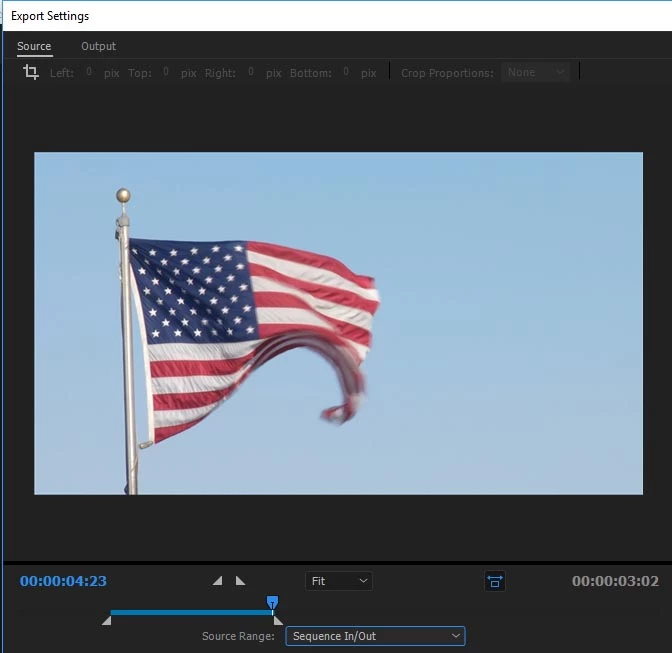
    Change Source Range at bottom left of Export panel to Entire Sequence. That is most likely the issue, may be set to export only part of your sequence.

    6 replies

    Kevin-Monahan
    Community Manager
    Community Manager
    July 12, 2022

    Hi Wherwolf12345,

    Sorry about that. Can you try setting Range to Entire Source? See if that works for you. Report back and let us know what happens.


    Thanks,
    Kevin

    Kevin Monahan - Sr. Community and Engagement Strategist – Adobe Pro Video and Audio
    Participant
    November 29, 2022

    I am just running into the same problem and have tried ALL the remedies posted but nothing works.

    Was there a remedy?

    my video is about a minute long and this is the second one that won't export. Cuts off about 2 seconds before the end.

    Kevin-Monahan
    Community Manager
    Community Manager
    November 29, 2022

    vlewis,

    Sorry. Can you show us a screenshot of the Export mode?


    Thanks,
    Kevin

    Kevin Monahan - Sr. Community and Engagement Strategist – Adobe Pro Video and Audio
    Participant
    June 26, 2022

    They just updated so if someone can give a update of how to do it now that will be great.

    Participant
    July 11, 2022

    I'm having the same issue! If anyone knows how to fix this now please let me know.


    Participant
    July 11, 2022

    I had the same issue. However, I have been trying to export to my nearly full drive. When I wrote to a drive with more space it worked. Guess I have to clear some space in my working drive. 

    markc41708285
    Participant
    February 27, 2021

    This is a bit after the initial question, but the Correct Answer is the correct answer. The solution is obvious after you see it. Many, many thanks to Jeff. From problem to solution in just a few minutes - magic.

    Participant
    April 21, 2020

    Hey, im having the same problem to... i have tried everything and nothing is working, i export my project and it finishes but it only has exported 1/3 of the video. Any Fixes? Please reply 

    Participant
    June 3, 2020

    Hey, I maybe know why. Make sure you don't select any of the clips and put your preview timeline to the start. Then try export media. See if this work! Reply me if it works or not!

    Participant
    June 3, 2020

    Some one know why i can't hae the preview export window in the export media window?

    jeffp68340199Correct answer
    Participating Frequently
    May 16, 2018

    Change Source Range at bottom left of Export panel to Entire Sequence. That is most likely the issue, may be set to export only part of your sequence.

    Suspended Moments
    Participating Frequently
    November 14, 2021

    PERFECT!!! That's exactly what my issue was and you were spot on with the fix. thank you!

    PECourtejoie
    Community Expert
    Community Expert
    May 16, 2018

    Hello, how are you exporting your video?

    Can you post a screenshot of your export settings?