
October 12, 2010
Answered

Adobe Premiere.exe - Entry Point Not Found

  • October 12, 2010
  • 3 replies
  • 36480 views

Hi folks,

i got a big(?) problem with adobe premiere cs5. i just won't start. I always get the error message:

Adobe Premiere.exe - Entry Point Not Found

Here is a screenshot. It is in german so here is a quick translation of the words:

"Einsprungspunkt nicht gefunden" is "Entry Point Not Found"

"nicht gefunden" is " not found"

second error message:

"Die angegebene Prozedur wurde nicht gefunden" is " the declared procedure was not found"
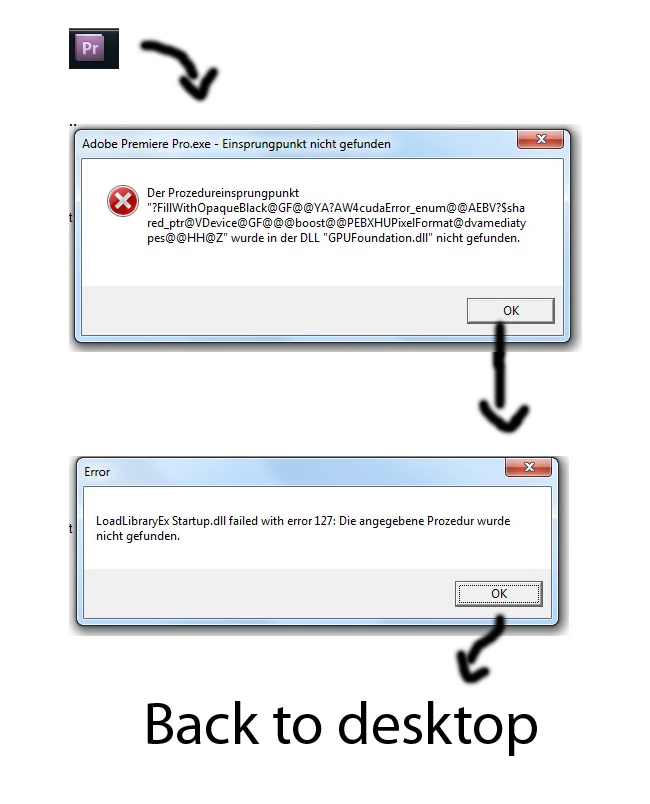
Thanks so much guys.

My system:

AMD Phenom Quad-Core

nvidia 9800gtx

windows 7 ultimate

8gb ram

Resolution: 1920*1080

Cheers

Jan

    This topic has been closed for replies.
    Correct answer Giorgio1957

    Deleted everything, ran the script a couple of times...ran some

    other registry cleaner... reinstalled everything... AND I GET THE SAME

    DAMN ERROR MESSAGE.... AHHHHHHHHHH.


    Awright guys I give up for now, thank you a lot for your ideas. I hope adobe comes up with a solution.

    Cheers Jan


    Hi Jan,

    -to get a little step forward I suggest to take a look at the "Event Viewer".

    To reach it:

    Control Panel\Administration Tools\Event Viewer.

    Here you can find more info 'bout your bug.

    Sometimes very useful infos.

    Hope Event Viewer will be more accurate.

    P.S.: "Event Viewer" and "Administration Tools" are translated by myself from an Italian Win7 O.S.

    Let know

    -Your error windows says GPUFoundation.dll not found:

    do you have it in Premiere folder?

    Should be a 204Kb .dll file.

    -Is your suite a downloaded one (ESD) or retailed (DVD)?

    As long as I know, in ESD Adobe software, Library is separately downloadable.

    -Is it your first try in opening Premiere application or did it run before and this has happened afterwards?

    Anyway, have you taken a look of this?

    http://blogs.adobe.com/premiereprotraining/2010/09/premiere-pro-cs5-5-0-2-update.html

    Ciao,

    Giorgio

    3 replies

    Participant
    November 17, 2020


    When i run my adobe permier pro cc programe than it show the pop up window please help me to slove this problem .

    Participant
    January 17, 2015

    i request to past amtlib.dll file from

    C:\Program Files\Adobe\Adobe Media Encoder CC 2014

    To

    C:\Program Files\Adobe\Adobe Premiere Pro CC 2014

    then its working

    Participant
    October 12, 2010

    This is a little shot in the dark, but did you enable the "GPU hack"?

    From the first error, it seems like it reacts to CUDA.

    If you did enable the cuda hack, remove it and see if that works.

    If you didn't, I'd update the graphics drivers.

    October 12, 2010

    Hi,

    I have no idea what a cuda or GPU hack is, so I think I did not do such thing.

    My graphic drivers are the newest they have. So it must be something else.

    Thanx for the responds though.

    Cheers

    October 12, 2010

    Yes, unfortunately, the best approach is to uninstall everything, even if you're only having a problem with one application. Due to the way the applications work together, just trying to uninstall and repair one program can lead to the others not working correctly, and then you'll end up having to reinstall everything, anyway--so it's just smarter to do it from the get-go.

    The download links work for me...?


    Deleted everything, ran the script a couple of times...ran some

    other registry cleaner... reinstalled everything... AND I GET THE SAME

    DAMN ERROR MESSAGE.... AHHHHHHHHHH.


    Awright guys I give up for now, thank you a lot for your ideas. I hope adobe comes up with a solution.

    Cheers Jan