Participant
May 19, 2020
Question

Adobe Premiere Export Times Very Slow and CPU Usage Very High

  • May 19, 2020
  • 2 replies
  • 1355 views

Hi, 


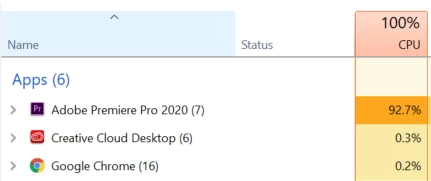
I would really appreciate some help. I've been having trouble with high CPU usage--it seems back in 2015 there was an issue that Adobe fixed.


However, on May 19th, 2020, I am still having the problem. I included a bunch of screenshots below to help give you context. Essentially all CPU power is going toward Premiere--but everything is super slow, and exporting says it will take 13hrs---making it impossible to use, even when I reduce the playback resolution etc. 


Sequence Settings: 
1920 x 1080
00;44;11;05, 25.00 fps
32000 Hz - Stereo

This topic has been closed for replies.

2 replies

Community Expert
May 19, 2020

Current updates are changing to better utilize the GPU (pretty much as of today), but encoding/decoding has largely been a CPU-intensive process, so it's normal to see high utilization of your CPU.


The types of effects that you're using on your footage are also going to have a large impact.


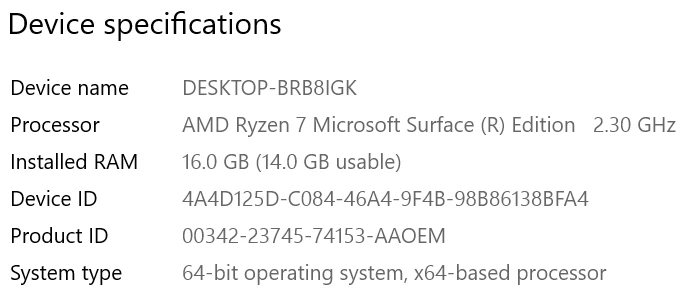
I'm also going to assume that the hardware you're using isn't going to be great for video editing, but others can speak to that better than I can.

mhh1234Author
Participant
May 19, 2020

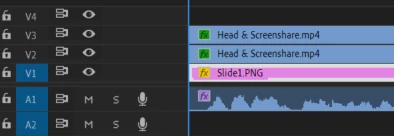
It is interesting because I wasn't having trouble with it last week. And the CPU is that high even when I'm not encoding. What types of edits cause more issues? I have a PNG with two videos layered on top one is a person's head and the other video are the shared slides (both taken from Zoom). I haven't had issues in the past but I am wondering what having multiple video tracks would do?

Community Expert
May 20, 2020

The type of media you work with has a large impact even aside from effects, and using multiple streams of media will increase the load on your CPU.


If you're working with zoom recordings those are almost certainly h264, which is an interframe codec, meaning that in order for your computer to play a single frame it has to decode many frames on either side of it (versus an intraframe codec which works the way you would think, where 1 frame = 1 frame. Higher file sizes but easier for your computer to decode.) You have multiple streams of h264 that you're trying to play at once - and playback = decoding = CPU.


If you want to lighten the load on the CPU can either make proxies or transcode the media to an intermediate codec before working with it. Those zoom recordings have an abysmal bitrate, so unfortunately even your lowest bitrate intraframe codec (DNxHD36 or ProRes Proxy are both 36Mbps) are going to be way larger than the originals. If playback was a serious hindrance to what you are trying to do, I would still do that. If you made proxies you could just delete them when you were done.

mhh1234Author
Participant
May 19, 2020

In case helpful, here are the output and source settings.