Participant
November 16, 2022
Answered

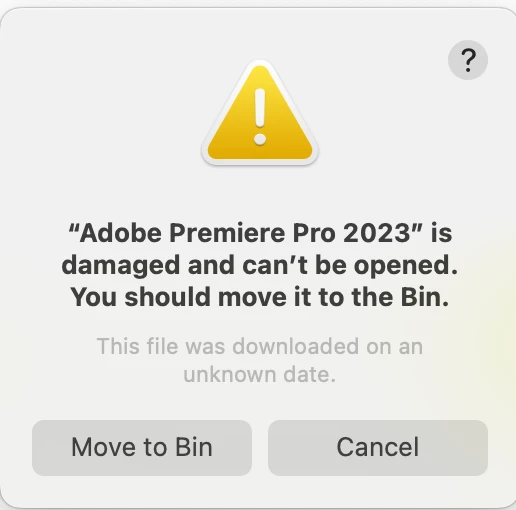
“Adobe Premiere Pro 2023” is damaged and can't be opened

  • November 16, 2022
  • 12 replies
  • 38608 views

Hello,


I'm trying to open Premiere Pro 2023 from the Creative Cloud but I'm just getting the following message:


Does anyone have any insights on what to do? I can't even move it to the bin as it tells me I have to manually move it to the bin,


Help!

Correct answer GFX5D67

Hi GFXD67,
I see your message and it sounds like the steps given earlier did not work for you. Is that right? If so, try the following. 


  1. Open the Apple menu > System Settings.
  2. Select Privacy & Security > Developer Tools.
  3. Click the ( + ) button and navigate to the folder where the damaged app resides.
  4. Select the app and click Open.

Is that working for you? Please let us know. It could help others. Sorry for the frustration.


Thanks,
Kevin


Thanks for the reply. Unfortunately I didn't see this message in time and so cannot test it, but I did manage to solve the issue after seeing from a web search a page that said that the message doesn't mean the the app is actually damaged and could be a security issue.


So I went to Privacy & Security and I found there one of those messages you get when installing certain software about something being blocked from doing something to the system and you need to manually go into System Settings to allow it. (Either 'system extension blocked...' or '[app] was blocked from use because it is not from an identified developer').


Either the message didn't appear when I first installed Premiere or it was hidden behind some other window (or perhaps hidden by Stage Manager in Ventura?), but either way I didn't see it. After now clicking on the option to allow whatever it was (and probably restarting my mac), Premiere 2023 is working again. So I could have done all this without any uninstall/reinstall process it seems. I certainly think that this guidance should be given  in troubleshooting FAQs if it isn't already, and if the error message was about Ventura thinking PP is not from an identified developer then that should be looked into.

12 replies

Mohammad Aamir Khan
Adobe Employee
Adobe Employee
January 14, 2025

Easy Fix - Allow it from Security TAB
"Open Anyway" Need to be clicked from Security tab when this Error Appearted and relaunch app after allowing it

Thanks
Aamir Khan

Participant
September 9, 2024

Its simple, before you go into uninstalling everything, head over to Privacy and Security, scroll to the bottom where it tells you some apps were blocked, and allow Premire Pro. It works.

Participant
January 17, 2024

Hatte das gleiche Problem unter MacOs 13.7 Ventura mit der Premiere Pro 2024.1

Nachdem ich mit dem CSCleanerTool alles runtergeschmissen habe konnte ich Premiere 2024.1 neu installieren.

Jetzt läufts.

LG - Nico 

Participant
November 10, 2023

The answer for me is found in GFX5D67 reply. All i needed to do was to go into settings > Prvacy & Security and allow Premiere pro to "open anyway".


Participant
November 2, 2023

After attempting to launch the app, go to System Preference / Privacy & Security / there should be a messege there saying the app was blocked from opening and you can select open anyways...

Participant
October 17, 2023

Go to Settings > Privacy & Security and scroll to security;


Participant
September 23, 2024

This solved it for me.

Participant
July 14, 2023

Problem mit AdobeCreativeCloudCleanerTool gelöst

Clean up Selected

Participant
May 17, 2023

Tried everything on this list, including installing/uninstalling, and checking to make sure all permissions were granted in privacy and security.. Ultimately, the thing that got the app to open was going to Finder, right-clicking on the app, and selecting 'open'. When it went to open, a message popped up saying something about the developer not being verified, etc. Just clicked 'open' again and it worked. 

kglad
Community Expert
Community Expert
May 17, 2023

@msg_ 


that was your mac's security feature blocking it from opening.

Participant
May 15, 2023

Urgente!!!! Premiere dejó de funcionar y al reinstalarlo da mensaje de error!!! Tengo un MacBook Pro con Ventura 13.3.1

Kevin-Monahan
Community Manager
Community Manager
June 2, 2023

Please post a screenshot of the error, @Olman-CL. That would be very helpful to the troubleshooting process.


Thanks,
Kevin

Kevin Monahan - Sr. Community & Engagement Strategist – Pro Video and Audio
Participant
January 15, 2023

I just ran into the same issue. For me the following steps worked:


1. Uninstall Pr and Media Encoder via Creative Cloud App

2. Remove these 2 folders/programms from finder (if still there)

3. Restart system

4. Install older version of Pr (different versions could be picked via the 3 dots next to the "install-button")

5. check if Pr is now running

6. if step 5 was successfull, update to newest version


Hope this works for you guys too 🙂

Participant
April 28, 2023

I can run PP 2022 but not 2023. Have tried uninstalling everything and using the Adobce remove tools described above.

Kevin-Monahan
Community Manager
Community Manager
April 28, 2023

Hi GFXD67,
I see your message and it sounds like the steps given earlier did not work for you. Is that right? If so, try the following. 


  1. Open the Apple menu > System Settings.
  2. Select Privacy & Security > Developer Tools.
  3. Click the ( + ) button and navigate to the folder where the damaged app resides.
  4. Select the app and click Open.

Is that working for you? Please let us know. It could help others. Sorry for the frustration.


Thanks,
Kevin

Kevin Monahan - Sr. Community & Engagement Strategist – Pro Video and Audio