Known Participant
January 25, 2026
Answered

Adobe Premiere Pro 2026

  • January 25, 2026
  • 1 reply
  • 309 views

Hi just the Premiere Pro 2026 is I don't know but can you fix it or resolve the issue today or on Monday please ? please see the attachment below can you fix it or resolve the issue today or on Monday ? Thank you Kevin

876590iAC4556555B50B306.jpg


Correct answer Averdahl

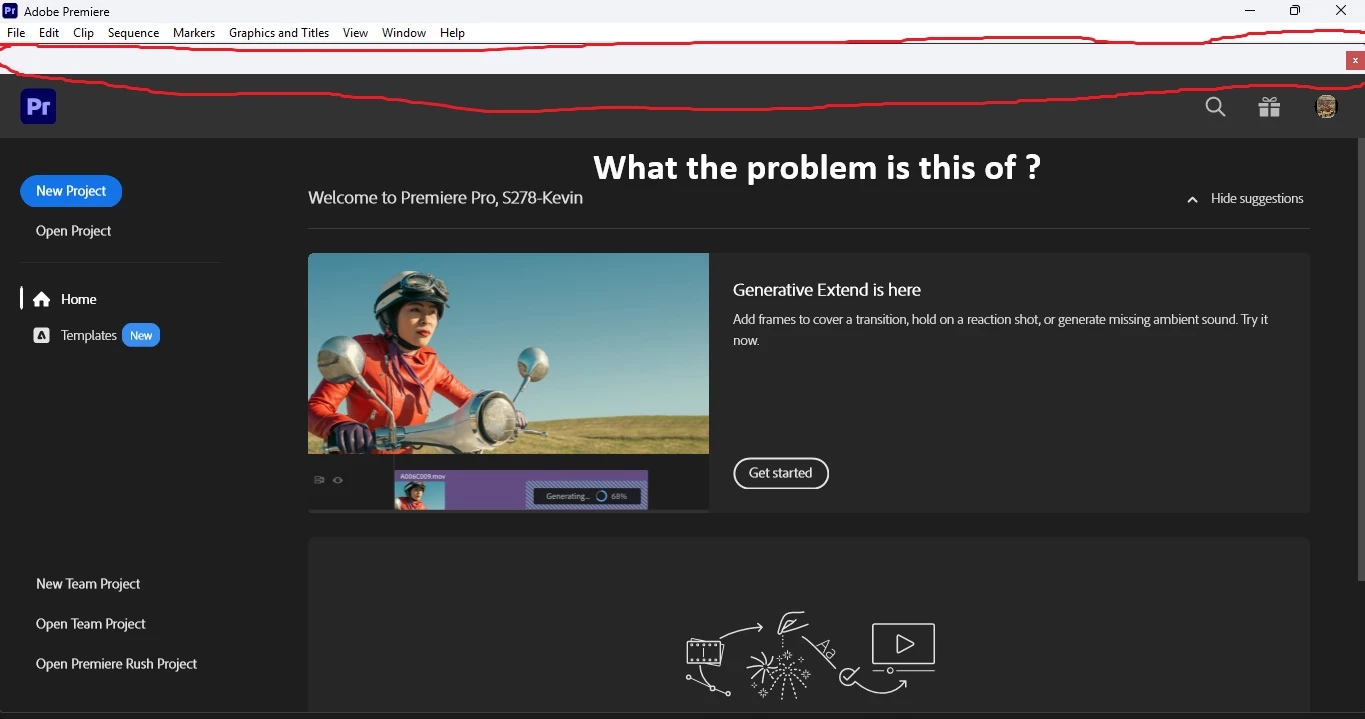
Hi but that not my problem my problem is different but there is a blank white with red x on it but I don't know what it could be have an issue that will take more troubleshooting can you find the way to fix this.

Thanks KevinAdobe Premiere Pro Check.jpg


It has been there for several versions of Premiere Pro so there is nothing to troubleshoot, it should be there. If you click on the red X it will simply close the "start screen" with all your recent projects and leave you with a black screen with only the top left.


What is the actual problem you have with it? 


...there is a blank white with red x on it


By @Sammy Red the Betta Fish

1 reply

Known Participant
January 25, 2026
Adobe_Premiere_Pro_Check.jpg
Sammy the Red the Betta fish
Known Participant
January 25, 2026

Hi just the Premiere Pro 2026 is I don't know but can you fix it or resolve the issue today or on Monday please ? please see the attachment below can you fix it or resolve the issue today or on Monday ? Thank you Kevin876591i7FEC8C5300652C43.jpg

Sammy the Red the Betta fish
R Neil Haugen
Legend
January 25, 2026

Close Premiere, relaunch while holding the Shift key down, and select the option to dump all cache files, see if that helps.


If not, then next, use the CC Desktop app to uninstall Premiere, reboot, then reinstall Premiere from the CC app.

Everyone's mileage always varies ...