
Participant
June 24, 2019
Answered

Adobe Premiere Pro doesn't use GPU when playback a project. How can I fix it?

  • June 24, 2019
  • 5 replies
  • 7445 views

Hi there,

I have a problem with the Adobe Premiere Pro. When I playback a project, my CPU use about 90% - 100% resources, but my GPU use 0% - 3% resources. It's strange I guess.
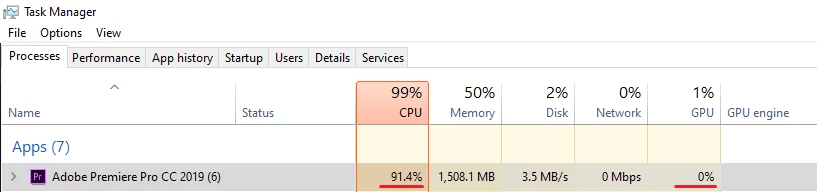
In the settings (Premiere Pro) I have use the Mercury Playback Engine GPU Acceleration(CUDA).

My PC:

  • Adobe Premiere Pro 13.1.2
  • Windows 10 Home (1903), 64
  • CPU Intel Core i5-7400 3.00GHz
  • RAM 16 GB
  • GPU NVidia GTX-660 (2GB)

P.S. I know about proxy and other optimisations.

This topic has been closed for replies.
Correct answer R Neil Haugen

The 660's are too old to be of any use in the 13.x and on Premiere versions.

Also,the GPU is used for things on the GPU Accelerated Effects List such as Warp Stabilizer and Lumetri color. Major resizing. So it doesn't always work as much as people frequently think.

Neil

5 replies

Participating Frequently
October 16, 2022

I have been suffering this same issue now for over 5 months we built 3 editing computers to attempt to find a solution and yet the issues continue I know this is not what you want to hear, BUT after 10 years of using adobe I am now downloading DaVinci Resolve which has far greater balance of CPU / GPU. Forget all the nonsense about updating drivers or changing hardware because its pointless.


Paying a subscription for broken software at this point, full of bugs, crashes, random errors and BSOD. sorry for the rant but its the truth. maybe lower resolution video works best but I edit 4k Videos and its a nightmare even with top end PC's.


To really answer your question, the truth is that adobe has a terrible balance between GPU and CPU usage so I'm trying to save you from the same rabbit hole I wasted time on.

R Neil Haugen
Legend
October 17, 2022

Jeremy,


Something rather common among computer users is the assumption that everyone is having the problem they are. Doesn't matter the app, profession, whatever ... that's pretty common and very 'human'.


However 'human' it may be, there's several million users daily in Premiere that aren't getting that problem as you've described it. For instance, on both my Acer intel-based laptop with a 2080Ti (laptop version, of course) and my 24-core Ryzen 3960X CPU, 128GB/RAM with a full 2080Ti, I get heavy use of the GPU when GPU effects are involved.


As do a lot of others I know.


And yes, it's very frustrating that your situation hasn't been good. And might be very wise to switch to Resolve, the Studio (paid) version, an app I use daily myself. Though I don't enjoy it. And truthfully, it doesn't run any better on my desktop than Premiere, and runs horribly on my Acer laptop. Which runs Premiere 2022 just fine.


But everyone's mileage always varies.


And these apps are simply tools ... fancy hammers. So use the tool what works for getting your work out to your clients. Whether Pr, Resolve, Avid, whatever.


You gotta get the work out.


Neil

Everyone's mileage always varies ...
Participating Frequently
October 17, 2022

I understand what you mean, but I just ran the same test on Adobe premiere & Davinci Resolve. it took adobe 22 MINUTES to render an edit with 4K clips/background blur & font, while Davinci Resolve took 14 SECONDS to render, I mean if that's not crazy then I don't know what is.


I love adobe and all its features but its just not running well on any system I buy, I keep having hope with every update that they will fix certain issues but it never happens, just seems to be getting worse. for example Davinci has a Live save feature that no matter if the program crashes or you accidentally close it, it always opens back up where you left off.


And the "render in place feature" is absolutley crazy, you can render your edit and decompose it if you want to make changes to it later, its simple quality of life features that adobe is seriously lacking.


I don't want to start a debate or anything, I guess some people might not have any issues like you say but good luck editing 4K its a pain on adobe.


Thanks for the replies tho I really appreciate it.


Participant
June 24, 2019

Thank you all.

I fixed my problem with playback. I just updated the video card from Adobe’s recommended list:

Adobe Premiere Pro System Requirements

  • NVIDIA GeForce GTX 1070

Averdahl
Community Expert
Community Expert
June 24, 2019

When I playback a project, my CPU use about 90% - 100% resources, but my GPU use 0% - 3% resources. It's strange I guess.

Read this post about what to expect: Mercury, CUDA, and what it all means

Legend
June 24, 2019

Couple things.

First, the Task Manager isn't a reliable method of determining GPU usage in Premiere Pro.

Second, if CUDA is turned on in the Project Settings, then the GPU is being used where it can.

R Neil Haugen
R Neil HaugenCorrect answer
Legend
June 24, 2019

The 660's are too old to be of any use in the 13.x and on Premiere versions.

Also,the GPU is used for things on the GPU Accelerated Effects List such as Warp Stabilizer and Lumetri color. Major resizing. So it doesn't always work as much as people frequently think.

Neil

Everyone's mileage always varies ...
Participant
June 24, 2019

Thanks for an answer.

I know about my GPU. It's old. I was looking the new grahic card, but my Task Manager says what GPU doesn't use resourses. And I asked the question here. 

I going to upgrade my PC, but I don't know what I need for comfort working with Premiere Pro: GPU or CPU?

R Neil Haugen
Legend
June 24, 2019

The CPU/RAM/motherboard setup is the central part of all Premiere processing. GPU and SSD drives on fast connections then support the CPU/RAM/mobo central system.

Neil

Everyone's mileage always varies ...