
maryr34816705
Known Participant
September 14, 2020
Answered

AE composition black in Premiere Pro 2020

  • September 14, 2020
  • 3 replies
  • 735 views

I am having trouble with the dyanmic link in Premiere Pro. I have an AE composition imported into Premiere Pro, but it only shows up as a black screen. Here is a screen shot
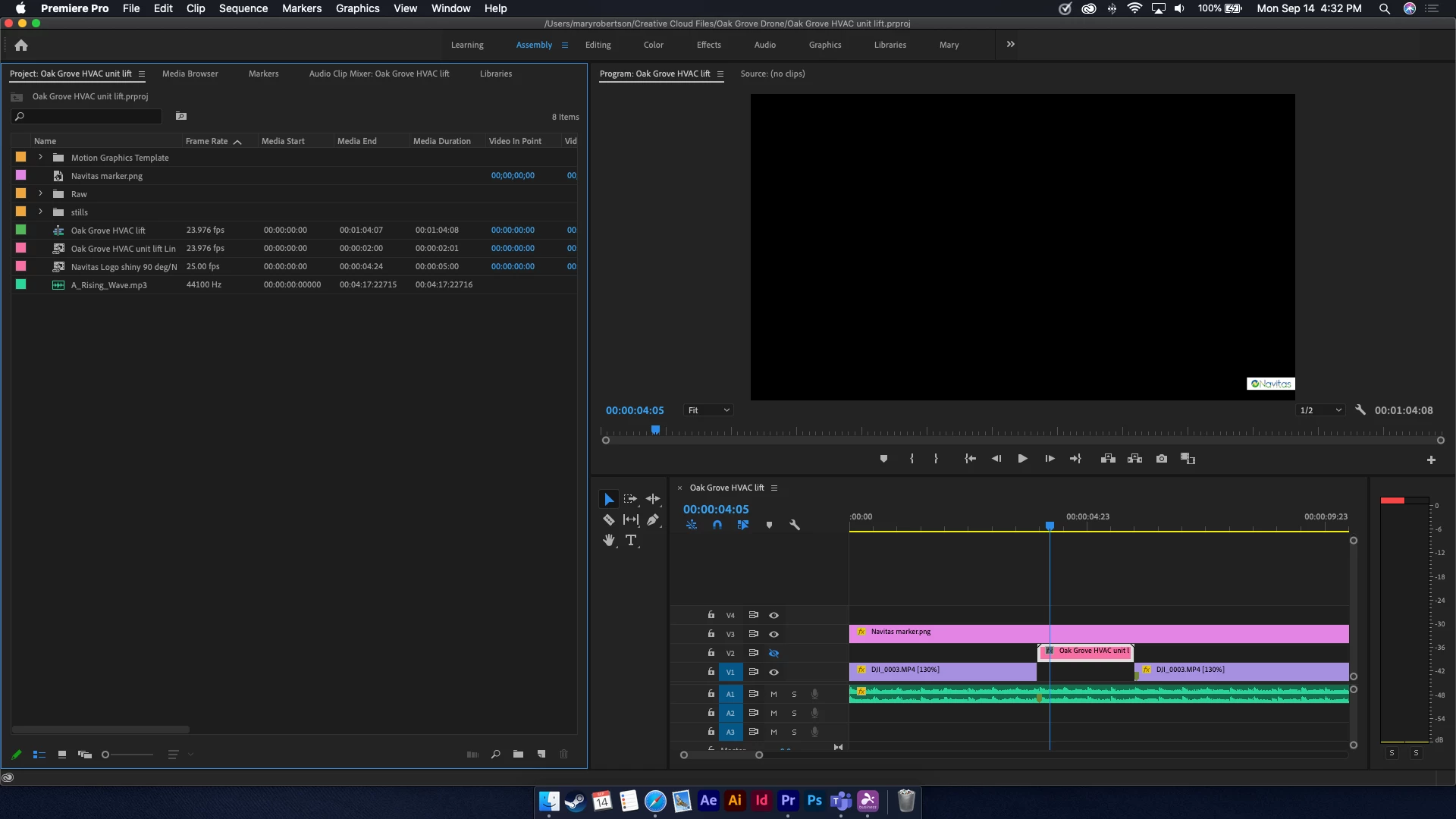
This screen shot is on my MacBook Pro (MacOS Catalina ver 10.15.6), but I have the same problem on my Windows computer (Windows 10 Pro 2020).  I am running the most current version of both Premiere Pro and AE on both computers. It doesn't matter if I use Premiere Pro to create an AE composition or if I create the composition in AE and then import it to Premiere Pro, the result is still a black screen.


Please help. Thanks.

This topic has been closed for replies.
Correct answer R Neil Haugen

In that screen shot, you have a clip of some sort on V2 that is blanked out with the crossed-out-eyeball icon, the Oak Grove HVAC clip. That of course won't be showing at all.


And you have the png layered over it.


Where is the comp ... the png or the clip?


Neil

3 replies

Kevin-Monahan
Community Manager
Community Manager
September 14, 2020

Hi Mary,

Can you please give us your system specifications, including information about your CPU/RAM/GPU and the media you are using? That would be very helpful!


Thanks,

Kevin

Kevin Monahan - Sr. Community and Engagement Strategist – Adobe Pro Video and Audio
Legend
September 14, 2020

I usually render out of AE and bring that in to Premiere and put it on a layer directly above the AE comp.  Makes things simpler so you don't have to do complex rendering in premiere and if you need to make changes you can go back to AE...

R Neil Haugen
R Neil HaugenCorrect answer
Legend
September 14, 2020

In that screen shot, you have a clip of some sort on V2 that is blanked out with the crossed-out-eyeball icon, the Oak Grove HVAC clip. That of course won't be showing at all.


And you have the png layered over it.


Where is the comp ... the png or the clip?


Neil

Everyone's mileage always varies ...
maryr34816705
Known Participant
September 15, 2020

Okay I feel stupid. 

Yes, the V2 track was hidden and when I unhid it, it shows up. 

It works great now!


Chalk it up to a crazy Monday.

Thanks for "fixining" it.