
teivovo
Participant
August 6, 2019
Answered

AE Video Overlays Not Appearing Correctly in Premiere Pro?

  • August 6, 2019
  • 1 reply
  • 2103 views

Hi everyone, I'm currently hitting my head on something that I have not come across before.

I have a video overlay (Add) placed on top of the main content in AE. In AE, this plays fine in the previews.

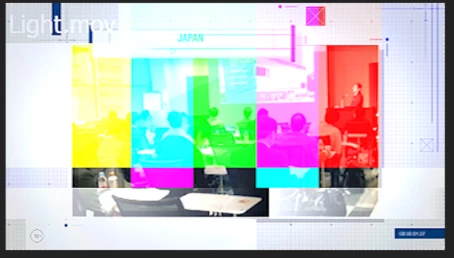
However, when I link to this composition in Premiere Pro, the overlay does not preview and render. Only color bars show up and the name of the overlay video appears on the top left corner.

Is there something that I am doing wrongly?

Sorry... AE and Premiere Pro newbie here.

Thanks in advance!
    This topic has been closed for replies.
    Correct answer eikonoklastes

    That frame appears when After Effects is missing footage. Load up your project in AE, and make sure everything works properly there. If it's showing up fine there, try deleting your media cache or re-importing the project into Premiere.

    1 reply

    eikonoklastesCorrect answer
    Legend
    August 6, 2019

    That frame appears when After Effects is missing footage. Load up your project in AE, and make sure everything works properly there. If it's showing up fine there, try deleting your media cache or re-importing the project into Premiere.

    teivovo
    teivovoAuthor
    Participant
    August 7, 2019

    Cool thanks! Reimporting the clip worked!!