
ENON films
Participant
October 29, 2021
解決済み

After Premiere upgrade, saturation on timeline went off while footage saturation remained the same

  • October 29, 2021
  • 返信数 1.
  • 12513 ビュー

Hi, so I recently upgraded Premiere after a series of crashes, but the crashes aren't the problem:


Once rebooted, my timeline window displays the footage saturated when no saturation effect has been added, while the raw footage remains flat, adn when I export the footage it keeps the saturation... what has happened here? I'm thinking of some solutions like relinking all the footage, but I need to know what has happened here to avoid it again in the future, and any other solution suggestions if available... (oh, and it's not a hardware issue, or if it is it's a weird one as I've opened the file in several different computers and the issue remains)

Image attached (right is raw flat footage .MXF, left is timeline window):
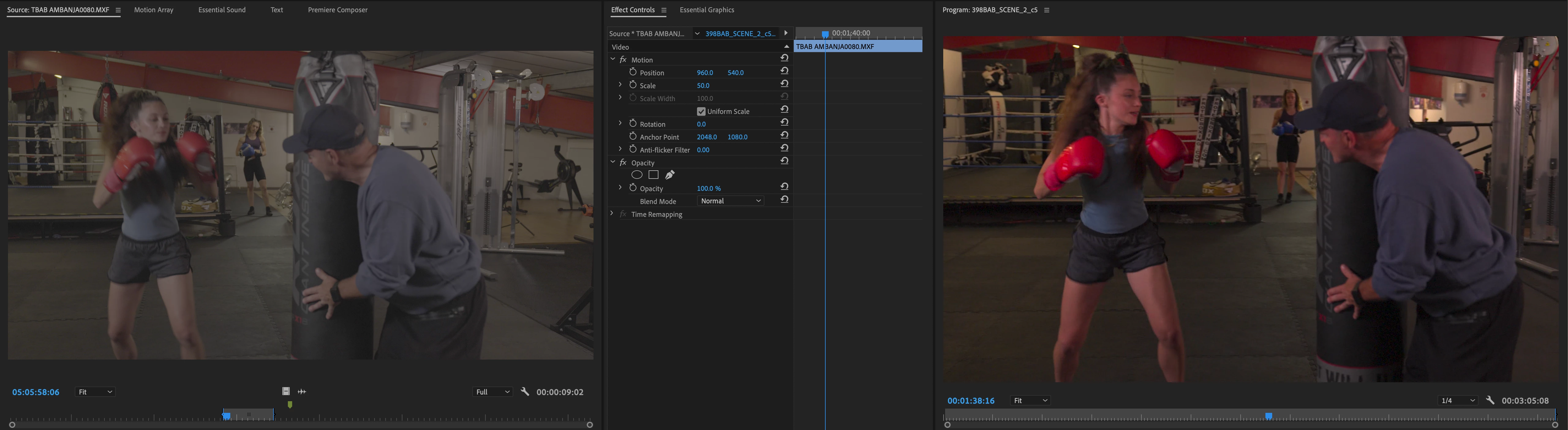
 

Thanks!

解決に役立った回答 Sumeet Kumar Choubey

Hi ENON films,


Sorry to hear about this. In which color space was the media  recorded? Also, if this project was created in the previous version of Premiere Pro, please try these steps & check if it helps.

  • Right-click on the media file in the Project panel.
  • Select Modify > Interpret Footage.
  • Under Color Management, set Color Space Override to Rec. 709 & click OK.

Let us know if restores the correct preview.


Thanks,

Sumeet

返信数 1

Community Manager
October 30, 2021

Hi ENON films,


Sorry to hear about this. In which color space was the media  recorded? Also, if this project was created in the previous version of Premiere Pro, please try these steps & check if it helps.

  • Right-click on the media file in the Project panel.
  • Select Modify > Interpret Footage.
  • Under Color Management, set Color Space Override to Rec. 709 & click OK.

Let us know if restores the correct preview.


Thanks,

Sumeet

ENON films
ENON films作成者
Participant
November 3, 2021

Thanks Sumeet! That worked!