
Inspiring
October 25, 2018
Answered

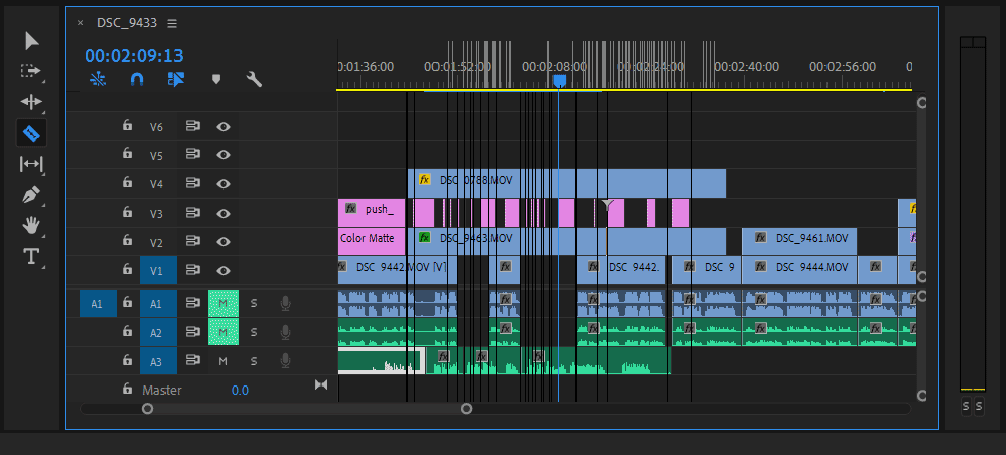
Afterimage lines in Premiere ver13 Timeline Panel

  • October 25, 2018
  • 8 replies
  • 6151 views

Moving my cursor around the timeline panel in Premiere ver13 creates a multitude of afterimage lines that make it difficult to edit. Any ideas on how to fix this? Moving the cursor to the left tends to create them, moving it to the right tends to erase them. This is a relatively fresh install, and I'm a little tired of erasing and resetting Adobe app preferences, so I haven't actually tried that at this point.

EDIT: I guess the razor tool is the only tool that creates the black lines. Still annoying, though.

PC Specs:

• Windows 10 Pro

• Intel i7-8700 3.20GHz

• 32Gb RAM

• Nvidia GTX1050Ti 4Gb

• OS and Adobe Apps installed on SSD, working documents on separate HDD
This topic has been closed for replies.
Correct answer Chinmay5E45

Yes that worked for me to I was using a custom scale of 115% as soon I turned it to 100% (recommended) afterimage issue got fixed.


8 replies

Participant
October 13, 2022

Laxmidhardas

Participant
September 10, 2020

This has been happening to me too. I checked and it is also doing it on the After Effects timeline. I tried downgrading to previous versions and updating to the new one today too and it still isn't working. Has anyone found a solution? Running almost the same specs as original post.

i7-9750H 2.60GHz

32gb RAM

NVIDIA GTX 1650

Participant
October 25, 2020

I reset my screen resolution in windows 10, it signed me out and when I signed back in now I only have 1 line. Much better than what I had before with multiple.

March 11, 2020

I don't know if this will help anyone else, but I was getting similar white lines when moving the mouse around the timeline and I was able to get rid of them by resetting my Windows 10 display scale from 110% back to 100%.

Chinmay5E45Correct answer
Participant
March 25, 2021

Yes that worked for me to I was using a custom scale of 115% as soon I turned it to 100% (recommended) afterimage issue got fixed.


jonp87846066
Participant
December 31, 2018

I am getting the exact same issue. Any one found a solution to this yet?

I've tried reinstalling 2019, 2018, 2017.

ScottJ53Author
Inspiring
November 15, 2018

I finally got around to resetting plugins cache and deleting the preferences. No changes, issue persists.

juanmario
Participating Frequently
November 7, 2018

Surely, if you move the razor tool on an empty video track, the lines do not appear, which indicates that it is a delayed effect on the behavior of the tool.

For incompatibility with a controller is what I think:

Before turning on the PC, disconnect all peripherals other than STD, including the mouse, if necessary, connect a generic one.

Turn on and test.

If the problem goes away, you should test until you find which driver creates the conflict and try to update them to see if the problem is resolved.

And if it's something else, I have no idea.

ScottJ53Author
Inspiring
November 8, 2018

You're correct, the issue doesn't occur when scrubbing an empty video track.

"Disconnect all peripherals." Well I need a mouse to test the issue and a keyboard to log in to my computer. Already tried disconnecting a monitor. There's nothing left to disconnect other than speakers, which are turned off and I assume probably not related to the issue. I can possibly try a "generic" mouse later; there might be a spare Dell mouse around here.

Research tells me that an STD is an expansion card, which I don't believe I have. Are you actually talking about disconnecting internal PC hardware?

Legend
November 8, 2018

nVidia released a new driver today.  Maybe try that one.

Legend
November 6, 2018

What's your screen resolution?

ScottJ53Author
Inspiring
November 7, 2018

1920 x 1200, dual monitor setup.

Ann Bens
Community Expert
Community Expert
November 7, 2018

Does it also show with one display>

Might want to roll back one driver. (dont go past 411.xx)

Kevin-Monahan
Community Manager
Community Manager
November 5, 2018

HI SCOTTCJOHNSON53,

Weird looking screen redraw error there. Can you try updating your GPU drivers and then reporting back? Let us know what happens once you do.

Thanks,

Kevin

Kevin Monahan - Sr. Community & Engagement Strategist – Pro Video and Audio
ScottJ53Author
Inspiring
November 6, 2018

Already have current drivers: 416.34