
Participant
June 25, 2022
Question

Al importar un archivo SRT me encuentro que dos subtitulos diferentes que se juntan en uno

  • June 25, 2022
  • 1 reply
  • 779 views

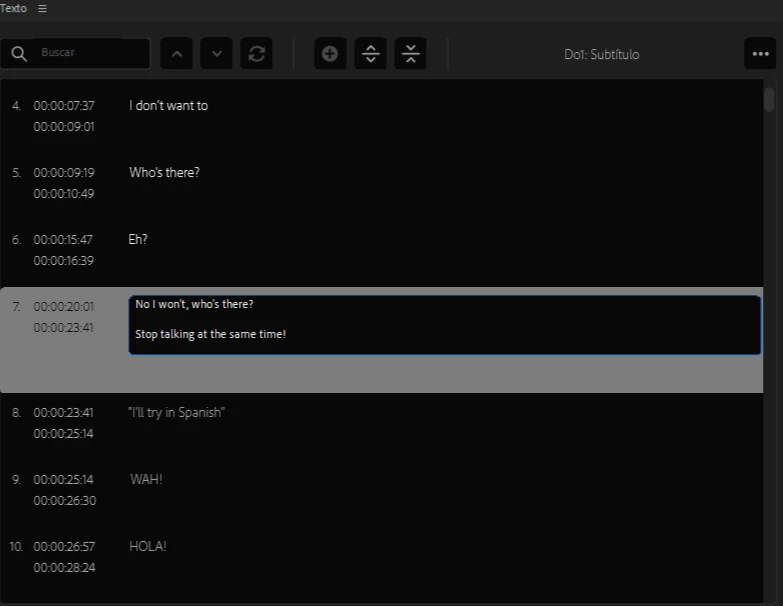
Disculpen de antemano preguntar esto, verán, al momento de importar el archivo SRT para colocar los subtítulos a un video, al momento de colocarlos en la línea de tiempo podrá ver en las imágenes en el cuadro seleccionado que hay 2 subtitulos con tiempos distintos los cuales están juntos en uno solo, desconozco si esto es normal para el programa y si esto debería de ser así, me agradaria saber si hay alguna forma de cambiar esto y poder separar los subtítulos para que no estén juntos en uno solo, gracias por su atención. 


This topic has been closed for replies.

1 reply

Stan Jones
Community Expert
Community Expert
June 25, 2022

Two possibilities:


In your SRT, there are 2 captions at the same timecode.


Or, it is a 2 line caption with an extra line.


BUT, I cannot find a way to get the space between the 2 lines. Anything that will do that imports without the space, or gives a generic importer error when I try to import it.


You can create a second "block" in the caption, but when you select the text, only one block appears inside the block editing box.


Screenshot of the timeline and the Essential Graphics panel? Copy paste from the srt, the caption and the ones before and after?


Stan


Participant
June 25, 2022

¡Gracias por su atención! Entonces, fuí a ver nuevamente si el error estaba en mi SRT pero como podrá ver en las imágenes todo parece estar en orden.


Una vez dentro de Premiere es cuando empiezan los problemas, les mostraré la línea de tiempo y el panel de gráficos esenciales.


 Como podría ver, por alguna razón al colocar en la línea de tiempo los subtítulos estos cambian, esto no debería pasar pues en el SRT pudimos ver que están separados y no hay 2 subtítulos en el mismo código de tiempo.


Con respecto a “¿ Copiar y pegar del srt, el título y los anteriores y posteriores? ” debo decir que no pude entender a lo que se refería.


¡Gracias por su atención nuevamente! y estoy atenta a las respuestas.

Participant
June 26, 2022

Thank you for your thorough response.


In the SRT, the END timecode for Caption #29 is 00:11:43,381. The BEGIN timecode for Caption #30 is 00:11:43,380. The 381 milliseconds if AFTER 380. So PR sees these as overlapping timecodes and puts them into one caption.


If this is the only one that is wrong, just edit that caption and split it and edit it so it is correct.


Or, if there are more errors like this one, edit the SRT and make Caption #29 END timecode 00:11:43,380.


See if that fixes it.


Stan


¡Gracias Stan! una pregunta antes de ir a intentarlo


 ¿Cuanta es la mínima diferencia que debería de tener para que no las detecte así?