
AJV Media
Known Participant
August 19, 2021
Answered

All fonts missing from Premiere Pro 2021!

  • August 19, 2021
  • 17 replies
  • 25887 views

I recently noticed I can't access any of my fonts in PP 2021. When I use the type tool, it uses a generic font. Then when I try to select a different font, there's nothing there at all.
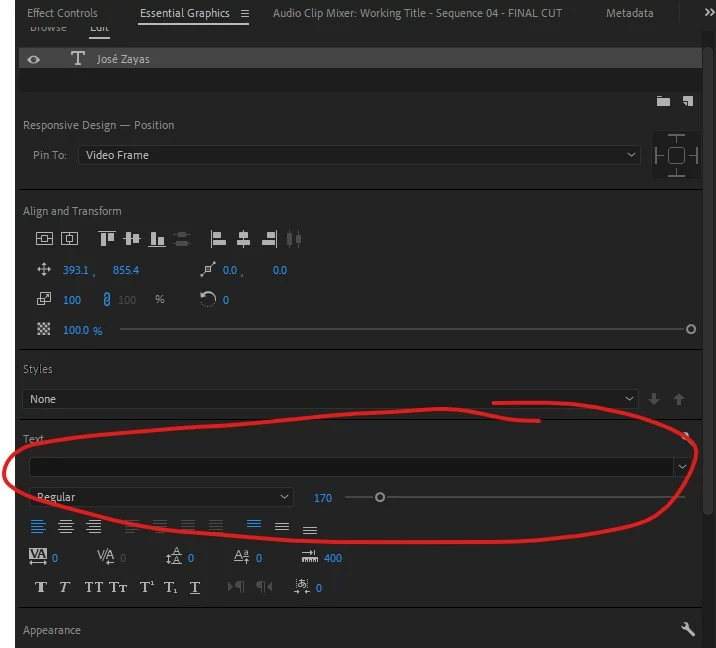


I click on the pulldown menu and it appears empty.
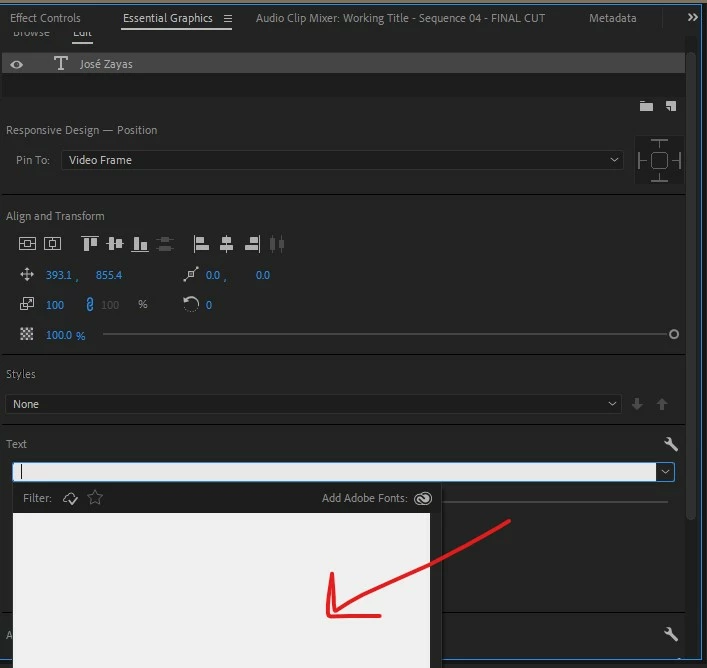
 

All my other Adobe apps have the fonts available.


This is my Windows computer:

Processor Intel(R) Core(TM) i9-7900X CPU @ 3.30GHz 3.30 GHz
Installed RAM 64.0 GB (63.7 GB usable)
System type 64-bit operating system, x64-based processor
Edition Windows 10 Pro
Version 21H1
Installed on ‎9/‎27/‎2020
OS build 19043.1165
Experience Windows Feature Experience Pack 120.2212.3530.0

Please help!

This topic has been closed for replies.
Correct answer efficient_Spirit5C88

Hey, Sumeet! Had the same problem yesterday when I updated to 15.4 and just installed the Beta!


Yes - for me, the fonts are back!


Device name Editing-Station
Processor AMD Ryzen 7 2700X Eight-Core Processor 3.70 GHz
Installed RAM 32.0 GB
System type 64-bit operating system, x64-based processor
Edition Windows 10 Pro
Version 21H1
Installed on ‎8/‎17/‎2020
OS build 19043.1237
Experience Windows Feature Experience Pack 120.2212.3530.0


17 replies

Kartika Rawat
Community Manager
Community Manager
September 29, 2021

Hi all!

Sorry for the frustration. We have logged a bug on this.

Thanks for your patience.

Kartika

Toullelan45
Participant
September 29, 2021

Hi, 


I've the same issue with the version 15.4.1

I've already tried some tips from this topic but anything is working. 


I've reverted to version 15.2.0 and now it's working. 


Hopefully this will be fixed soon. 

carlopixelframe
Participating Frequently
September 23, 2021

I have exactly the same problem on the new version 15.4.1

carlopixelframe
Participating Frequently
September 23, 2021

am now back to version 15.2.0 and now everything is back and as usual!

ben.reeves
Participant
August 25, 2021

I've reverted to version 15.2.0, and all the fonts seem to have come back:


AJV Media
AJV MediaAuthor
Known Participant
August 26, 2021

Holy cow! This worked! All my fonts are back in Premiere Pro v15.2.0 and I can use them as before. Thank you so much!

Participant
September 5, 2021

I have the exact same issue, got tons of work to do and this is influencing my workflow.... please find a fix Adobe!!!!!

ben.reeves
Participant
August 25, 2021

I have this exact same problem. I've tried all of the suggestions (uninstalling and reinstalling Premiere, using the Creative Cloud Cleaner, running as administrator, using ALT+SHIFT to preset preferences, trying new projects and old projects), but no success. Like AJV Media, mine also only affects Premiere. The fonts are fine in the other apps.


MyerPj
Community Expert
Community Expert
August 21, 2021

<<All my other Adobe apps have the fonts available.>>


Very strange. Did you try it with a new project? Without loading the current one select "New" from the Home screen. Did you try resetting you're preferences?


AJV Media
AJV MediaAuthor
Known Participant
August 26, 2021

Yes, I tried with a brand new project, having re-installed the latest version of Premiere (v 15.4.1) but no luck there. The only thing that fixed it was reverting to v 15.2.0 (build 35).

Ann Bens
Community Expert
Community Expert
August 19, 2021
AJV Media
AJV MediaAuthor
Known Participant
August 19, 2021

Thnaks. I tried that but, unfortunately, it didn't work.

I even uninstalled and re-installed Premiere and it didn't help.

nishu_kush
Community Manager
Community Manager
August 20, 2021

Sorry for your issue, AJV Media.

Can you try running Premiere Pro as administrator? Right click the Premiere Pro icon and select Run as administrator.

Let us know if it helps.


Thanks,

Nishu