
AJV Media
Known Participant
August 19, 2021
Answered

All fonts missing from Premiere Pro 2021!

  • August 19, 2021
  • 17 replies
  • 25887 views

I recently noticed I can't access any of my fonts in PP 2021. When I use the type tool, it uses a generic font. Then when I try to select a different font, there's nothing there at all.
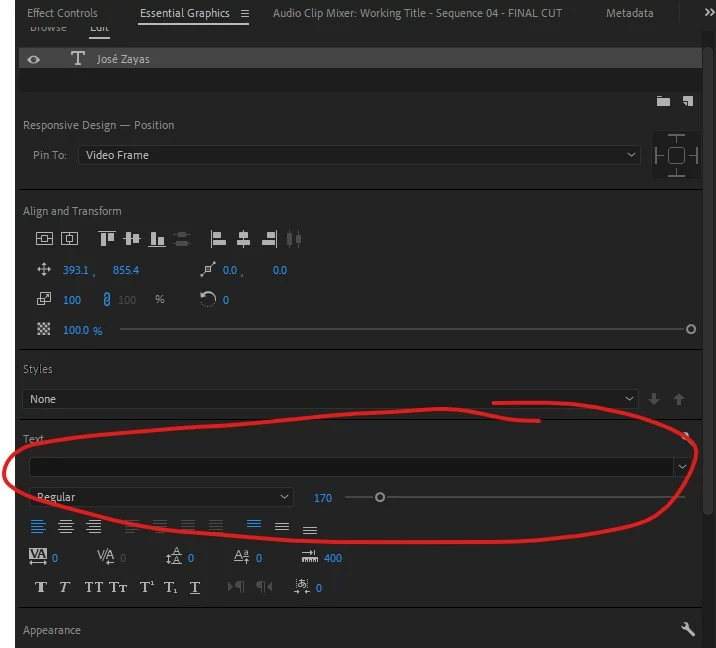


I click on the pulldown menu and it appears empty.
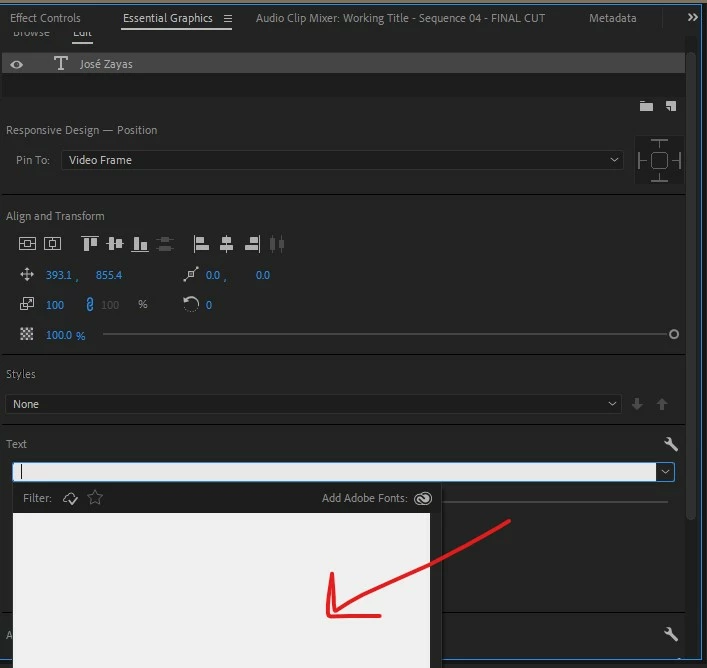
 

All my other Adobe apps have the fonts available.


This is my Windows computer:

Processor Intel(R) Core(TM) i9-7900X CPU @ 3.30GHz 3.30 GHz
Installed RAM 64.0 GB (63.7 GB usable)
System type 64-bit operating system, x64-based processor
Edition Windows 10 Pro
Version 21H1
Installed on ‎9/‎27/‎2020
OS build 19043.1165
Experience Windows Feature Experience Pack 120.2212.3530.0

Please help!

This topic has been closed for replies.
Correct answer efficient_Spirit5C88

Hey, Sumeet! Had the same problem yesterday when I updated to 15.4 and just installed the Beta!


Yes - for me, the fonts are back!


Device name Editing-Station
Processor AMD Ryzen 7 2700X Eight-Core Processor 3.70 GHz
Installed RAM 32.0 GB
System type 64-bit operating system, x64-based processor
Edition Windows 10 Pro
Version 21H1
Installed on ‎8/‎17/‎2020
OS build 19043.1237
Experience Windows Feature Experience Pack 120.2212.3530.0


17 replies

djuncheg117156386
Inspiring
March 2, 2023

Same problem in 2023, latest 23.2.0 version. 

Its just Adobe. Nothing fixed for years. 

Participant
March 25, 2023

Hi djuncheg1,
This happened to me after upgrading to 2023 (v23.2.0). All fonts were missing from selection box, and existing text font was substituted.


Resolution:

After leaving premiere open for about 10 minutes (in the font selection screen), all fonts re-appeared. I suspect Premiere was just slow re-inventorying all the system fonts. 

Brandon Loshe
Legend
November 23, 2022

I had the same issue. I assume by now it is fixed since this is a couple of versions ago. If this happens again, I workaround could be to use the Essential Graphics Panel with your text layer selected. You can edit text from that panel, as well.

firstl65387004
Known Participant
October 20, 2022

How is this most basic and essential feature still a bug?


I can open a new project from the current version 22.6.2 and fonts are there, but then if I open an older project from a previous versoin all fonts are missing.  Swtiching between timelines, have fonts, no fonts, have fonts, no fonts, have fonts, no fonts, WTF?


I didn't want to upgrade, CC auto installed the latest version and my boot drive crashed and I had to do a clean install, and the 2020 version of premiere isnt't available.  What a bunch of BS.

Peru Bob
Community Expert
Community Expert
October 20, 2022
quote


I didn't want to upgrade, CC auto installed the latest version


By @firstl65387004


Turn off auto updates in the preferences of the CC app.

firstl65387004
Known Participant
October 20, 2022

Updates were off.  I even Uninstalled all the 2022 apps and double checked that updates were disabled, came back later in the day and CC reinstalled the 2022 apps.

Participant
June 26, 2022

I just had this issue with Premiere Pro version 22.5.0 and just opening CC Desktop did not work for me. Even my locally installed system fonts did not show up at first. But I used CC Desktop to enable a **new** font and then all of my fonts showed up. Premiere Pro should have a "refresh" button to have it reload all installed fonts.

Participant
June 10, 2022

Adobe, how is this still an issue for over a year in new updates of software that is an industry standard? Bugs are fine in betas but you guys really need to get your stuff together. Adding "pro" to the name of software really doesn't do much does it?


Anyone find an actual fix yet or is downgrading to an antiquated version the magic?

Inspiring
May 27, 2022

Hi Everyone, 

I'm back on this post in 2022 and got the SAME problem. My version of Premiere Pro is the 22.0.0 and I've installed the Poppins fonts family but nothing appears ONLY in Premiere Pro. Illustrator got it, Photoshop also.
So i uninstalled the font family and activated it back with Adobe Fonts this time but it's still the same problem.
I'm currently updating my Premiere version to 22.4. Hope it will solved it.

Inspiring
May 27, 2022

Well i've uptaded to 22.4 and nothing change with my trouble. Poppins font family is not showing. I really need some help quickly pls

MyerPj
Community Expert
Community Expert
May 27, 2022

I suppose you could try to sign out of Creative Cloud and sign back in, if not, perhaps uninstalling and reinstalling Premiere?

Participant
November 22, 2021

I had the exact same issue and was able to resolve it by making sure the Creative Cloud Desktop app was running while I had Premiere open. On my Windows PC, the Creative Cloud Desktop app doesn't start by default when I boot Windows (I'm sure I manually removed it from my startup programs at some point) so initially when I opened Premiere I wasn't getting any fonts at all. I saw exactly what was shown in your pictures. I then opened the Creative Cloud Desktop app and all the fonts showed up! I think it would be helpful if, in future releases, instead of showing just a blank white screen where the fonts should be there was an error message that said something along the lines of "can't connect to Creative Cloud, make sure the desktop app is running".

Participating Frequently
May 1, 2022

I was having the same issue with Adobe fonts not showing in Premiere Pro. Following your suggestion, I closed Premiere Pro, opened the Creative Cloud Desktop app and then re-launched Premiere Pro, this resolved the issue for me as well, all my 'active' Adobe fonts are now showing. Thanks


Currently using Adobe Premiere Pro version 22.3.1 (Build 2)

baltazarisland
Participant
November 7, 2021

Just had this issue with version 22.0

- Closed premiere

- Deactivated all the fonts through the Creative Cloud app

- Reactivated each family 

They came back.

Participant
October 22, 2021

Had the exact same problem and read through this thread. Uninstalled 15.4.1 and was going to install 15.2 but decided to just reinstall 15.4.1 again. It worked. Not sure why that simple solution worked on my system and isn't on others. I keep my cache pretty low in cc and throughout my entire system so it doesn't bog down. Maybe a total cleansing of cache would help? I'm not certain, but just throwing it out there.

MyerPj
Community Expert
Community Expert
October 22, 2021

Good to know. 🙂

Community Manager
September 30, 2021

Hi everyone,

We're currently investigating this issue. Could you please try the latest Premiere Pro Beta & let us know if the fonts are loading properly? You may refer to this link to know more about the Creative Cloud Beta program.

Thanks,
Sumeet

efficient_Spirit5C88Correct answer
Participant
October 1, 2021

Hey, Sumeet! Had the same problem yesterday when I updated to 15.4 and just installed the Beta!


Yes - for me, the fonts are back!


Device name Editing-Station
Processor AMD Ryzen 7 2700X Eight-Core Processor 3.70 GHz
Installed RAM 32.0 GB
System type 64-bit operating system, x64-based processor
Edition Windows 10 Pro
Version 21H1
Installed on ‎8/‎17/‎2020
OS build 19043.1237
Experience Windows Feature Experience Pack 120.2212.3530.0


Community Manager
October 1, 2021

Glad to hear that it's working properly. Feel free to reach out if you experience any issues.


Thanks,

Sumeet