

AndrewTheGreat
Known Participant
July 7, 2024
Answered

All the effect controlls are gone

  • July 7, 2024
  • 4 replies
  • 1144 views

I got a project file in which all the clips have no effect controls except for time remapping - the rest is gone. 


This is what I see:
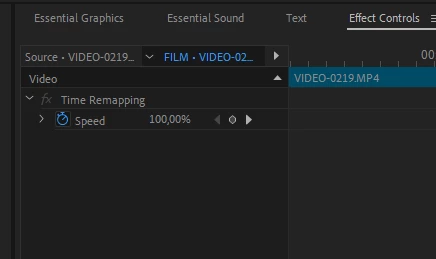
This is what I should see:
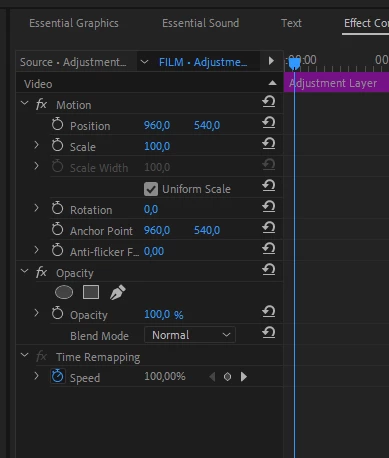
 

What I tried:

- copypaste the files from the seqience into a new one. 

- copypaste all the timeline elements into a new project

- reset the workspaces, switch between the workspaces

- reset Premiere Pro Settings

- clear all the cache files both manually and in the Preferences -> Media Cache

- open this project file on different machines (Mac\PC) and different versions of Premiere Pro.


The only way to fix it so far is manual clip-by-clip replacement of everything that lies on the timeline - new clips placed do have all the effect controls. The problem is - this is only part of a bigger project and the whole project has hundreds of clips, so manual work will take ages...

Here's the partly project:

https://drive.google.com/file/d/1s-vMubO-CuIzl1bKBixJu2NspT_g2q-U/view?usp=sharing


Any ideas of what happened and how to fix it at the lowest possible cost?

Correct answer Averdahl
quote

Any ideas of what happened and how to fix it at the lowest possible cost?
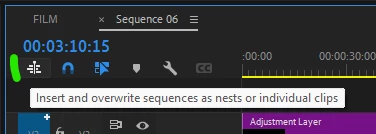

By @AndrewTheGreat


You can fix it by creating a new timeline, click the "Insert and owerwrite..." icon in the new timeline and then drag the timeline named FILM from the Project panel into the new timeline.


When i do that all individual clips and edits will be inserted into the new timeline and all properties, Motion/Rotation/Anchor Point, etc, etc are back.


Question: Your source footage is 50 fps, why do you edit it in a 25 fps timeline?


4 replies

Averdahl
Community Expert
AverdahlCommunity ExpertCorrect answer
Community Expert
July 7, 2024
quote

Any ideas of what happened and how to fix it at the lowest possible cost?

By @AndrewTheGreat


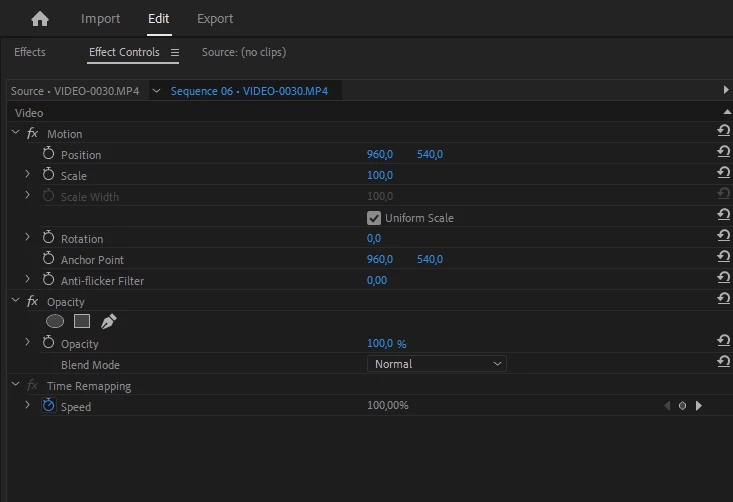
You can fix it by creating a new timeline, click the "Insert and owerwrite..." icon in the new timeline and then drag the timeline named FILM from the Project panel into the new timeline.


When i do that all individual clips and edits will be inserted into the new timeline and all properties, Motion/Rotation/Anchor Point, etc, etc are back.


Question: Your source footage is 50 fps, why do you edit it in a 25 fps timeline?


Stan Jones
Community Expert
Community Expert
July 7, 2024

@Averdahl,


Bingo!


Even with many sequences, I like that approach. I don't know what created this problem, but very little works that would not require individual clip/edit replacements - and replace from bin does not work.


The other thing that "works" is export FCP XML, but I never trust that it gets everything right.


Stan


AndrewTheGreat
Known Participant
July 7, 2024

I sometimes think people don't see what is written in front of them...

@Rag and Bone Importing doesn't work either, you can check yourself, the project file is included in the first message


@Ann Bens 

Stop trying to edit and EDIT!
Rag and Bone
Community Expert
Community Expert
July 7, 2024

I sometimes think people don't see what is written in front of them...

"I know you pasted the sequence into a new project, but the import process may do something else. "


Honestly, why should I open you project file and search through it? You didn't list that as something you tried. But, whatever, I  don't need to get grief for trying to help

Ann Bens
Community Expert
Community Expert
July 7, 2024

Just drag them again onto the timeline: issue solved.


Rag and Bone
Community Expert
Community Expert
July 7, 2024

I don't know what's going on here, but one standard trick you could try is to import this project into a new project. 

I know you pasted the sequence into a new project, but the import process may do something else. Can't hurt to try while waiting for someone with a good idea to come along.