
Participating Frequently
January 15, 2020
Answered

Alpha glow issue when using text, please help solve this.

  • January 15, 2020
  • 2 replies
  • 4730 views

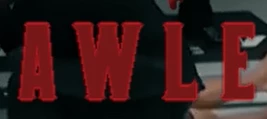
Having this really strange issue when using alpha glow on text in premiere pro. For some reason when alpha glow is applied to text the text start to show jagged edges.


In the photo you can see what I am talking about, but it's so weird because the issue seems to happen to letters with angles. I've tried using different fonts but still the same.


Alpha glow is causing this and I have no idea why, can anyone help solve this problem?


This topic has been closed for replies.
Correct answer Richard TOULON

Can you recommend me a glow plug in effect? 


I need the glow to fade in and out so Photoshop wont work for me, I will see if it works better in AE though.


I have tested Universe plug in ( Universe glow ). Using AE is a good idea.

By the way, you can use Photoshop even if you want to animate your glow. In Photoshop you can apply fx, like stroke, outer glow etc and render them as standalone layers. clic on the fx icon in your layer panel and choose create layers. All your fx will be rendered as a layer. Import the PSD in Photoshop as a "Sequence" and so you can now animate the opacity of the glow, the stroke or the word itself. Good luck.

2 replies

Inspiring
January 16, 2020

Initially thought it might be a matter of switching 'Composite in Linear Color' on or off in 'Sequence Settings'. But testing all combinations of on or off and changing renderers in Project Settings made no difference. I get smooth text with Alpha Glow each time regardless - no jaggies at all. This is on PP2019 on a Mac.

Sorry don't have any other ideas.


regards


SteveG

Participating Frequently
January 16, 2020

I'm using 2019 too, but keep getting jagged edges with alpha glow. I've tried everything, but no luck apart from a temporary workaround.


Thanks for taking the time to help with this 🙂 

Richard TOULON
Legend
January 16, 2020

Hi,

Give us more infos. Is the text created in Premiere Pro ? is it a PNG ? The jagged edges appears on playback only or in paused mode ?

Participating Frequently
January 16, 2020

Hi riklard, the jagged edges appears once alpha glow is applied to any text within premiere pro, even when playback, paused and after export. The jagged edges only goes when I disable alpha glow.


I noticed that if I set the glow to anything below 40 the jagged edges are more noticeable. After a few hours of trying to solve this issue I have managed to figure out a solution to this. 


What I did was I made a copy of the text then placed it above the original, I removed the alpha glow effect from the copy, then removed stroke from the original and that kind of solved it but not completely. As you can see from the photo below it is already much better than before, but the jagged edges are slightly visible.

Richard TOULON
Richard TOULONCorrect answer
Legend
January 16, 2020

Can you recommend me a glow plug in effect? 


I need the glow to fade in and out so Photoshop wont work for me, I will see if it works better in AE though.


I have tested Universe plug in ( Universe glow ). Using AE is a good idea.

By the way, you can use Photoshop even if you want to animate your glow. In Photoshop you can apply fx, like stroke, outer glow etc and render them as standalone layers. clic on the fx icon in your layer panel and choose create layers. All your fx will be rendered as a layer. Import the PSD in Photoshop as a "Sequence" and so you can now animate the opacity of the glow, the stroke or the word itself. Good luck.