
Participant
January 28, 2021
Answered

Alpha Premultiplication Problem with ProRes 4444 Footage

  • January 28, 2021
  • 3 replies
  • 2462 views

I'm having major issues using ProRess 4444 footage (with alpha channel) in Premiere. The issue only started once I upgraded my desktop to the new Mac Pro.


Whenever I import a ProRes clip with an alpha channel, everything shows up in these wild green and pink colors, and also mirrored, like a reflection in water... I found out a workaround which is the following...


Go to Interpret footage > Modify clip.

Select Conform Alpha Premultiplication to:


That solves the problem, I don't even have to check the box that says "Premultiplied Alpha", but it's a bit of a pain to have to do this every time I import a ProRes clip with an alpha channel. I guess I could just render everything using the animation codec instead, but this is also not ideal...


Anyone else experiencing this?
 

This topic has been closed for replies.
Correct answer Jeff Bellune

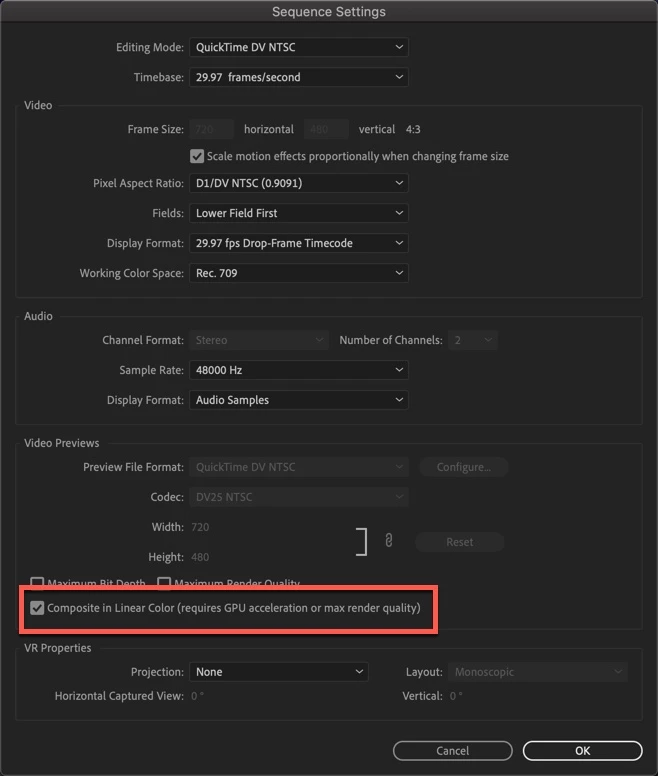
In the meantime, see if making Composite In Linear Color unchecked in your sequence settings helps at all:


3 replies

Jeff Bellune
Jeff BelluneCorrect answer
Legend
January 28, 2021

In the meantime, see if making Composite In Linear Color unchecked in your sequence settings helps at all:


Fusilly
Participating Frequently
August 17, 2021

Thank you Jeff! This was giving me headache!

R Neil Haugen
Legend
January 28, 2021

Yea, not "proper" behavior.


File a bug on their UserVoice website. All posts are read and logged physically into their system by at least one engineer, and I've talked with one of them in person. His biggest complaint: very few bug posts give near enough detail for them to have a clue what's going on. So give him the full details, including hardware, media, and steps like you've done here.


Neil

Everyone's mileage always varies ...
Ann Bens
Community Expert
Community Expert
January 28, 2021

Participant
January 28, 2021