
Participating Frequently
May 5, 2014
Answered

Animated gif selection does not appear in output menu of Premiere Pro CC?

  • May 5, 2014
  • 9 replies
  • 38200 views

I watched an online tutorial of how to make gif files using Premiere Pro CC. When selecting the output, an animated gif choice appeared in the output drop down menu of the Premiere Pro CC used in the tutorial. However, the output drop down menu of my Premiere Pro CC doesn't contain an animated gif selection. How do I get an animated gif selection to appear in the output drop down menu of my Premiere Pro CC?  I'd like to create gifs with my Premiere Pro CC.  
    This topic has been closed for replies.
    Correct answer bryanta8600976

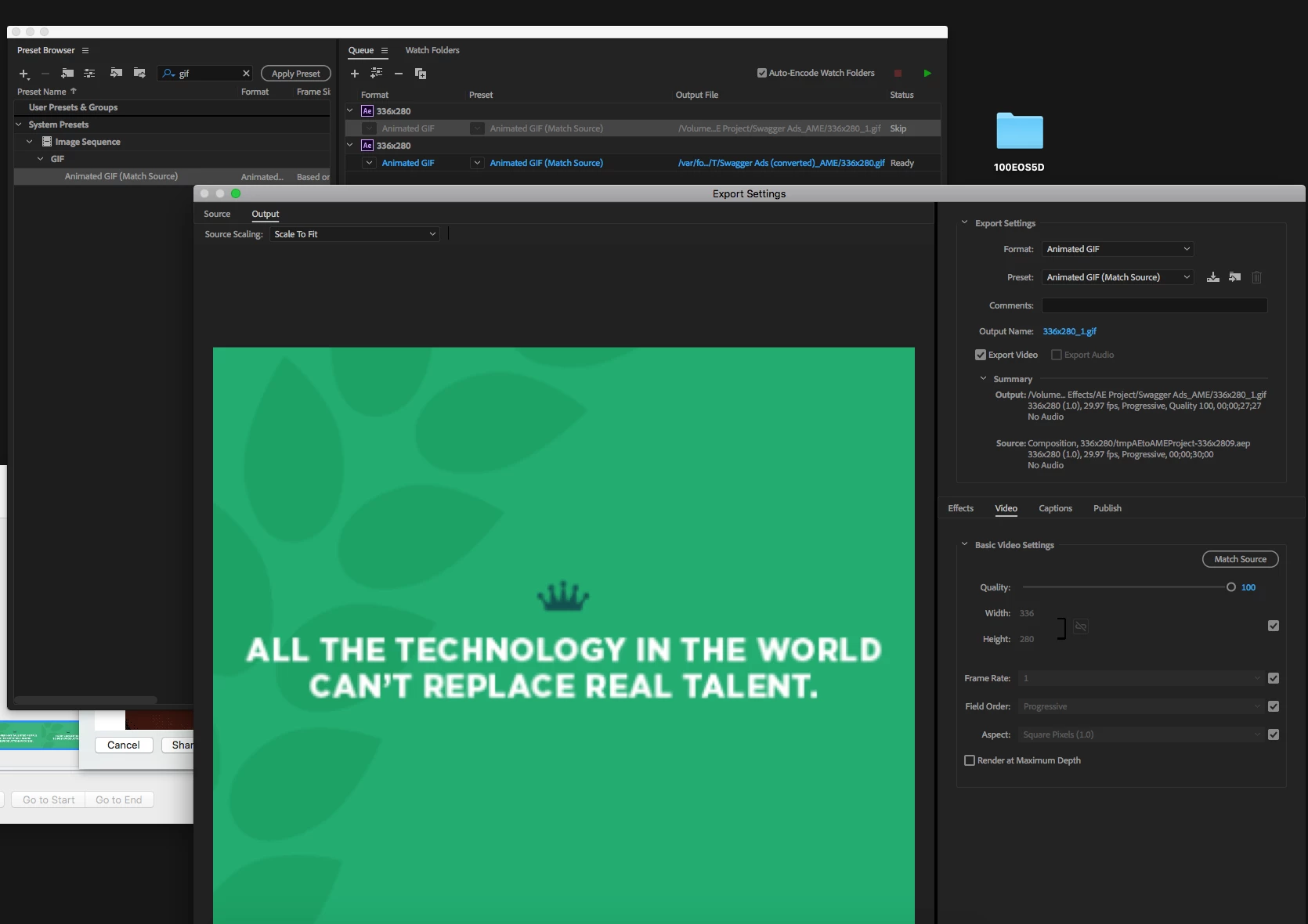
    It took them almost 4 years, but Adobe has finally realeased an update for media encoder CC 2018. Animated GIF is now an option for Mac.

    9 replies

    bryanta8600976
    bryanta8600976Correct answer
    Participant
    November 29, 2017

    It took them almost 4 years, but Adobe has finally realeased an update for media encoder CC 2018. Animated GIF is now an option for Mac.

    Participant
    August 12, 2017

    Same Problem, It's truly Mind Blowing that I can't have this option on my Mac, If Photoshop can do it why on earth can't Premiere to the same.

    Participant
    August 12, 2017

    I have tried multiple times in Photoshop and I always get this error. This is unbelievable that I can't get this to work in either Premiere or Photoshop.

    Participant
    August 12, 2017

    Bummer! I tried the work around through Photoshop and it worked, but it cost me more time (time I can't bill my client because its absurd)... Were you able to export the jpg's from premiere and load them into photoshop? From there, export via legacy and select gif... etc etc... and it should work. Again, this is simply crazy to have to do given Windows users can just export gif from premiere. And really, a gif is a video, so that's where it should be done in the first place, not photoshop. I really hope someone from Premiere is reading this and can put in the feature request for us... it would likely hold more weight coming from an Adobe team member. PLEASE!

    Participant
    August 11, 2017

    Seriously? That's the answer? Either do some crazy complex workflow or submit a feature request? REALLY?! When Windows users can just select a different export format??? REALLY!!!!?????!?!?!?!?!? Come on!! That can't be that hard to implement. So frustrating.

    Participant
    May 25, 2017

    dang, seems so silly that I can't just use media encoder for a gif on my mac.  Especially after watching vids of Windows peeps doing it so easily.  On the hunt for a codec plugin.  Will post here if I find one.

    amyd88230519
    Participant
    April 24, 2017

    Having same issue.

    Could the following questions be answered more completely:

    1. Is "Animated Gif" function available for CC users on a Mac?

    2. The export function in PP does not have an option for Media Encoder. Is there another way to route through ME, or another work around that is simpler?

    3. Is there a completely new/different way to generate an animated gif from Premiere Pro clips? One that is simple? It's a lot of work to make the video, then separate, then export, then format again for use on social media platforms.

    Thanks for your help!

    stefan_gru
    Inspiring
    April 24, 2017

    Amy,

    1. The function is not available for Mac.

    2. Choose File > Media Export > Media. In the Export Settings dialog box, click the Queue button to launch Adobe Media Encoder. By the way, you can also drag a sequence from Premiere Pro directly into the Queue panel in Media Encoder if you prefer to work that way.

    3. I don't know. There may be a plug-in available. This tutorial shows you how to make a (unpleasant looking) animated GIF but he's on Windows so the command he shows is not available on macOS: Premiere Pro CC: How to Make Animated GIFs in 3 Minutes - YouTube

    Actually, try this tutorial for Mac: Make GIFS in Premiere Pro — Premiere Gal

    Someone on another forum mentioned this app: GIF Brewery 3

    zelena33
    Participant
    June 8, 2017

    When will this function be available for mac then?

    Participant
    April 12, 2017

    Files supported for export with Adobe Media Encoder

    Apparently not supported on Mac.  You could try to find a plugin.  Very frustrating considering the resurgence of animated gifs.

    Participant
    February 16, 2017

    2017 and i have the same problem pls adobe

    stefan_gru
    Inspiring
    February 17, 2017

    Have you tried using Photoshop? I gave instructions for that earlier in this forum post.

    amyd88230519
    Participant
    March 4, 2016

    Same issue. I have CC and the Animated gif option is not there.

    Following because this would be extremely helpful/useful to have.

    I've seen a few messages on boards stating you can do this old school by importing the codec in photoshop then make the gif there, but this seems much faster with rendering, etc.

    Thanks!

    stefan_gru
    Inspiring
    March 4, 2016

    It's possible that Media Encoder allowed this earlier, but now you should use Photoshop to make it work. This just worked for me. (I'm on a Mac running 10.10.5.)

    1. Export your movie or animation from Premiere Pro (or even After Effects) via Media Encoder. For Format, choose JPEG. For Preset, pick a corresponding sequence setting. Pick a folder to export the sequence into so it's easy to isolate later.
    2. Open Photoshop and choose the Open command. Navigate to the folder where you saved the sequence and select the first image in the sequence. Click the Image Sequence check box at the bottom of the dialog box and then click OK.
    3. Choose a frame rate in the next dialog box and click OK. That will open the sequence as a movie in Photoshop with a timeline visible at the bottom.
    4. Choose File > Export > Save for Web (Legacy). In the upper right, choose GIF. In the lower right, change the Looping Options setting from Once to Forever. Click the little play button to watch the animation loop. Click Save.
    5. Load the saved GIF into your browser and it should loop. See image posted here.

    Please post a reply if this procedure works for you. To avoid a few snags I encountered when trying this out, I would recommend having your movie frame size and duration set in Premiere Pro and not try to do any resizing later. When I resized it later, the looping never happened; it played only once.

    Participant
    December 28, 2016

    Wow !! We are in 2016 almost 2017 ... I can't believe there was no answer/solution offered from Adobe moderators ...

    Stefan, thanks for the effort, but your solution is a long and painful workaround when the option "export to Animated Gif" with all its nice customisations (like adjusting the fps rate, the aspect ot the images etc..) is built in Media Encoder, After Effects and Premiere FOR WINDOWS .... as we can see with Steven L. comment ...

    Please ADOBE tell us how to import that CODEC in the MAC versions ...

    And please do it quickly since I need it badly for a project right now ....!!

    Steven L. Gotz
    Inspiring
    May 5, 2014

    This is what it looks like on my PC. Are you on a PC or a MAC?

    artofzootography.com
    Dimp88Author
    Participating Frequently
    May 5, 2014

    Steven,

    I'm a Creative Cloud member using a Mac running OS X 10.9.2. And the drop-down format list of the Preimere Pro CC downloaded to my mac doesn't have an Animated GIF choice within it's selections of formats.