

Another multicam audio track question – but a different-ish one
Lordy me I've tried so hard to get this right with multicams and audio tracks. I'm cutting a film that in any given scene as 1 to 10 actors mic'd up. It is inconsisten which actors are on which channel. Often times the sound mixer would record with 10 channels running, but only 2 actors are speaking, so when building/syncing my clips in a multicam sequence, I'd go through and delete the empty or noisy tracks. I'd even then go to modify>audio channels to make sure the sequence didn't retain 10 channels when I now only had, say, 6 that I needed (I'm using 'channels' and 'tracks' kind of interchangeably here).
So here's my problem: now that I'm editing, my eliminating those tracks in the multicam doesn't seem to matter – they still show up in my edit sequence. Where the audio is in the multicam sequence seems to be irrelevant – when I pull it into my sequence it is referencing the original tracks. So after all that work, every time I splice in a new clip into my edit I have to re-figure out and eliminate the offending tracks/channels.
Maybe it's better with pictures...
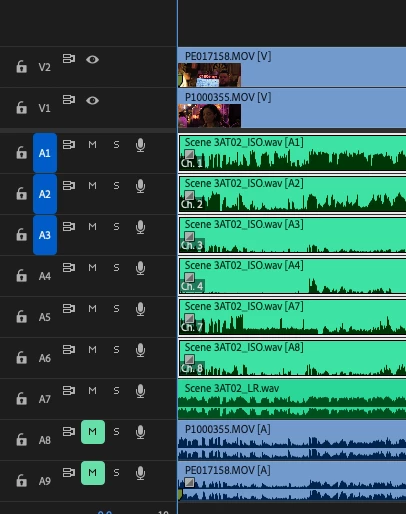
Multicam: only channels/tracks with audio. Channels 1-4, 7-8, an LR mixdown, and then camera audio (muted). This is how I want it when I edit this clip into my edit sequence. Seems like this would make sense.
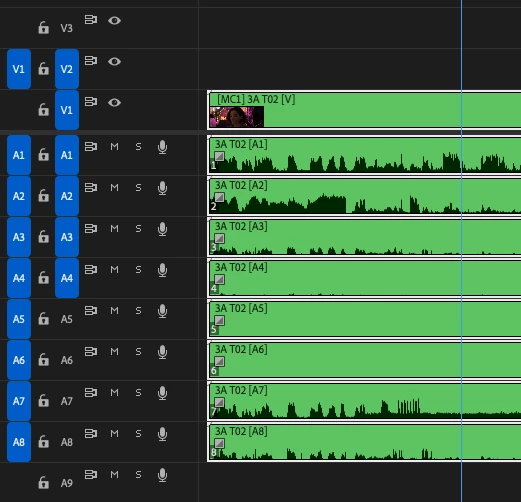
What actually happens in my Edit Sequence: Channels 1-8 (including 5 & 6 which are empty and of no use), no LR mixdown.
So here's my question: how can I get premiere to treat track 1 in the multicam as track 1 when I edit, track 2 as track 2, etc. The only solution that seems available is to reroute one-by-one thousands of multicam clips so that this is the case. This is ludicrous. Where did I go wrong?
I'm really at a loss and demoralized. It shouldn't be this GD complicafted. Grateful to the hive mind. I just want to edit!
 AdChoices