Participant
September 26, 2017
Answered

Arabic typing in Adobe premiere cc 2017.1.2

  • September 26, 2017
  • 2 replies
  • 20883 views

Hi .. i want to know how to write titles and captions in Arabic fonts directly within Adobe premiere cc 2017.1.2
Thanks!

This topic has been closed for replies.
Correct answer Meg The Dog

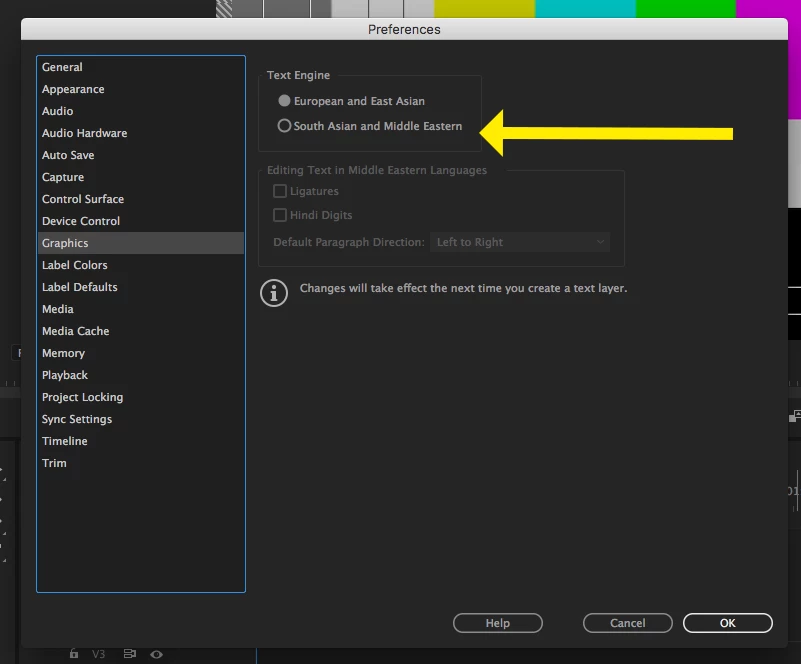
Assuming you have the Arabic font, go to the menu Preferences > Graphics and click the radio button for South Asian and Middle Eastern Text Engine, click OK.
MtD

2 replies

Participating Frequently
February 6, 2020

Just to let you know that this answer is still very useful in 2020. Remember to change to the arabic keyboard in System preferences in MacOS and proceed to these Premiere settings. Thanks so much! 


Participant
April 28, 2020

How can I do this for Premiere Rush? I am not able to find the same options and not able to use arabic properly on it. 

Thank you 🙂

Zaid Al Hilali
Community Expert
Community Expert
May 4, 2020

Premiere Rush doesn't support Arabic - yet.

Meg The DogCorrect answer
Inspiring
September 26, 2017

Assuming you have the Arabic font, go to the menu Preferences > Graphics and click the radio button for South Asian and Middle Eastern Text Engine, click OK.

MtD

Participant
February 27, 2018

Thank you, It works perfectly.