almezorymontage
Participant
April 7, 2018
Answered

Arabic Typing not Supported in Motion Graphics Templates

  • April 7, 2018
  • 10 replies
  • 8567 views

Hello

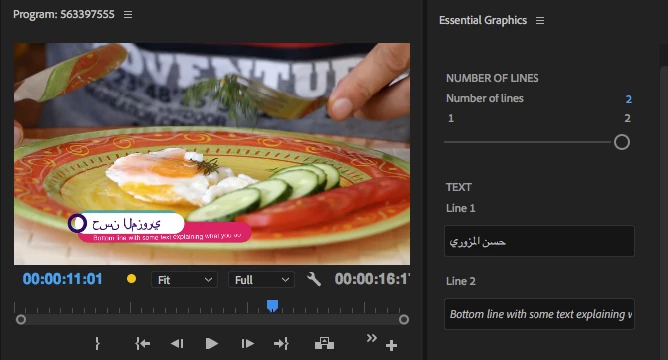
I want to write in Arabic in Motion Graphics Templates but it dosen't support Arabic Text

What time to support Arabic in Motion Graphics Templates?

Thanks
Correct answer Zaid Al Hilali

Since I don't work in video applications or with Motion Graphics, I asked my non-Arabic speaking colleague to assist me with this one. We opened the motion graphic template in After Effects, at the same time I opened Photoshop, typed an Arabic word there then saved the file with its Arabic layer. Back in After Effects, I imported the Photoshop document and was able to edit the Arabic text which we imported as a layer into After Effects.

I know this is a long procedure, but it is an old work around as I was told.

10 replies

Participant
June 11, 2024

I found the solution by mistake, just type them in reverse you'll get them in the right order...

Participant
August 20, 2023

hi you can download this file https://dl.maghzabzar.ir/items/script/51470032-farsi-text-aftereffects-script.zip  then extract this file  and go to your after effect,file<script<run script, type your word, apply and close double click on your text and ctrl +c  go to your perimire  and past this text.

Participant
December 10, 2023

Thank you so mach it work 100% with me in PP 2024.

Participant
April 10, 2023

You need Edit the motion graphic file by after effects .
Open file in after effects , Find which comp is the motion graphic render (From Windows > Essetional graphic)
Find the text layer. select text layer . From Paragraph windows , click on 3 lines and press reset paragraph . (You need active middle east typing before this step ).
Then export motion graphic again . 

Participant
July 24, 2020

Hello,

Zaid is talking about creating and editing a new layer in Arabic were the issues is not here, We can create a new layer in after effect or PR in Arabic with no issues BUT if we are using a template that has a text in english, Once the text is changed to Arabic we get broken letter as it seen on the attached photo.


Any idea how to solve this ?

Participant
March 30, 2021

I have built on what Zaid has suggested but instead of saving the file from photoshop, I copied arabic text from an open document in photoshop and pasted it in an After Effects titles template. It worked just fine.

P.S. Make sure you tick South Asian and Middle eastern (Edit/preferences/Type)

Here is the video of the method

blob:https://play.webvideocore.net/bb1af301-01ac-4a64-b1de-c92c35a371a2


Participant
March 30, 2021

Sorry the above link doesn't work, here's the link

https://screenrec.com/share/XxbO2wRVH4

Participant
April 12, 2019

Same here

the Arabic characters are broken and LTR, which is wrong...

I hope they can fix soon ... by now PP should be compatible with RTL

mahmoudh53620039
Participant
February 10, 2019

same here

i can`t type Arabic in motion graphic template PLZ help !!!!!

Participant
May 21, 2018

Same here !

Kevin-Monahan
Community Manager
Community Manager
May 15, 2018

Hi almezorymontage,

Did you try Zaid's method? Let us know what happens after trying it.

Regards,
Kevin

Kevin Monahan - Sr. Community and Engagement Strategist – Adobe Pro Video and Audio
Zaid Al Hilali
Community Expert
Community Expert
April 9, 2018

Can you please explain the steps you're taking to apply Arabic.

almezorymontage
Participant
April 9, 2018

I can't write in Arabic directly using motion graphics templates

Zaid Al Hilali
Community Expert
Zaid Al HilaliCommunity ExpertCorrect answer
Community Expert
April 9, 2018

Since I don't work in video applications or with Motion Graphics, I asked my non-Arabic speaking colleague to assist me with this one. We opened the motion graphic template in After Effects, at the same time I opened Photoshop, typed an Arabic word there then saved the file with its Arabic layer. Back in After Effects, I imported the Photoshop document and was able to edit the Arabic text which we imported as a layer into After Effects.

I know this is a long procedure, but it is an old work around as I was told.

almezorymontage
Participant
April 8, 2018

UP
