
SDUST
Known Participant
April 13, 2017
Answered

Artifacts in footage - how to clear up? (screenshot)

  • April 13, 2017
  • 5 replies
  • 5971 views

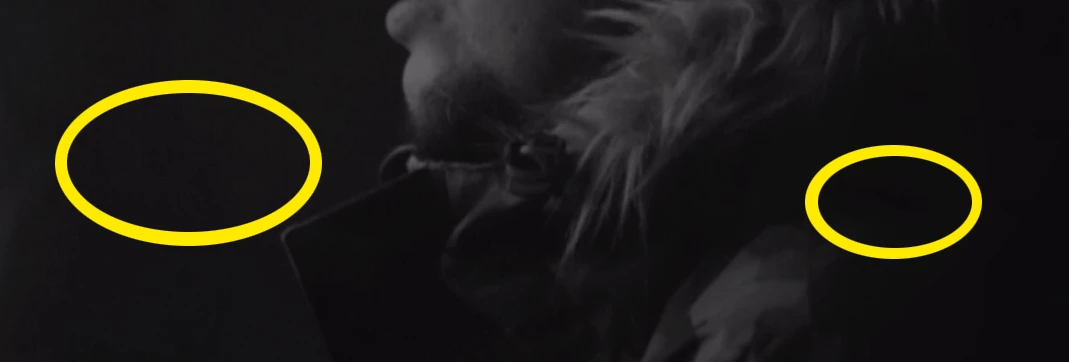
Find attached screenshot. I have a video that is made up of dark scenes and some slow mo shots. I notice in the slow mo shots, when it's a dark; there seems to be a lot of artifacts... any way to clear these up at all!? (may have to blow image to full size and look closely)
    This topic has been closed for replies.
    Correct answer SAFEHARBOR11

    Neat Video Denoiser

    Red Giant Video Denoiser

    5 replies

    SDUST
    SDUSTAuthor
    Known Participant
    April 13, 2017

    Thank you all!

    R Neil Haugen
    Legend
    April 13, 2017

    Jeff's comment about applying to an entire clip if he's got a long one, say a wedding ceremony in one 'take' that he will use as subclips, is spot on. Use perhaps the Cineform 10-bit YUV codec or DNxDH/R in SQ (115Mbps 8-bit), HQ (175Mbps 8-bit) or HQX (175Mbps 10-bit), depending on the original media file. A standard DSLR 8-bit will probably be ok with the SQ, but the HQ option takes more space, and ensures no loss of quality.

    If you've got 10-bit media, 4:2:2 or 4:4:4, then go with the HQX of course.

    Horshack's comment is a very practical one, used a LOT ... if say, you've got shadows near to black with noise, and it doesn't hurt the rest of the image to just drop 'em off the scale, so to speak. And might work with your footage ... depending on how "black" you want that background to be, and what it does to the shadows of your subject. This of course is fast & easy to apply, and doesn't require buying a plug-in, learning how to best use it, and of course ... the time of implementation and perhaps rendering replacement media.

    I do Horshack's tip when I can ... and use NeatVideo's Denoiser when I need to. The RG one is also very good.

    Neil

    Everyone's mileage always varies ...
    SDUST
    SDUSTAuthor
    Known Participant
    April 13, 2017

    I just downloaded Neat's Denoiser and so far so good! Thank you all!!!!

    Horshack
    Legend
    April 13, 2017

    An alternative to noise reduction would be to crush the blacks, ie use the "Levels" effect to lower the deep shadows to absolute black. That would eliminate the noise but you'd have to judge whether the aesthetic result is agreeable to you.

    SDUST
    SDUSTAuthor
    Known Participant
    April 13, 2017

    Thank you to you both!

    I will investigate the plugins... can I apply the denoiser to only the clips affected? Or it will go across the whole session?

    thanks !

    Participating Frequently
    April 13, 2017

    Gets applied on a clip-by-clip basis.

    On long recordings I've done where the whole works needs denoising, for instance a dark wedding ceremony, I might apply denoiser to the original clip, then export the whole clip to a high-quality intermediate codec. Then I edit with the new, cleaned up clip so that it doesn't bog down the edit process as Neil mentioned. Plus I only have to apply it once, rather than to a bunch of clips once that have already been cut up.

    Thanks


    Jeff

    R Neil Haugen
    Legend
    April 13, 2017

    Jeff (safeharbor11) hit it on the nail. The dark part of most video imaging is prone to "obvious" noise. When that's only little bits & pieces of a frame, going by at normal speed, it's hard to see. When you've got a large solid 'mass' like this, then any noise is vastly more visible. Especially in the deep shadows, and ... the higher recording speeds for in-cam slo-mo and also the creation of in-between frames by the program for in-post slo-mo both lend to creating a few bits of noise.

    And video noise reduction is a specialized task ... best handled by the apps Jeff listed in his reply. Yea, they cost a bit ... but ... they both work within PrPro as plug-ins, and do a great job.

    Finish your editing, then apply noise reduction as the last step. It's very CPU intensive, and can slow down editing if used earlier in the project.

    Neil

    Everyone's mileage always varies ...
    SAFEHARBOR11Correct answer
    Participating Frequently
    April 13, 2017

    Neat Video Denoiser

    Red Giant Video Denoiser