
Aspect ratio of exported video is different when viewed on phone vs. computer?
Hello all, first time posting here so I hope this issue isn't a common one because then I would look like a fool. I've googled this and only found generic "how do I change the aspect ratio of my video" questions, so here goes.
I've been learning Premiere for a few months now, and having a ton of fun with it; I do fencing on my free time, and editing videos of my sparring sessions has been a lot of fun to learn Premiere with as well as marry my favorite thing to do with my love of tech and media. It's all been fine and dandy until my latest video, where I noticed a really strange thing when I uploaded it to social media: the aspect ratio was totally ruined! It squashed a 1440x1080 video to be really similar to Instagram's 4:3 ratio, making everything look vertically stretched!
Here is a screenshot of the video's metadata:
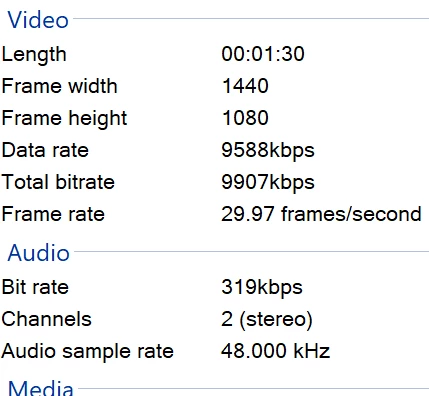
The truly bizarre thing I've noticed is that when I view this video (on the social media post) on the computer, it looks just fine, like all the other videos I've made. But it's only when viewed on the phone does it squash it! What's more, is this is the first time this has happened with any of the videos I've made!
So, to that end, the only thing I did differently this time around was I tried making multiple sequences within one project because they were highlights from the same sparring match and I wanted to keep all the highlights from one match in the same project file. Could creating a new Sequence mess with the aspect ratio of a video upon exporting? Maybe I chose the wrong video type for the Sequence? It was the second sequence in a Project file; the first one I made uploaded to social media just fine!
Thanks for your help, and I'd be happy to answer any other questions I can about the issue.
 AdChoices