

musaby
Known Participant
January 26, 2025
Answered

Audio Channels are behaving weirdly

  • January 26, 2025
  • 1 reply
  • 940 views

So it's pretty weird issue i'm dealing recently with Adobe Premiere Pro 25
When i add a sound to timeline:
in the first audio channel the sound only comes from left
in the second audio channel the sound only comes from right
in the 3rd & 4th i hear no sound
but some how when i move to 5th channel the sound is okay,
i record a short video for you so you guys can understand easily: https://youtu.be/zwEfKbd2P2Y
i have no effects on the sound, and i clicked all the buttons audio channel part(A1, A2 etc.) yet i  have this issue, also when i create different projects there is no such this issue, so i believe i did something wrong or something like that and i would like to learn how to fix such things.
Correct answer Averdahl

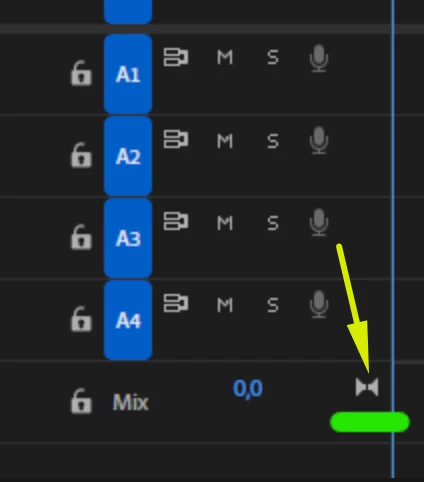
ahaha thank you for quick tutorial for how to create sequance, i was asking this icon, mine is different,
i'm not having issue with creating sequances, i'm saying some how i changed something on audio channels and i would like to find what i cahnged so next time i don't have to create new projects


The change you did was when you created your sequence since this setting cannot be changed after the fact. Or maybe more possible, you used one of the Broadcast sequence presets which all have multi channel audio Mix. It´s easy to do that error and i have done it as well several times.


quote

...i'm not having issue with creating sequances, i'm saying some how i changed something on audio channels and i would like to find what i cahnged so next time i don't have to create new projects


By @musaby


1 reply

Averdahl
Community Expert
Community Expert
January 26, 2025

Do you really need multichannel output? The Mix in your timeline is set to multiple channels, hence the question. If you need that, use the Audio Mixer to pan the audio.


If no, create a new timeline with a Stereo mix. 


musaby
musabyAuthor
Known Participant
January 26, 2025

Hello, of course i don't need that much, and i didn't do it willingly, and in 2nd picture u added(with audio channels), why my mix audio channel's button is different than urs how can i make it like you

Averdahl
Community Expert
Community Expert
January 26, 2025

The easiest way is to create a new timeline that matches you source footage is to simply drag the clip in the Project panel and drop it on the New Item icon down right in the Project panel. When done you can copy all the clips on your current timeline into the new timeline. 


Assuming here that your source footage is stereo.