
Participant
August 19, 2024
Question

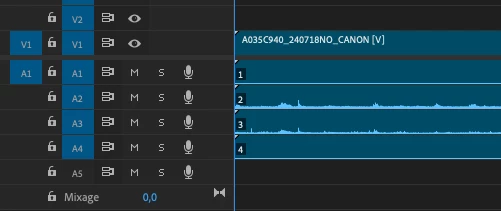
Audio clips in timelime: numbers on the clips

  • August 19, 2024
  • 2 replies
  • 626 views

Hi!

Recently numbers appeared my audio clips in the timeline. What do they mean? Can I make them disapear? It hapened after I made some updates (Premiere pro 2024 and Mac OS) and after I created proxies.

THanks for your answers.
 

This topic has been closed for replies.

2 replies

Inspiring
August 19, 2024

these are the channels in your audio track. in a dual mono track for instance you would see 1 and 2 if you cut them into the timeline.

Participant
August 19, 2024

Hi @daapap , thanks for commenting. Not shure to understand, on my A4, I see "4", this would mean the track has 4 channels?

Participant
August 19, 2024

No. A1 is channel 1, A2 is channel 2, etc.


Hi @Peru Bob ! Sounds logical. But why the little numbers in the black square on my clips?

Participant
August 19, 2024

Hi again!

Also wondering how to bring back the possibility to mute or "solo" all the tracks (Ihave 4) just beside the timeline. Now it displays only two tracks that I can solo, before I could solo any of the 4 (if my memory is right!).

Thanks!