
shauns82460770
Inspiring
May 2, 2018
Answered

Audio Distorted

  • May 2, 2018
  • 3 replies
  • 24288 views

Hey folks,

Whenever I start Adobe Premiere (CC 2018), the audio becomes distorted. The audio quality becomes rather "tinny" and loses its low-end. This problem also occurs with Audition CC 2018. Whenever I click out of the program - to go to the browser to play a YouTube clip or something - the audio switches back to optimal quality.

I'm working on Mac oS High Sierra 10.13.2.

Any ideas would be greatly appreciated.

Thanks!

-Shaun
This topic has been closed for replies.
Correct answer Vishu_Aggarwal

I am running Premiere pro cc 2018 v12.1.1 on MAC OS 10.13.4 and no issues with audio .wav or .mp3.

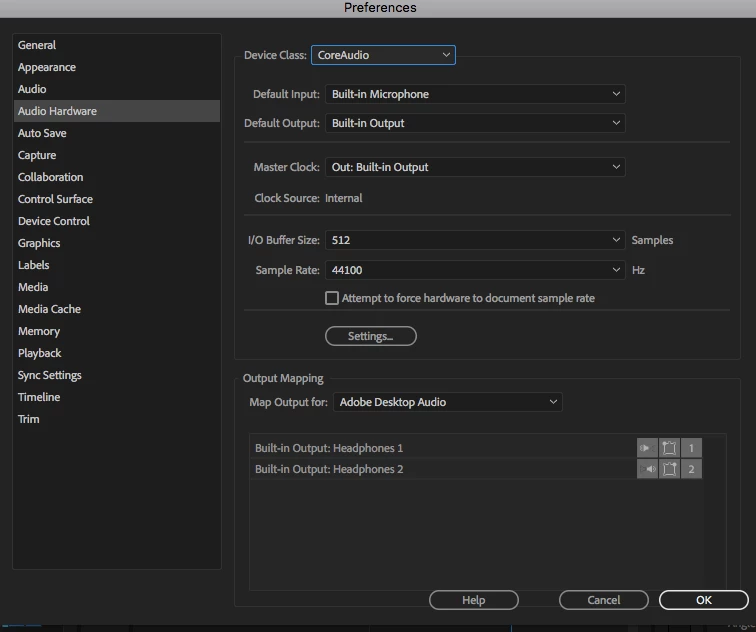
Check the sound output settings in Mac system preferences and set the Audio Hardware preference of premiere pro to Built-in Output.

Screenshot of my Audio Hardware settings -

3 replies

Vishu_Aggarwal
Vishu_AggarwalCorrect answer
Participating Frequently
May 29, 2018

I am running Premiere pro cc 2018 v12.1.1 on MAC OS 10.13.4 and no issues with audio .wav or .mp3.

Check the sound output settings in Mac system preferences and set the Audio Hardware preference of premiere pro to Built-in Output.

Screenshot of my Audio Hardware settings -

Vishu AggarwalAdobe Certified Instructor, Professional and Expert
shauns82460770
Inspiring
May 30, 2018

Ah yes, I found the problem. I had about the 'Default Input' and 'Default Output' set to my headphones (WH-1000XM2). It was resolved when I set the 'Default Input' back to Built-in Microphone.

scatalan08
Participant
May 23, 2018

Just wondering if you found a fix for this problem. I have the exact same issue. My mp3 audio would work fine previously. But since the latest premiere update, all audio sounds distorted. I've tried to convert it to a WAV file as many suggest with no luck. This has been a real pain.

Vidya Sagar
Adobe Employee
Adobe Employee
May 29, 2018

Hi scatalan08,

Clear the media cache & test. Here are the steps: FAQ: How to clean media cache files?

Let us know the status.

Thanks,

Vidya

Vidya Sagar
Adobe Employee
Adobe Employee
May 8, 2018

Hi Shaun,

Sorry for the trouble. It seems like an issue with the default output hardware.

Share a screenshot of Premiere Pro Preferences > Audio Hardware window. Steps: FAQ: How do I capture and post a screen shot or video?

Thanks,

Vidya